


Marketing teams managing 50-100+ people face a resource allocation puzzle that requires a more dynamic solution than spreadsheets can offer. When you’re coordinating campaigns across content, creative, acquisition, events, and operations teams, visibility becomes your biggest challenge. Who’s overloaded? Who has capacity? Which projects are at risk?
Without real-time answers, even well-planned campaigns miss deadlines, teams burn out, and leadership questions marketing’s impact on business outcomes.
The best resource management software transforms this scattered execution into coordinated delivery. These platforms provide workload visibility, automate routine coordination, and connect daily work to strategic objectives. They help marketing leaders prevent bottlenecks, optimize team capacity, and demonstrate ROI through data-driven insights.
Join us for a few minutes and let’s explore what separates exceptional resource management platforms from basic alternatives. We’ll cover how to achieve portfolio alignment and walk you through some very helpful implementation strategies. Without further ado, let’s get started.
Key takeaways
Marketing leaders juggling 50-100+ people across multiple disciplines know the truth: your resource management approach either makes or breaks your execution. The right resource management software transforms disconnected teams into a unified force that delivers campaigns on time, prevents burnout, and demonstrates clear ROI to leadership.
Here’s what separates exceptional resource management platforms from basic project trackers:
- Real-time workload visibility: see who’s overloaded and who has capacity across your entire marketing organization.
- Cross-functional alignment: connect content, creative, acquisition, events, and operations teams in one workspace.
- Strategic connection: link daily work to OKRs and company goals for measurable impact.
- Rapid adoption: get teams productive in weeks, not months, with intuitive interfaces people actually use.
What makes heads of marketing choose monday work management for resource management?

Heads of marketing in services organizations are fighting an ongoing battle: juggling teams across content, creative, acquisition, events, and ops — all while trying to keep everyone visible, prevent burnout, and show leadership exactly how marketing moves the needle.
Tracking assignments is just the tip of the iceberg. The real challenge? Seeing your team’s bandwidth in real time, creating consistent processes that don’t kill creativity, and tying every marketing effort directly to business results.
For context, among Fortune 500 companies, 34% blame underskilled employees for at least some of their organization’s inability to reap value from their marketing technology. When you’re coordinating 24+ campaigns simultaneously across global teams, spreadsheets and basic project management platforms create more problems than they solve.
Research also shows that aligned teams are 260% more motivated to work, experience 41% lower turnover rates, and achieve 40% higher productivity.
Fortunately, intelligent solutions like monday work management address these challenges through a combination of workload visibility, process standardization, and strategic alignment. The platform provides the operational infrastructure marketing leaders need to transform fragmented execution into coordinated delivery that drives measurable results.
monday work management's top features for resource management
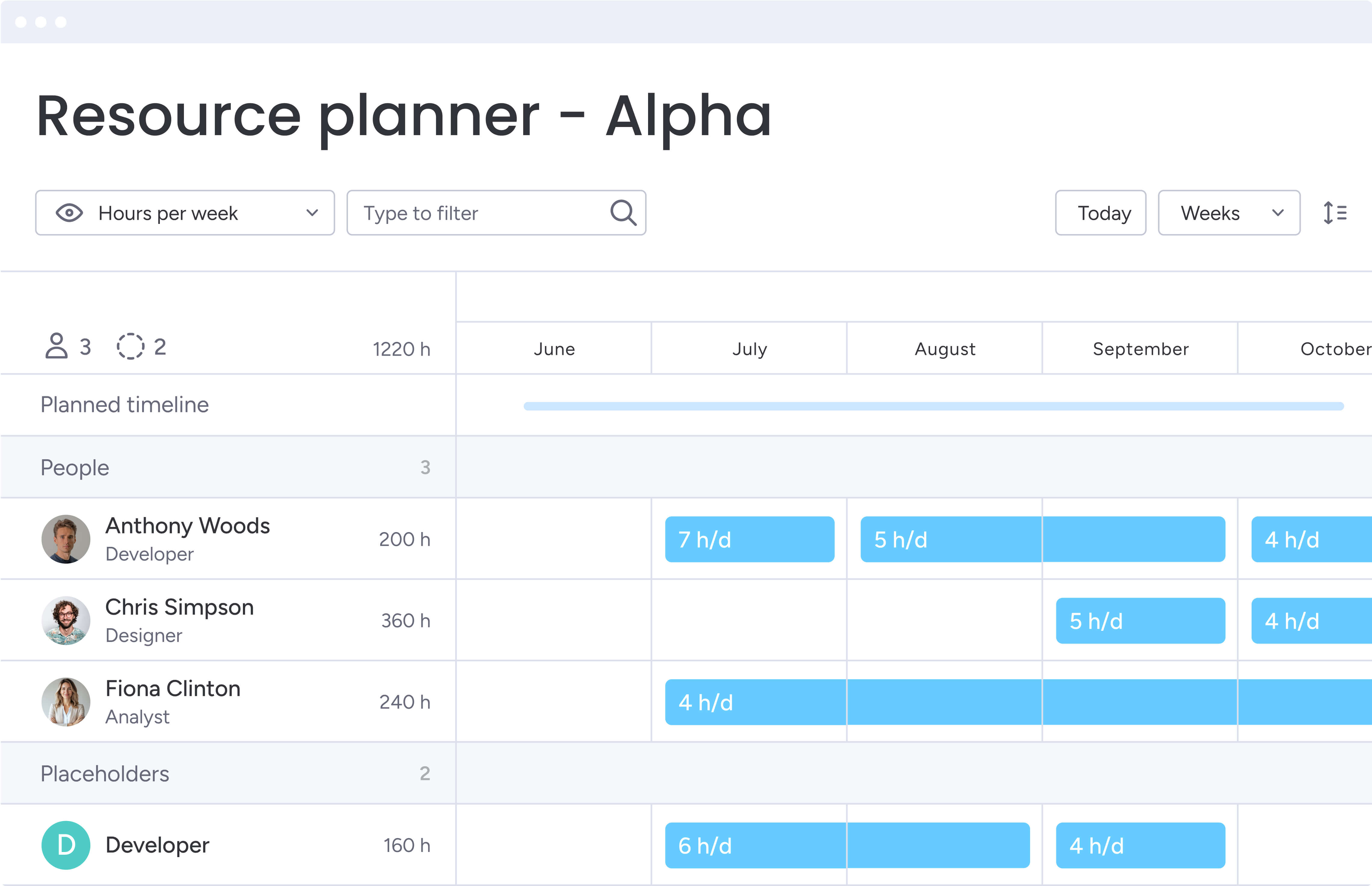
Marketing leaders need comprehensive visibility and control over their resources to deliver exceptional results, making enterprise resource management essential for scaling effectively. monday work management provides five core capabilities that transform how teams coordinate work, allocate resources, and demonstrate impact.
These features work together to create a unified system that scales with your organization’s growth:
Workload management and capacity planning
The Workload widget shows you exactly who’s maxed out and who can take on more work across your entire marketing team. You’ll see everyone’s scheduled hours, available bandwidth, and assigned tasks at a glance, thanks to a simple color system:
- Red: indicates over-allocation requiring immediate attention.
- Yellow: shows team members at full capacity.
- Green: reveals available capacity for new assignments.
For marketing leaders managing 50-100+ team members, this feature solves the critical challenge of resource visibility. The drag-and-drop interface lets you reassign work instantly to balance workloads. You can view capacity by day, week, or month to plan both immediate execution and long-term initiatives.
The Workload View integrates with time tracking, comparing estimated hours against actual time spent. This data improves forecasting accuracy for future campaigns and helps demonstrate team productivity to executive leadership.
For example, ThoughtWorks achieved a 55% reduction in email communication and 41% reduction in conference calls by providing total visibility into who’s working on what and when.
Portfolio management and strategic alignment
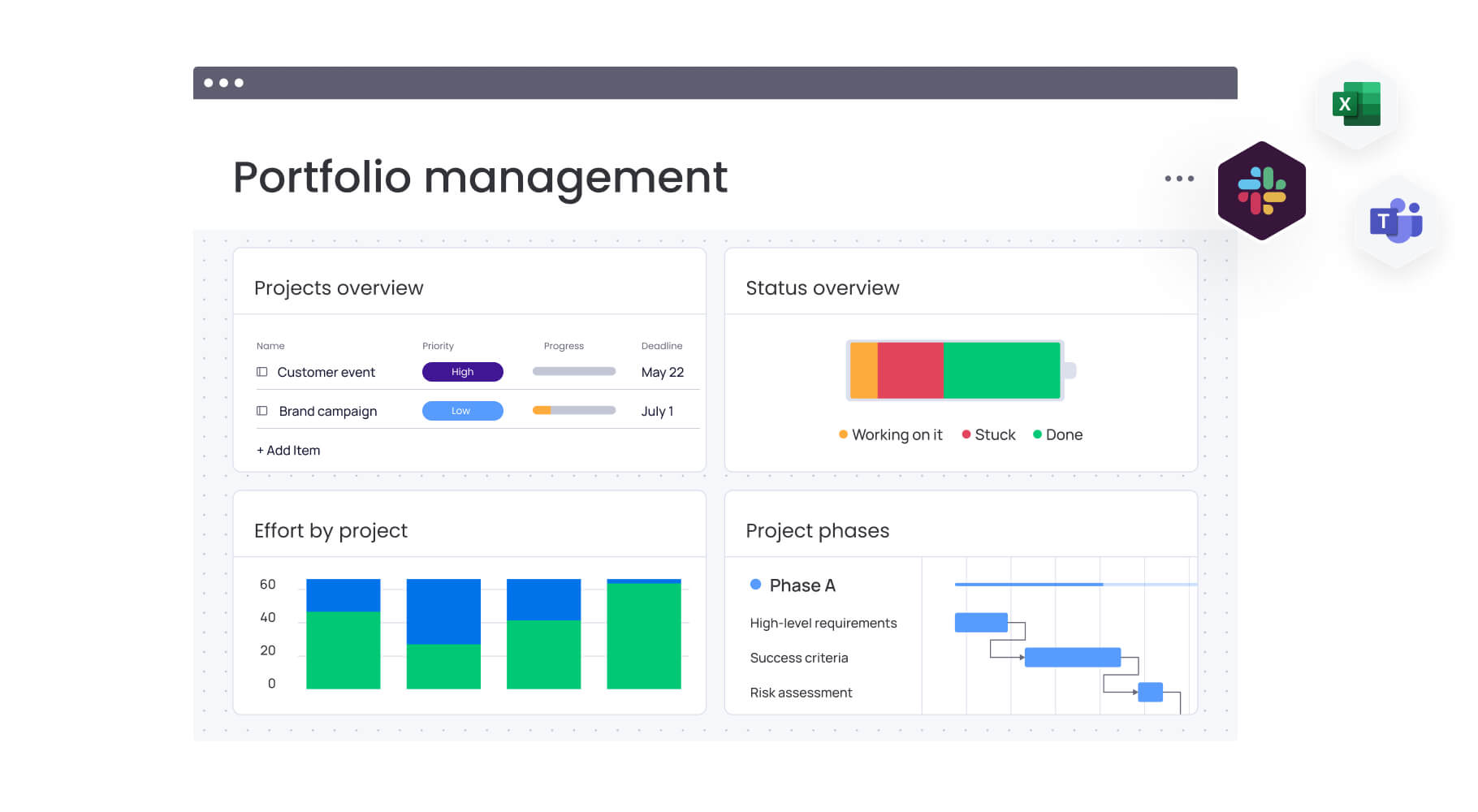
Portfolio management bridges the gap between your strategy and what’s actually happening day-to-day. Your portfolio dashboard pulls data from all your boards, showing you in real time how projects are progressing, where budgets stand, who’s working on what, and whether you’re hitting your strategic goals.
This feature enables marketing leaders to demonstrate how campaigns drive business outcomes by showing the direct connection between initiatives and OKRs. Key benefits include:
- ROI optimization: identify which initiatives deliver the highest return on investment.
- Strategic communication: share portfolio-level reports with executive leadership.
- Resource prioritization: make data-driven decisions about campaign allocation.
The Goals and OKRs feature links individual campaigns directly to company-level objectives, ensuring every marketing initiative contributes to business growth.
FARFETCH achieved 6x ROI and saved $118K per month by gaining visibility across 400 people from 40 different teams, allowing leadership to make informed decisions about resource allocation and prioritization.
Workflow automation and process standardization
monday work management’s automation takes the tedious stuff off your plate while bringing consistency to how your marketing team works. With over 200 pre-built automation recipes and custom automation creation without coding, you can automate notifications, status updates, task assignments, and approvals.
Key automation benefits for marketing teams:
- Reduced manual coordination: automate routine tasks like sending reminders and moving tasks between stages.
- Standardized templates: ensure teams don’t reinvent workflows for every campaign.
- Scalable best practices: maintain consistency while allowing creative flexibility.
McDonald’s Australia saved 1,224 hours per month by setting up automations within their boards, achieving a 615% ROI by streamlining workflows and reducing manual coordination.
Real-time dashboards and reporting
Customizable dashboards provide real-time visibility into campaign performance, team productivity, budget adherence, and resource utilization. You can create multiple dashboards tailored to different audiences, from detailed operational views for team leads to high-level executive summaries.
Dashboards pull data from across your marketing boards, displaying key metrics through charts, graphs, and widgets that update automatically. Essential metrics to track include:
- Campaign ROI: measure return on marketing investments.
- Customer acquisition costs: monitor efficiency of acquisition channels.
- Content performance: track volume and engagement metrics.
- Budget forecasting accuracy: compare planned vs. actual spending.
- Stakeholder satisfaction: monitor internal and external feedback.
Genpact achieved 100% removal of spreadsheets and 25% decrease in email exchanges by using monday work management’s dashboards to provide visibility into campaign status and progression.
Cross-functional collaboration and communication
monday work management centralizes communication across marketing teams, departments, and external stakeholders. The platform provides in-context collaboration through comments, mentions, and file sharing directly on task cards.
You can create dedicated workspaces for different teams while maintaining visibility across all activities. The platform supports seamless collaboration with legal, product, and finance teams through shared boards and controlled permissions.
FARFETCH connected commercial teams, fashion teams, and editorial teams in one place, establishing common workflows and saving 3.5K hours per month with a 6x ROI through improved cross-company marketing visibility.
How heads of marketing benefit from monday work management
Marketing leaders who switch to monday work management see real changes in how their teams operate — not just quick wins, but improvements that stack up over time to give them a serious edge over competitors.
- Time savings and efficiency gains: organizations eliminate thousands of hours of manual coordination monthly. Teams reduce email exchanges by 25% and conference calls by 41% through improved visibility and automated workflows. Standardized templates and real-time dashboards eliminate status update meetings, allowing teams to focus on strategic and creative work.
- Cost efficiency and ROI: companies achieve 6x ROI through improved resource utilization and reduced platform sprawl. By preventing burnout and balancing workloads effectively, you maximize productivity without additional headcount. The platform’s ability to demonstrate marketing ROI helps secure budget for high-impact initiatives.
- Quality and compliance improvements: standardized workflows ensure brand consistency across all marketing materials. Audit trails and version control provide accountability, while automated notifications ensure nothing falls through the cracks. Real-time data accuracy eliminates errors from manual spreadsheet management.
- Enhanced visibility and strategic alignment: real-time dashboards provide instant visibility into campaign performance, team workloads, and progress toward objectives. Marketing leaders can provide definitive turnaround times to stakeholders with confidence. Portfolio-level reporting demonstrates marketing’s impact to executive leadership, strengthening the function’s strategic position.
How to implement resource management with monday work management
A successful implementation requires a plan that delivers quick victories to build team buy-in. This approach helps you set up processes that actually stick.
This six-step framework ensures your team achieves full adoption within two–four weeks while maximizing the platform’s impact on your operations.
Step 1: assess your current resource management challenges
Begin by mapping existing resource allocation processes and identifying pain points. Document how you currently track team capacity, assign work, and monitor workloads.
Key assessment activities include:
- Process mapping: document current workflows from request to delivery.
- Pain point identification: gather input from team leads across content, creative, acquisition, events, and operations.
- Data collection: analyze current resource utilization and bottleneck patterns.
- Stakeholder interviews: understand specific challenges from different team perspectives.
Step 2: set up your resource management workspace
Create a centralized workspace in monday work management that brings together all marketing teams and projects. Configure the Workload Widget to track team capacity and define resource pools by department, role, and skill set.
Essential setup components:
- Team structure: define departments, roles, and reporting relationships.
- Capacity baselines: establish baseline capacity for each team member based on working hours and existing commitments.
- Resource pools: group team members by skills, availability, and project types.
- Permission levels: set appropriate access controls for different team roles.
Step 3: implement standardized workflows and templates
Build templated boards capturing your team’s best practices for recurring marketing activities. Configure automation recipes to move work through stages automatically and send notifications when tasks are assigned.
Template development priorities:
- Campaign planning: create templates for different campaign types and channels.
- Content creation: standardize workflows for blog posts, social media, and marketing materials.
- Event management: build templates for webinars, conferences, and product launches.
- Intake processes: create forms for project requests that capture all necessary information upfront.
Step 4: connect strategy to execution with portfolio management
Set up your portfolio dashboard to aggregate data from all marketing boards. Link individual projects to company-level OKRs and strategic objectives.
Portfolio configuration steps:
- Dashboard creation: build executive and operational dashboards for different audiences.
- OKR linking: connect individual campaigns to company-level objectives.
- Reporting automation: configure portfolio-level reports showing resource allocation across initiatives.
- Progress tracking: set up automated progress updates toward strategic objectives.
Step 5: enable real-time visibility and collaboration
Configure dashboards for different audiences, including operational dashboards for team leads and executive dashboards showing campaign performance. Set up automated reports delivering key metrics to stakeholders regularly.
Visibility implementation includes:
- Role-based dashboards: create tailored views for different team roles and seniority levels.
- Automated reporting: schedule regular reports for stakeholders and leadership.
- Cross-functional boards: enable collaboration with legal, product, and finance teams.
- Permission management: set appropriate access controls for external collaborators.
Step 6: optimize and scale based on data insights
Dig into your reports to spot patterns in how your team uses resources and where work gets stuck. Check how your time estimates stack up against reality — this will make your future planning much more accurate.
Optimization activities:
- Performance analysis: monitor team capacity trends and identify when additional resources are needed.
- Process refinement: continuously improve workflows, templates, and automations based on team feedback.
- Forecasting improvement: use historical data to enhance project estimation accuracy.
- Scaling preparation: plan for team growth and expanded platform usage.
Comparison: monday work management vs competing platforms
Choosing the right resource management platform comes down to how well it handles the realities of large marketing teams — not just features on paper. Below, we compare leading platforms across the areas that matter most in practice, including workload visibility, portfolio-level reporting, automation depth, ease of adoption, and total cost.
This side-by-side view highlights where platforms truly support enterprise-scale marketing operation (and where they fall short).
| Feature | monday work management | Wrike | Smartsheet | Asana |
|---|---|---|---|---|
| Real-time capacity planning | Workload view with visual heatmaps | Workload charts | Resource views | Workload management (Business+) |
| Campaign management | Multi-view boards with dependencies | Marketing-specific templates | Project sheets | Campaign tracking |
| Budget tracking | Native budget columns + formulas | Budget management | Budget tracking | Limited budget features |
| Marketing automation | 200+ automation recipes | Automation engine | Workflow automation | Rules (Premium+) |
| AI-powered features | Risk identification, project planning, request categorization | AI work intelligence | AI formulas | AI teammates (Enterprise) |
| Price per user/month | From $9 (billed annually) | From $10 (billed annually) | From $9 (billed annually) | From $10.99 (billed annually) |
| Implementation time | 2 weeks to 1 month typical | 4-6 weeks typical | 3-4 weeks typical | 2-3 weeks typical |
| G2 rating | 4.7/5 (14,683 reviews) | 4.2/5 (4,457 reviews) | 4.4/5 (15,000+ reviews) | 4.4/5 (12,620 reviews) |
| Gartner recognition | Leader in Marketing Work Management 2024 | Recognized vendor | Recognized vendor | Recognized vendor |
| Enterprise security | SOC 2, ISO 27001, GDPR, HIPAA | SOC 2, ISO 27001, GDPR | SOC 2, ISO 27001, GDPR | SOC 2, ISO 27001, GDPR |
How Genpact transformed global marketing operations
Genpact’s globally distributed marketing department runs 24 ongoing campaigns simultaneously, with each campaign involving multiple cross-channel activations managed by campaign managers and channel owners.
The team previously relied on spreadsheets saved across personal desktops, emails, and SharePoint folders, creating version control chaos and making it impossible to track campaign status effectively.
The implementation approach
Genpact implemented monday work management to standardize end-to-end campaign planning and execution. The team created workflow apps outlining the entire activation process for each channel, with columns showing target dates and actual timeframes to identify trends and bottlenecks. They utilized Timeline view and dashboards to drill down into critical items for each week or month.
Measurable results achieved
- 40% improvement: in cross-team collaboration for successful campaign planning and execution.
- 100% removal: of spreadsheets, eliminating version control issues.
- 25% decrease: in email exchanges, reducing communication overhead.
Align people, priorities, and performance in one system: try monday work management
Resource management determines whether marketing teams deliver exceptional results or struggle with burnout and missed deadlines: the right platform provides visibility, standardization, and strategic alignment that transforms disconnected execution into coordinated success.
Advanced solutions like monday work management bring these capabilities together in one intuitive space. From real-time workload management to AI-powered insights, it helps marketing leaders optimize resources, demonstrate ROI, and deliver campaigns that drive business growth.
The platform’s proven track record with organizations like Genpact, FARFETCH, and ThoughtWorks demonstrates its ability to scale with enterprise marketing teams while maintaining the flexibility needed for creative work.
Ready to transform how your marketing team manages resources and delivers results? Start building more efficient workflows, gaining real-time visibility, and connecting strategy to execution today.
The content in this article is provided for informational purposes only and, to the best of monday.com‘s knowledge, the information provided in this article is accurate and up-to-date at the time of publication. That said, monday.com encourages readers to verify all information directly.
Frequently asked questions
How does monday work management handle resource allocation for both in-house teams and external agencies?
monday work management provides a unified resource directory including both internal team members and external resources. You can create resource profiles for all contributors, tracking availability, skills, and hourly rates in one place. The Workload widget displays capacity across all resources regardless of employment type. Different permission levels for external collaborators ensure they access relevant project information while maintaining security.
What is the typical adoption timeline for marketing teams of 100+ people?
Marketing teams typically achieve full adoption within two weeks to one month. The platform's intuitive interface requires minimal training, with most users becoming comfortable within days. For teams of 100+ people, a phased rollout works best: start with a pilot group of ten-20 users, refine workflows based on feedback, then expand to additional teams.
How does monday work management enable cross-departmental collaboration?
The platform enables seamless cross-departmental collaboration through shared boards with granular permission controls. You can create boards including members from marketing, legal, product, and finance, with each department having appropriate access restrictions. Automation capabilities route work to the appropriate department based on specific triggers, while comments and mentions keep all communication in context.
What AI capabilities support predictive resource planning?
monday work management includes AI-powered features that optimize resource planning and workflows. The platform analyzes historical project data to provide accurate time estimates for future campaigns. AI identifies risks across your portfolio by analyzing project status, deadlines, and resource allocation. AI Blocks can categorize incoming requests at scale and suggest automation recipes based on your team's work patterns.
How can I measure team productivity without creating surveillance culture?
monday work management focuses on transparency and empowerment rather than surveillance. Time tracking and workload features help teams manage their own capacity and identify when they need support. You can measure productivity through outcome-based metrics like campaign delivery times and project completion rates. The Workload Widget helps teams self-manage by showing when they're approaching capacity.
What's the best approach for migrating from multiple disconnected platforms?
Start by identifying your highest-pain process and migrate that first to provide immediate value. Map existing workflows in monday work management and configure templates capturing best practices. Rather than doing a direct data dump, use migration as an opportunity to clean up processes. Plan for a transition period where both systems run in parallel, allowing teams to become comfortable before fully sunsetting old platforms.

 Get started