


Marketing teams at enterprise organizations manage complex portfolios with dozens of campaigns, hundreds of tasks, and cross-functional teams spanning creative, content, acquisition, and operations.
However, when resources are scattered across spreadsheets, emails, and disconnected platforms, leaders lose visibility into capacity, priorities shift without notice, and teams burn out from manual coordination. The challenge isn’t strategy or talent — it’s having the operational foundation to execute at scale while maintaining quality and meeting deadlines.
Effective resource management software addresses these operational realities by centralizing campaign information, providing real-time visibility into team capacity, and automating the coordination tasks that consume valuable time. These platforms enable marketing leaders to balance workloads proactively, connect individual campaigns to strategic goals, and demonstrate measurable impact.
Let’s dive into what truly makes resource management software work for enterprise marketing teams, the capabilities that eliminate operational headaches, and see how companies like Genpact and SPH Media transformed their campaign execution.
Key takeaways
- Centralize all campaign information to eliminate scattered workflows: move from spreadsheets and SharePoint folders to one platform where teams access real-time campaign status, budgets, and timelines.
- Prevent team burnout through real-time capacity planning: use workload visualization to see when team members are over-allocated and redistribute work before it impacts performance or morale.
- Connect marketing work directly to business goals: link every campaign to company OKRs so teams understand how their daily work drives revenue growth and strategic success.
- Transform resource management with monday work management’s portfolio view: track hundreds of campaigns across multiple brands while monitoring team capacity, budget adherence, and performance metrics in real time.
- Standardize workflows to eliminate manual coordination: create automated approval processes and intake forms that route work to the right people based on skills and availability.
What makes heads of marketing choose monday work management for resource management?

Running enterprise marketing isn’t just about strategy — it’s about solving the daily chaos of coordinating massive teams and juggling dozens of campaigns simultaneously. Sophisticated and modern solutions like monday work management address these challenges by providing the visibility, alignment, and operational efficiency that marketing leaders need to drive measurable business impact.
Heads of marketing at enterprise media companies choose monday work management because it directly addresses their most critical operational challenges with resource management capabilities.
With teams of 50-100+ people spread across content, creative, acquisition, and more, marketing leaders need a command center. That’s exactly what the platform delivers — complete visibility into every campaign, performance metric, and team member’s workload.
Marketing leaders gain the ability to drive growth and brand awareness through multi-channel strategies while ensuring effective use of budget and team resources. The platform also aligns marketing strategy with company goals through OKRs, allowing leaders to oversee campaign planning, execution, and performance while reporting impact to executive leadership with confidence.
Top monday work management features for resource management
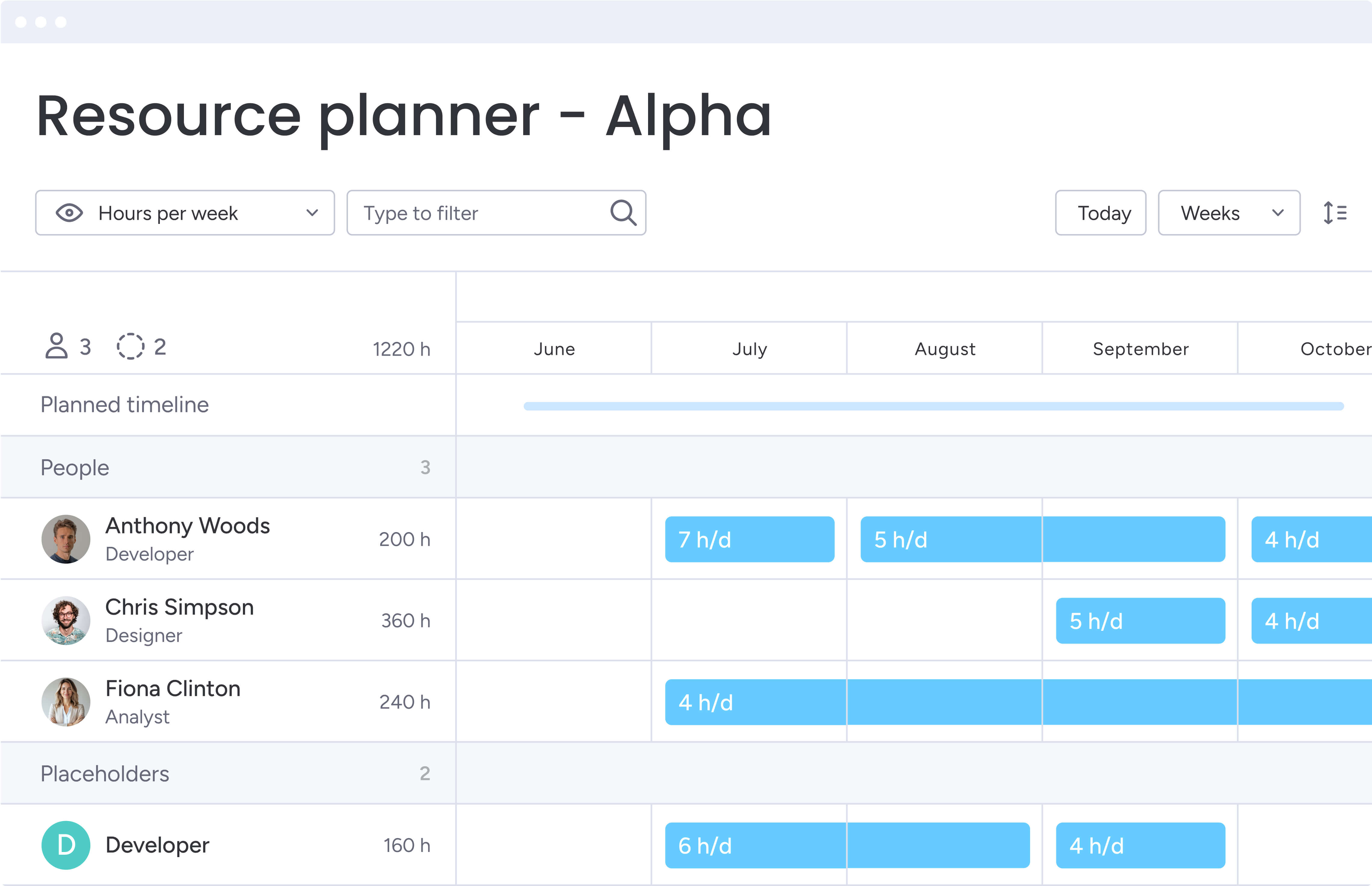
Here’s how monday work management helps you allocate resources smartly, keep your team from burning out, and stay on top of even the most complex campaign portfolios. Each capability addresses specific operational challenges that enterprise marketing teams face when managing large-scale initiatives.
Resource management capabilities
The resource management features give you instant visibility into who’s overloaded and who has capacity, so you can assign work based on both skills and availability. The platform’s Workload widget displays each team member’s capacity, scheduled hours, and availability across all projects, allowing marketing leaders to balance workloads and prevent burnout before it occurs.
Key resource management features include:
- Real-time capacity visualization: view team member workloads by week, month, or custom timeframes.
- Drag-and-drop reallocation: redistribute tasks when team members are over-allocated or priorities shift.
- Skills-based assignment: match team members to projects based on their expertise and availability.
- Burnout prevention: identify over-capacity situations before they impact team performance.
This intelligent solution also tracks both planned and actual hours, enabling you to improve forecasting accuracy for future campaigns and demonstrate effective use of budget and team resources to executive leadership.
Portfolio management
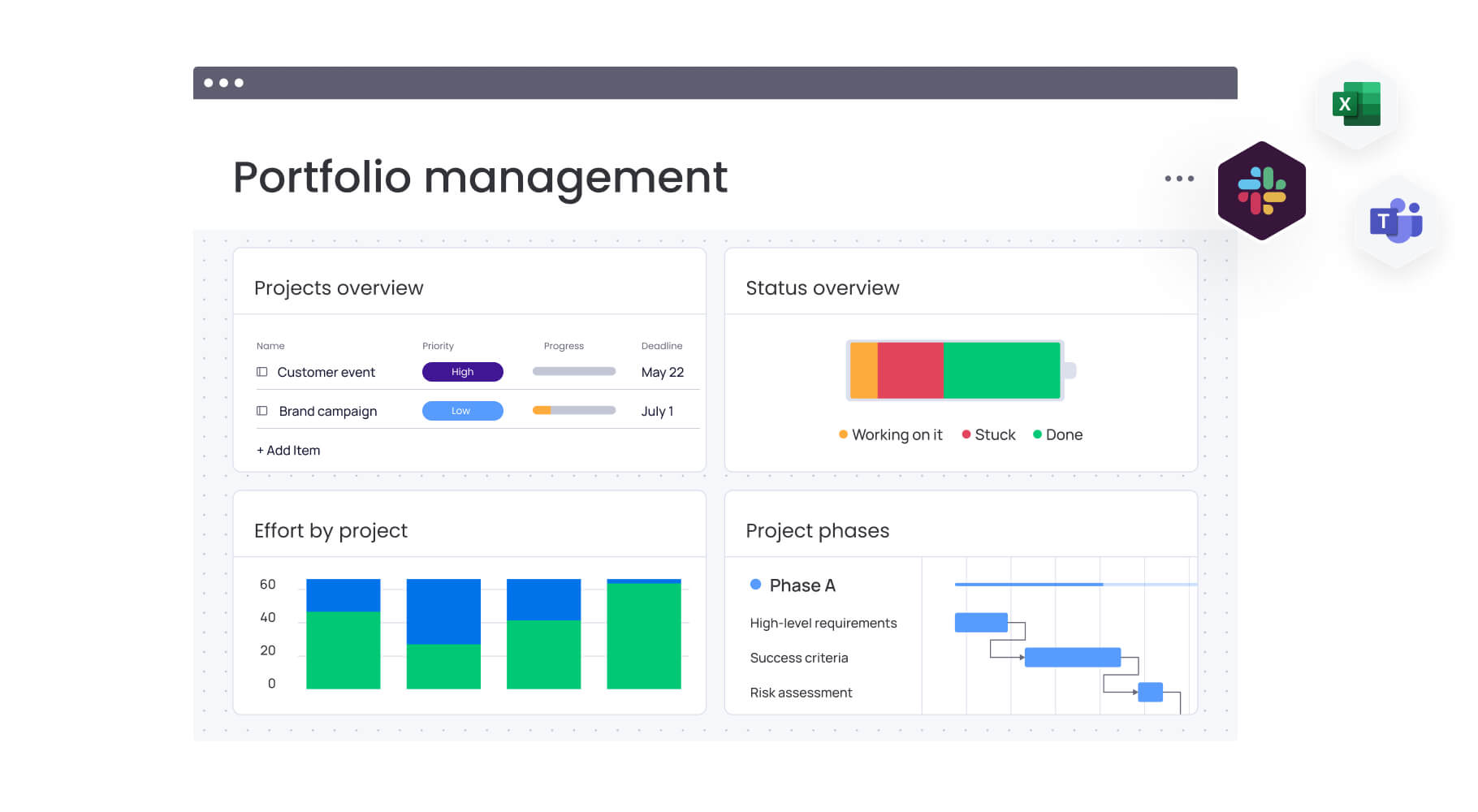
With portfolio management, you’ll connect the dots between projects across your entire organization. This clarity helps you manage dependencies, distribute resources effectively, and tackle risks before they derail your deliverables. The platform aggregates data from multiple campaigns and initiatives into a unified view, allowing heads of marketing to track portfolio performance and value in real time.
Key portfolio management features include:
- Real-time monitoring: track budget status, timeline adherence, and resource allocation across your entire campaign portfolio.
- Risk identification: color-coded warnings automatically flag projects at risk of exceeding budgets or running late.
- Cross-project dependencies: identify and manage dependencies between initiatives to optimize resource allocation.
- Shareable reports: generate portfolio-level reports to demonstrate marketing impact to executive leadership.
This portfolio-level visibility is essential for marketing leaders who oversee campaign planning, execution, and performance across multiple brands, regions, or product lines.
Automations
Free up your team to focus on high-impact work. The automation engine eliminates the manual work that slows your team down and ensures consistent workflows across departments. The platform offers 200+ pre-built automation recipes that trigger actions automatically based on events and execution activity.
Common automation examples for marketing teams:
- Creative request routing: automatically assign creative requests to the right team members based on type and priority.
- Status notifications: send updates when campaign statuses change or deadlines approach.
- Approval workflows: trigger approval processes when assets are ready for review.
- Task creation: generate tasks automatically when new requests arrive through forms.
For heads of marketing managing large teams across content, creative, acquisition, events, and operations, automations ensure operational efficiency through standardization while reducing the manual coordination that consumes valuable time.
Dashboards and reporting
Need to know how campaigns are performing or which teams are most productive? The dashboards give you those insights in real time, all in one place. The platform offers pre-built dashboard widgets that visualize key metrics and custom dashboards that aggregate data from multiple projects.
Essential dashboard capabilities include:
- Performance metrics: track campaign ROI, CAC, MQL-to-Customer rate in real time.
- Resource analytics: monitor team capacity utilization and productivity metrics.
- Budget tracking: visualize budget adherence and forecasting accuracy.
- Custom filtering: analyze performance by campaign type, team, brand, or any custom dimension.
When it’s time to show your CMO or CEO exactly what marketing has delivered this quarter, these dashboards turn complex data into clear stories of impact and ROI. The platform’s AI-powered portfolio report instantly generates executive-level summaries with trends, risks, and actionable insights — all critical for heads of marketing in media, tech, retail, and finance industries.
Goals and OKRs
Using Goals and OKRs with monday work management enables heads of marketing to align marketing strategy with company goals and track progress toward strategic objectives. The easy-to-use platform allows you to set company-level goals and objectives, then connect specific campaigns and initiatives to those goals, ensuring that projects being executed contribute directly to strategic success.
This strategic alignment capability addresses the disconnected execution where siloed teams lack ownership and understanding of how their work contributes to business outcomes. Your teams can see exactly how their work connects to company OKRs, creating priorities and ensuring that marketing efforts drive maximum impact.
Additionally, the platform’s goal tracking features allow you to monitor progress across multiple objectives simultaneously, identifying which goals are on track and which require additional resources or strategic adjustments.
Project intake and approvals
Project intake and approvals in monday work management streamline how marketing teams receive requests, manage approvals, and prioritize work. The platform’s customizable intake forms allow stakeholders across your organization to submit campaign requests with all relevant details captured in a standardized format.
These requests automatically create items in your workflow, triggering notifications to the appropriate team members and routing work through your defined approval processes.
For heads of marketing managing large teams, this standardized intake process prevents the duplicative work and lack of ownership that occurs when requests arrive through multiple channels.
Time tracking
Finally, time tracking in monday work management enables heads of marketing to monitor how long tasks and campaigns take to complete, improving forecasting accuracy and demonstrating team productivity to executive leadership. The platform allows team members to log time directly on task cards or use the timer feature to record time while working.
All time tracking data is tied to employees’ roles and projects, enabling you to compare budgeted versus actual hours and identify where campaigns are consuming more or less time than planned. This provides the data needed to demonstrate how marketing resources are being utilized and identify opportunities to improve efficiency.
How heads of marketing in media benefit from monday work management
Marketing leaders in media companies experience transformative improvements across five key areas when they implement monday work management for resource management. These aren’t just nice-to-have improvements — they tackle the exact problems that keep your marketing team from hitting their targets and proving their worth to the business.
1. Time savings and campaign velocity improvements
The platform eliminates the hours spent chasing updates across scattered spreadsheets, emails, and SharePoint folders by providing a single source of truth for all campaign information.
2. Cost efficiency through optimized resource utilization
Intelligent capacity planning tools prevent the burnout that occurs when teams are over-allocated while also identifying underutilized resources that could be redeployed to higher-priority initiatives.
3. Productivity gains through operational standardization
monday work management enables marketing teams to work faster by eliminating manual coordination tasks, automating repetitive processes, and providing visibility into priorities and dependencies.
4. Output quality improvements through collaboration
Eliminate the version control chaos and lack of ownership that leads to errors and rework through standardized workflows, approval processes, and collaboration across siloed teams.
5. Enhanced visibility and tracking capabilities
monday work management also provides centralized visibility into all campaigns, performance, and team workloads through its leadership visibility capabilities, enabling heads of marketing to identify bottlenecks, reallocate resources, and report impact to executive leadership with confidence.
How to manage marketing resources effectively with monday work management
Ready to overhaul your resource management? Here’s our six-step process that’ll take you from spreadsheet chaos to operational clarity.
Step 1: centralize all campaign and project information
Begin by migrating your marketing campaigns, initiatives, and team workflows from scattered spreadsheets, emails, and SharePoint folders into monday work management. Create boards for different campaign types, brands, or marketing functions, using the platform’s customizable structure to match your existing workflows.
Implementation actions:
- Audit existing systems: identify all current tools and repositories where campaign information is stored.
- Design board structure: create boards that reflect your campaign types, brands, or functional areas.
- Import campaign data: transfer existing campaign information into your new centralized system.
- Establish access permissions: define who can view and edit different types of campaign information.
This centralization creates a unified environment where teams can execute work cohesively.
Step 2: implement standardized intake and approval workflows
Set up customizable intake forms that capture all necessary information when stakeholders submit campaign requests, creative briefs, or project proposals. Configure automated workflows that route these requests to the appropriate team members based on campaign type, priority, or resource requirements.
Key workflow components:
- Intake forms: design forms that capture all necessary campaign details upfront.
- Routing rules: create automated assignment based on campaign type and team capacity.
- Approval processes: establish sign-off requirements using managed templates.
- Notification systems: set up alerts for status changes and deadline approaches.
These standardized workflows prevent teams from reinventing processes and ensure consistent execution across your marketing organization.
Step 3: configure resource management and capacity planning
Enable the Workload widget to visualize team capacity, scheduled hours, and availability across all campaigns and projects. Set up the resource directory to maintain a central database of your team members including their roles, skills, and capacity limits.
Resource planning setup:
- Team member profiles: document roles, skills, and capacity limits for each team member.
- Workload visualization: configure views by week, month, or custom timeframes.
- Assignment protocols: establish guidelines for task assignment based on capacity and skills.
- Capacity monitoring: set up alerts for over-allocation situations.
The capacity manager provides a live view of resource capacity across your entire portfolio, helping with intake and prioritization decisions.
Step 4: create dashboards for real-time visibility
Build custom dashboards that aggregate data from across your campaign portfolio, visualizing key metrics like campaign ROI, budget adherence, team capacity utilization, and progress toward goals. Configure dashboard widgets to show the specific metrics that matter most to your role.
Dashboard configuration:
- Executive dashboards: high-level portfolio performance and resource utilization metrics.
- Operational dashboards: team capacity, project status, and workflow bottlenecks.
- Campaign dashboards: individual campaign performance and timeline tracking.
- Automated reporting: schedule regular reports for stakeholders and leadership.
These dashboards transform how you demonstrate marketing impact and enable data-driven decision-making.
Step 5: connect campaigns to strategic goals
Define your company-level marketing goals and OKRs within monday work management, then link specific campaigns and initiatives to these strategic objectives.
This connection ensures that every project your team executes contributes to broader business goals and provides visibility into how marketing efforts drive company success.
Goal alignment process:
- Strategic goal definition: document company-level marketing objectives and key results.
- Campaign linking: connect individual campaigns to relevant strategic goals.
- Progress tracking: monitor advancement toward objectives in real time.
- Resource prioritization: allocate resources based on strategic importance.
Use goal tracking features to monitor progress toward objectives in real time, identifying which goals are on track and which require additional resources or strategic adjustments.
Step 6: optimize through automation and continuous improvement
Implement automations that eliminate manual coordination tasks, such as sending notifications when campaign statuses change, creating tasks when new requests arrive, or updating stakeholders when deadlines approach.
Optimization activities:
- Workflow automation: implement rules for status updates, task creation, and notifications.
- Time tracking analysis: capture actual hours to improve future forecasting.
- Process refinement: regularly review and optimize workflows based on performance data.
- Team feedback integration: gather input from team members to identify improvement opportunities.
Regularly review your workflows, dashboards, and processes to identify opportunities for optimization.
Comparison: monday work management vs competing platforms
Don’t just take our word for it — here’s how monday work management stacks up against competitors on the features that matter most, how quickly you can get up and running, and who else is using these platforms.
The following comparison also serves to highlight the distinctive advantages that the intuitive solution offers for marketing resource management.
| Feature | monday work management | Wrike | Asana |
|---|---|---|---|
| Resource capacity planning | Workload view with visual capacity limits, drag-and-drop reallocation, color-coded warnings | Workload charts with resource allocation tracking | Workload feature in business tier and above |
| Campaign management | Unified campaign boards with timeline, calendar, and Gantt views; automated dependencies | Marketing-specific templates with timeline tracking | Campaign tracking with custom fields and templates |
| Real-time dashboards | 20+ customizable widgets, pre-built templates, automatic updates | Customizable dashboards with analytics widgets | Reporting dashboards with custom charts |
| Automation capabilities | 200+ pre-built recipes, no-code automation builder, cross-board automations | Automation engine with conditional logic | Rules-based automation (limited in lower tiers) |
| Goals and OKRs | Native goals feature with automatic progress tracking | Goals feature with progress tracking | Goals feature with milestone tracking |
| Integrations | 200+ native integrations, open API, Zapier connectivity | 400+ integrations including marketing tools | 200+ integrations via app marketplace |
| Retail-specific features | E-commerce integrations, inventory-aligned workflows, multi-location coordination | General project management focus | General work management focus |
| Price per user/month | From $9/user/month (billed annually) | From $10/user/month (billed annually) | From $10.99/user/month (billed annually) |
| Implementation time | 2 weeks to 1 month for full adoption | 1-2 months typical implementation | 2-4 weeks typical implementation |
| G2 rating | 4.7/5 (12,000+ reviews) | 4.2/5 (3,500+ reviews) | 4.3/5 (12,000+ reviews) |
How Genpact transformed their campaign management
Genpact’s globally distributed marketing department demonstrates how monday work management transforms resource management for enterprise marketing teams. Their implementation showcases the practical benefits that marketing leaders achieve when they centralize campaign management and standardize workflows across large, distributed teams.
The challenge
Genpact’s marketing team runs approximately 24 ongoing large-scale marketing campaigns at any given time, each with several cross-channel activations jointly managed by campaign managers and channel owners. The team relied heavily on spreadsheets to manage their Go-To-Market planning process, with these spreadsheets saved across personal desktops, emails, and Microsoft SharePoint folders.
With so many campaigns and activations running simultaneously and multiple stakeholders involved, achieving the necessary visibility was nearly impossible: there was no single source of truth or central repository that kept track of the status, progression, and key information.
monday work management solution
Genpact implemented monday work management to create a single source of truth for their marketing campaigns and standardize their end-to-end campaign planning and execution process. The team built workflow apps outlining the entire activation process for each channel, with columns showing target dates and actual timeframes to identify trends and bottlenecks.
The marketing team created a high-level GTM campaign calendar with subitems showing the hierarchy of programs, campaigns, and activations across the team. They also utilized management forms to formalize campaign brief submission and approval processes, creating automated workflows that serve as queues for requests.
The results
he transformation delivered measurable improvements across collaboration, efficiency, and communication:
- 40% improvement: cross-team collaboration for successful campaign planning and execution.
- 100% removal: complete elimination of spreadsheets from marketing workflow.
- 25% decrease: reduction in email exchanges across the marketing department.
Take control of your marketing resource management today
The results speak for themselves: marketing teams using monday work management collaborate better, operate more efficiently, and deliver campaigns that actually hit their targets. From Genpact’s 40% improvement in cross-team collaboration to SPH Media’s seamless management of hundreds of campaigns across 130+ team members, the platform delivers the resource management capabilities that enterprise marketing teams need to succeed.
monday work management also puts all your campaign information in one place, standardizes how work gets done, and shows you exactly where your team stands at any moment.
The result? More strategic resource decisions, improved team well-being, and measurable proof of marketing’s impact when you’re presenting to leadership.
Join marketing teams who trust the platform to eliminate silos, optimize resources, and deliver campaigns that drive measurable business impact. With a 14-day free trial, you can experience real-time capacity planning, portfolio-level visibility, and automated workflows with no risk.
The content in this article is provided for informational purposes only and, to the best of monday.com‘s knowledge, the information provided in this article is accurate and up-to-date at the time of publication. That said, monday.com encourages readers to verify all information directly.
Frequently asked questions
How does monday work management handle multi-brand campaign management for media companies?
monday work management enables multi-brand campaign management through its flexible board structure and portfolio management capabilities. You can create separate boards for each brand or property while maintaining portfolio-level visibility across all brands through aggregated dashboards and the AI-powered portfolio report feature.
Can monday work management integrate with our existing marketing technology stack?
Yes, monday work management offers 200+ native integrations with popular marketing tools including Adobe Creative Cloud, Google Workspace, Microsoft Teams, Slack, HubSpot, Salesforce, and major digital asset management platforms. The platform also provides an open API that enables custom integrations with proprietary systems or specialized media tools.
How long does implementation typically take for a 50-100+ person marketing team?
Implementation timelines for monday work management typically range from days to weeks depending on the complexity of your workflows and the number of teams being onboarded. The platform's pre-built templates for marketing teams enable rapid setup, with many organizations achieving initial deployment within one to two weeks.
How does monday work management prevent team burnout while maintaining aggressive campaign deadlines?
monday work management prevents team burnout through its Workload Widget and capacity manager, which provide real-time visibility into each team member's workload. Marketing leaders can see when team members are approaching over-capacity and proactively redistribute work before burnout occurs, while automation eliminates manual coordination tasks that consume valuable time.
What specific features support external agency and freelancer management?
monday work management supports external agency and freelancer management through guest access, which allows external collaborators to participate in specific boards or projects without requiring full platform licenses. You can create boards specifically for agency work, set permissions that control what external partners can view and edit, and use the platform's time tracking features to monitor agency hours and deliverables.
How does monday work management connect resource management to actual business outcomes?
monday work management connects resource management to business outcomes through its Goals and OKRs feature, which allows you to link specific campaigns and initiatives to strategic objectives. The platform's dashboard capabilities enable you to visualize how resource allocation impacts campaign performance metrics like ROI, CAC, and MQL-to-Customer rate, demonstrating to executive leadership exactly how marketing resources contribute to revenue growth.

 Get started