


You’re juggling five client projects, each with different timelines, stakeholders, and deliverables. Your team is spread across multiple tools — Slack for communication, Excel for budgets, email for approvals, and three different platforms for task tracking.
When a client asks for a project update, you spend 20 minutes hunting through systems just to piece together the current status. Sound familiar?
Project management isn’t just about task lists anymore. Service teams need a platform that brings everything together — your scattered workflows, portfolio visibility, and all that administrative busywork that keeps you from actually delivering value. The best project management software transforms fragmented operations into streamlined execution that scales with complexity while maintaining profitability.
Let’s look at what really separates basic project trackers from true work operating systems that can transform how your team delivers. We’ll explore key features that address the unique challenges of services organizations, compare leading platforms based on real-world requirements, and show how teams like Playtech achieved measurable improvements in efficiency and collaboration through strategic platform selection.
Key takeaways
Project management software has evolved from simple task tracking to comprehensive work operating systems that connect strategy to execution. For project managers in services organizations, the right platform transforms scattered workflows into unified operations that deliver measurable results.
Great project platforms nail these three capabilities that solve your biggest delivery headaches:
- Service teams need unified visibility: real-time views across projects help project managers stay ahead of risks and client expectations.
- Automation reduces admin work: intelligent workflows cut manual tasks so teams can focus on strategic delivery.
- Standardized processes support consistency: templates and governance keep projects on track while allowing flexibility for unique client needs.
- Resource optimization protects profitability: capacity insights help teams balance workloads and deliver projects efficiently.
- monday work management strengthens delivery: the platform centralizes planning, collaboration, and reporting for teams managing multiple client engagements.
What makes project managers choose monday work management for project management?

Work scattered across multiple platforms is one of the core project management challenges facing project managers in services organizations today. Email threads, spreadsheets, chat messages, and disconnected project platforms fragment visibility and slow delivery. Connected solutions like monday work management address this by centralizing all project data, communication, and workflows on one platform where every stakeholder can track real-time progress.
Service teams also need support that goes beyond basic task lists. They manage complex client engagements, shifting requirements, and strict budgets, which means they need a system that scales with that complexity. This is why many teams adopt monday work management as their operational backbone.
For example, when Playtech’s PMO department implemented the platform, they saw a 26% increase in efficiency and saved three hours per person each week. Visibility into project costs, resource allocation, and approval workflows helped their project managers spend less time on administration and more time on strategic delivery.
monday work management stands out for service teams because it strengthens three capabilities that matter most:
- Leadership visibility: AI-powered insights across portfolios.
- Standardization: consistent delivery while maintaining flexibility.
- Resource optimization: prevents burnout while maximizing utilization.
With these capabilities in place, design, development, and client service teams stay aligned, reducing the miscommunication and missed handoffs that often slow projects down.
monday work management top features for project management
Here’s how monday work management tackles your biggest project headaches head-on. These features don’t just work in isolation: they connect to create a system that grows with you, whether you’re managing five projects or fifty.
Interactive Gantt charts and timeline visualization
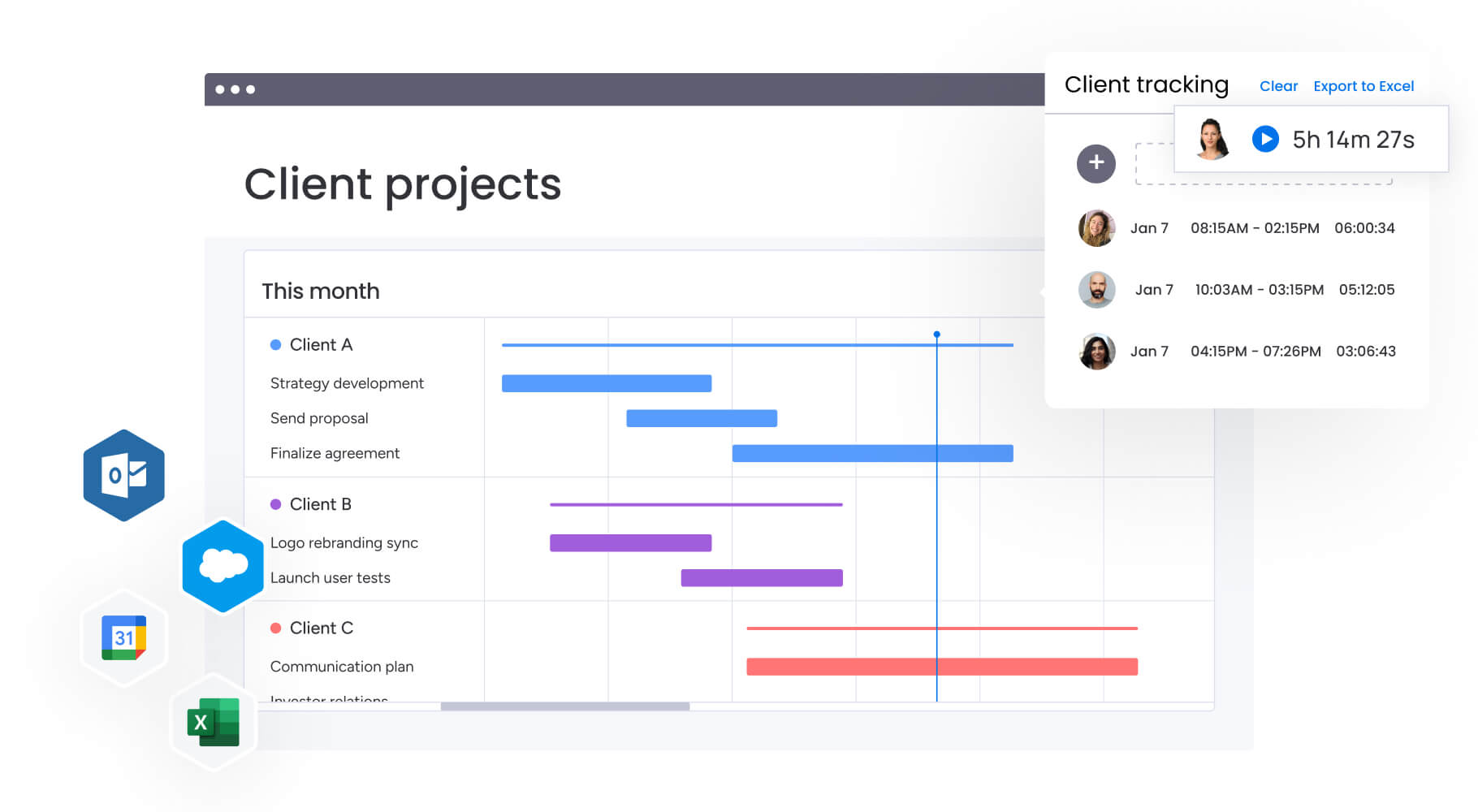
Gantt charts in monday work management go beyond static timelines to provide interactive project visualization. Project managers can drag and drop tasks to adjust schedules, identify critical paths instantly, and understand project dependencies at a glance.
The platform also supports multiple timeline views including Calendar, Timeline, and Gantt, allowing teams to choose the visualization that matches their workflow.
Managing multiple client projects requires understanding how tasks interconnect and impact delivery timelines. The visual nature of these charts makes it simple to explain project status to stakeholders who may not be familiar with detailed project plans. You can quickly identify which tasks are blocking others and spot resource conflicts before they become problems.
Portfolio management with AI-powered insights
Portfolio management gives you a consolidated, real-time view of how every project is progressing. AI-powered risk insights scan updates across your portfolio to highlight potential issues, complete with urgency levels, owners, and recommended next steps. Customizable dashboards bring together data from multiple projects so you can monitor budgets, workloads, and overall project health without creating manual reports.
When you’re balancing more than 20 client projects with shared resources and shifting priorities, this bird’s-eye view becomes essential. It helps you make confident decisions about where to focus, when to reallocate resources, and how to keep delivery on track.
Key capabilities include:
- Out-of-the-box portfolio dashboards: analyze hundreds of projects simultaneously.
- AI-powered portfolio reports: generate instant executive summaries with trends, risks, and charts.
- Real-time status tracking: monitor project health across all client engagements.
This level of visibility doesn’t just improve planning, it also strengthens collaboration across teams by giving everyone a shared understanding of progress and risks.
No-code workflow automation
Automation in monday work management eliminates repetitive tasks without requiring technical expertise. The platform provides predefined automation recipes covering common project management needs — sending notifications when deadlines approach, updating item statuses based on triggers, and creating new items when specific conditions are met. Project managers can also build custom automation rules that match their specific workflows.
These automations transform how services teams operate by handling routine administrative work instantly. Instead of manually updating stakeholders, chasing approvals, or moving tasks between stages, automation ensures consistency while reducing errors. When managing multiple client projects, this automation prevents important steps from falling through the cracks.
Integrated resource management and workload optimization
Resource management integrates directly into project workflows through the platform’s resource directory and capacity manager. The Workload view provides real-time visibility into team bandwidth, skills, and capacity across multiple projects. Project managers can plan, assign, and adjust resources at the project level while preventing team burnout.
For services organizations where people are the primary asset, resource management software directly impacts profitability and client satisfaction.
The platform helps project managers:
- Identify overallocation: see who’s overallocated before it impacts delivery.
- Find available capacity: locate team members with bandwidth for new projects.
- Match skills to projects: access skill inventories for accurate staffing decisions.
This visibility enables smarter staffing decisions and more accurate project timelines.
Built-in time tracking and budget management
Accurate time and budget tracking are essential for service organizations, and monday work management brings both directly into your project workflows. Time tracking captures how long tasks actually take, giving you the data you need for realistic planning. The platform records both billable and non-billable hours and links them to the right projects and clients.
Budget management is handled through formula columns and real-time calculations, allowing you to compare estimated costs with actual spending as work progresses.
Key capabilities include:
- Integrated time tracking: track task duration without relying on separate tools.
- Billable and non-billable hours: link time entries to clients and projects for accurate invoicing.
- Real-time budget calculations: use formula columns to monitor spending against estimates.
- Financial visibility: see at a glance whether a project is staying within budget or needs adjustment.
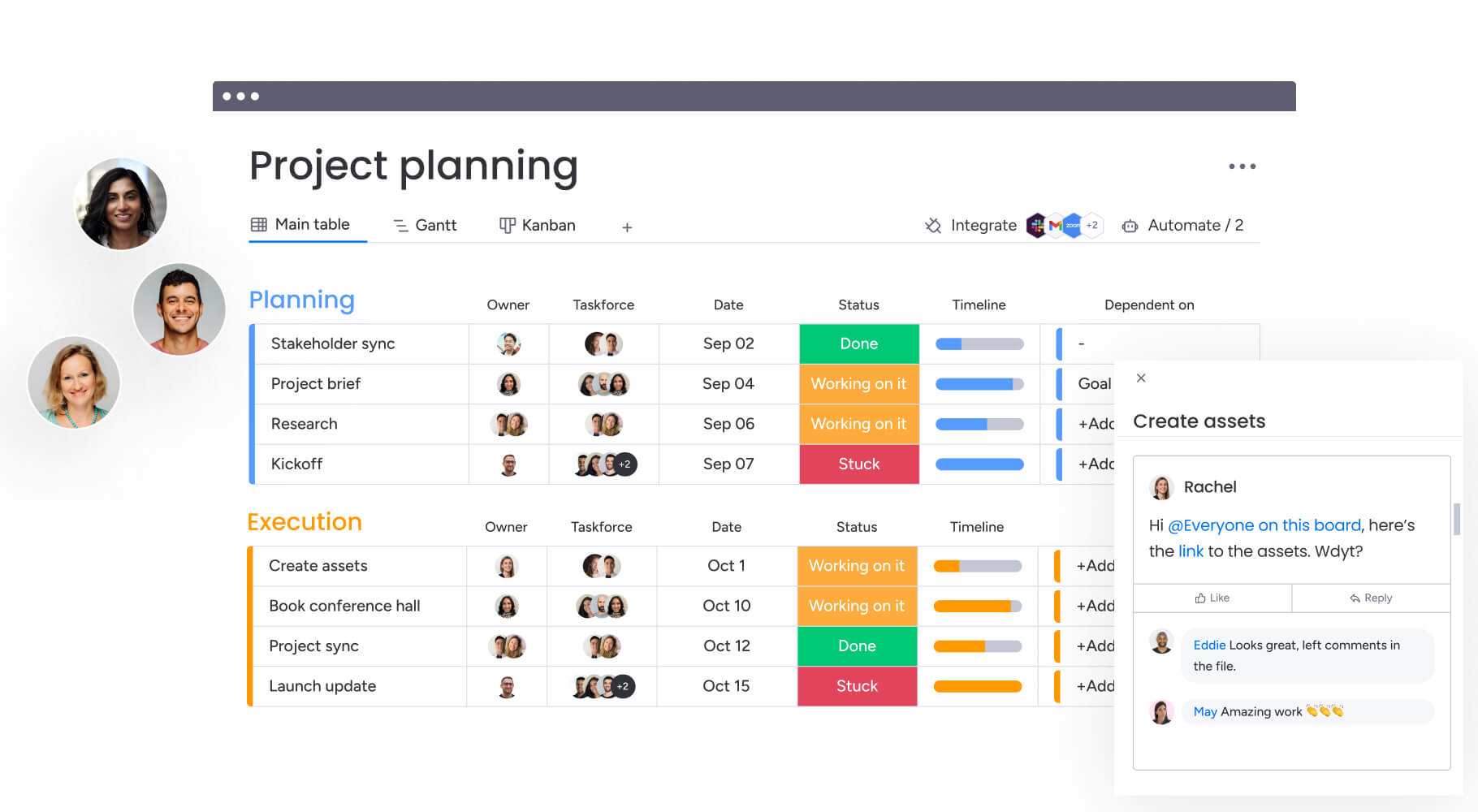
How a project manager in the services industry benefits from monday work management
When service teams centralize their work in monday work management, the impact is clear. The platform helps project managers handle multiple client engagements while maintaining quality, profitability, and predictable delivery. These improvements show up across six key areas:
- Time savings through intelligent automation: project managers reclaim hours each week by automating status updates, approval workflows, and stakeholder communications.
- Enhanced cost control and profitability: real-time budget tracking and resource optimization help prevent overruns. Playtech can release resources as soon as they’re no longer needed, creating measurable cost savings.
- Complete visibility across portfolios: centralized dashboards surface project health, resource allocation, and bottlenecks across all client engagements. This visibility helps project managers identify risks early and act before they affect delivery.
- Accelerated project initiation: standardized templates and managed workflows streamline project setup. Playtech’s project managers duplicate templates and tailor them for each new project, significantly reducing setup time.
- Improved team collaboration: shared boards, commenting features, and real-time updates strengthen coordination between internal teams and external stakeholders.
- Stronger compliance and governance: automated workflows and audit trails ensure projects follow consistent processes. With a single source of truth, teams eliminate confusion around project status, ownership, and decisions.
How to solve project management challenges with monday work management
Juggling multiple client projects is a tightrope walk: you need enough structure to stay consistent but enough flexibility to handle each client’s unique needs. Here’s a trusted playbook for turning project chaos into a well-oiled machine that delivers for every client, every time:
Step 1: establish your centralized workspace
Create a dedicated workspace for your PMO or services team. Set up boards for each client or project type, then import existing project data from spreadsheets and other tools. This establishes your single source of truth where all project information lives.
Step 2: deploy standardized project templates
Build reusable templates that capture your project methodology, including standard phases, tasks, approval gates, and deliverables. Use managed templates to ensure consistency across the organization while allowing teams to customize for different service offerings.
Step 3: configure resource management views
Set up the Workload view to visualize team capacity across all projects. Build your resource directory with team members’ skills, availability, and hourly rates. This enables accurate resource planning and helps prevent overallocation.
Step 4: implement intelligent automation
Create automation rules for recurring tasks like status notifications, approval requests, and task assignments. Set up automated reminders for approaching deadlines and configure cross-project dependencies to manage complex workflows.
Step 5: build portfolio-level dashboards
Construct executive dashboards that aggregate data across all projects. Configure widgets to display budget utilization, resource allocation, project health, and upcoming milestones. Use AI-powered portfolio reports to generate instant summaries for stakeholder meetings.
Step 6: connect your existing ecosystem
Integrate monday work management with your communication tools, file storage, and specialized systems. Connect Slack or Teams for messaging, Google Drive or SharePoint for documents, and Jira or Salesforce for technical workflows. This ensures seamless data flow without requiring teams to change their working habits.
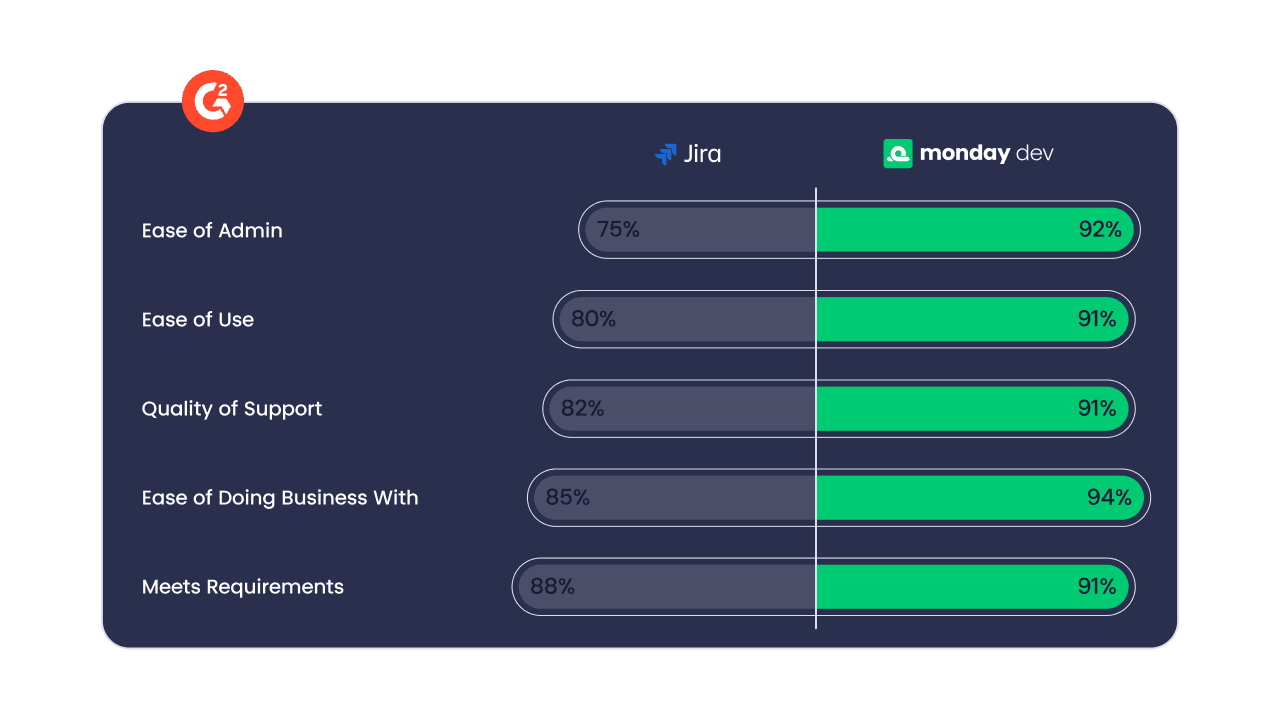
Comparison table: monday work management vs competing platforms for project management
With so many project management platforms available, it can be hard to know which one meets the needs of a services organization. This comparison highlights how monday work management performs alongside other major tools across key capabilities.
| Feature | monday work management | Asana | Wrike | Smartsheet |
|---|---|---|---|---|
| Native time tracking | ✓ (all paid plans) | ✗ (integration required) | ✗ (integration required) | ✗ (integration required) |
| Portfolio management | ✓ Advanced with AI insights | ✓ Limited (higher tiers) | ✓ Advanced | ✓ Advanced |
| Workflow automation | 25,000 actions/month (Standard) | 250 actions/month (Starter) | 200 actions/user/month (Business) | Varies by plan |
| Resource management | ✓ Built-in workload views | ✗ (Advanced plan only) | ✓ Available | ✓ Available |
| Budget tracking | ✓ Formula columns | ✗ (integration required) | ✗ (integration required) | ✓ Available |
| Client collaboration | ✓ Guest access | ✓ Limited | ✓ Available | ✓ Available |
| Price per user/month | $12 (Standard, 3-seat minimum) | $13.49 (Starter) | $10 (Team) | $9 (Pro) |
| Implementation time | 2 weeks to 1 month | 1-2 weeks | 2-4 weeks | 2-3 weeks |
| G2 rating | 4.7/5 | 4.4/5 | 4.2/5 | 4.4/5 |
How Playtech's PMO transformed their project delivery
When Yossi Shamir joined Playtech 11 years ago, project managers relied on spreadsheets, email, and notepads to manage countless client projects. Now, many organizations consult a project management software list before adopting a unified platform.
Digital transformation changed client expectations, demanding more frequent updates and faster results: the team was losing opportunities to reduce costs and improve efficiency while struggling to meet these evolving demands.
The implementation approach: Playtech implemented monday work management to bring their methodology to life and manage projects from initiation to closure in one place. The team created separate boards for preliminary discussions, management approvals, project budgeting, and active portfolios. They also built customized templates that project managers could duplicate and adjust quickly for each new project.
Integration with Jira further provided visibility into development team progress, bridging the gap between waterfall and Agile methodologies.
Measurable transformation results: the transformation delivered remarkable results across multiple dimensions:
- 26% increase in efficiency: across all project operations.
- 3 hours saved per person per week: through automation and centralized workflows.
- 49% improvement: in collaboration and transparency with stakeholders.
- 23% increase in meeting KPIs: across the PMO department.
Ready to transform your project management function?
Let’s face it — basic task trackers just don’t cut it when you’re balancing complex client projects, juggling limited resources, and trying to give leadership the visibility they need. monday work management delivers the comprehensive capabilities needed to centralize scattered workflows and create consistent, profitable project delivery.
The platform’s combination of AI-powered insights, flexible automation, and enterprise-grade governance transforms how project managers coordinate cross-functional teams and deliver client value. With proven results from a variety of leading organizations, the platform demonstrates its ability to scale project management operations while maintaining quality and profitability.
Experience how centralized project management can transform your services organization with a 14-day free trial now.
The content in this article is provided for informational purposes only and, to the best of monday.com’s knowledge, the information provided in this article is accurate and up-to-date at the time of publication. That said, monday.com encourages readers to verify all information directly.
Frequently asked questions for a project manager in the services industry
How long does it take to implement monday work management for a services organization?
Implementation time for monday work management typically ranges from two weeks to a month for most services organizations. The platform's intuitive interface requires minimal training, and pre-built templates for professional services accelerate setup. Teams can begin using core features immediately while gradually adopting advanced capabilities. Larger implementations with complex workflows may take four to six weeks, but the phased approach ensures teams see value quickly.
Can monday work management handle different billing models for various clients?
monday work management supports multiple billing approaches through its flexible structure. You can track billable and non-billable hours, set different hourly rates for team members, and use formula columns to calculate project costs based on time entries. The platform integrates with accounting systems like QuickBooks for seamless invoicing based on tracked time and expenses.
What's the migration process from scattered tools to monday work management?
Migration begins with importing existing project data from spreadsheets, Asana, Trello, or other tools using monday work management's import features. You can maintain integrations with tools your team wants to continue using while centralizing project visibility. Most teams migrate gradually, starting with new projects while maintaining legacy systems for in-flight work.
How does monday work management manage resource conflicts across projects?
The Workload view provides real-time visibility into each team member's capacity across all projects. Project managers can see who's overallocated, identify scheduling conflicts, and rebalance assignments before conflicts impact delivery. The resource directory maintains information about team members' skills and availability, enabling informed staffing decisions.
What training ensures successful team adoption?
monday work management provides interactive product tours, video tutorials, and a comprehensive knowledge base for successful adoption. Enterprise customers receive dedicated onboarding services including custom workflow implementation and change management support. The platform's intuitive design means most team members can begin using core features with minimal training, while project managers can access advanced training for complex features.
How secure is client project data in monday work management?
Client project data in monday work management is protected by enterprise-grade security including SOC 2 Type II certification, ISO 27001 compliance, and GDPR compliance. The platform offers IP restrictions, two-factor authentication, multiple SSO options, and tenant-level encryption. Role-based permissions allow project managers to control exactly who can view, edit, or delete project data, ensuring client confidentiality.

 Get started