


For marketing leaders managing 50–100+ people, the challenge is universal: planning happens in one system, execution in another, and measurement in a third. This fragmentation hides campaign progress and forces teams into reactive management, where hours are wasted manually compiling reports from scattered sources.
Effective marketing reporting software eliminates this gap by unifying planning and performance. Unlike traditional analytics tools that only visualize data after a campaign runs, modern solutions allow you to track execution in real time. This ensures you can identify risks and adjust resources before deadlines are missed.
This guide explores the features that drive enterprise efficiency, from real-time dashboards to automated resource management. You will learn how to move from reactive data gathering to a proactive strategy that proves business impact with hard numbers.
Key takeaways
Media marketing leaders need a unified marketing planning software solution that connects campaign planning directly to performance measurement. Unlike traditional tools that only visualize post-campaign data, this integrated approach allows you to plan, execute, and measure results in one system.
For teams of 50–100+ members, this solves the core challenge of disconnected execution across creative, acquisition, and operations.
- Connect campaign planning directly to performance measurement: use one unified platform that tracks execution and measures results without switching between multiple disconnected systems.
- Eliminate manual reporting with automated dashboards: set up real-time dashboards that update automatically as your team works, saving hours spent compiling weekly reports from scattered sources.
- Integrate with 200+ marketing platforms: monday work management pulls performance data from Google Analytics, Facebook Ads, and your CRM directly into workflow boards for complete campaign visibility.
- Gain visibility into team capacity to proactively manage workloads: track workload across 50-100+ team members to balance work distribution and prevent missed deadlines from over-allocation.
- Link every campaign to strategic business goals: connect individual marketing initiatives to company OKRs so executives see exactly how each campaign drives measurable business outcomes.
What makes heads of marketing choose monday work management for marketing reporting?

Heads of marketing at companies like SPH Media and Genpact choose monday work management to unify campaign planning and performance reporting. Unlike traditional reporting tools that only visualize data post-campaign, this platform allows you to plan, execute, and measure results without switching systems.
For leaders of 50–100+ member teams, this solves “disconnected execution.” Using different tools for planning and reporting obscures whether campaigns are on track, but a unified system provides the visibility needed to fix performance issues before they emerge.
Solutions like monday work management close this gap with real-time dashboards that update automatically. This is essential for media marketing teams managing hundreds of complex campaigns simultaneously across multiple brands and regions.
monday work management top features for marketing reporting
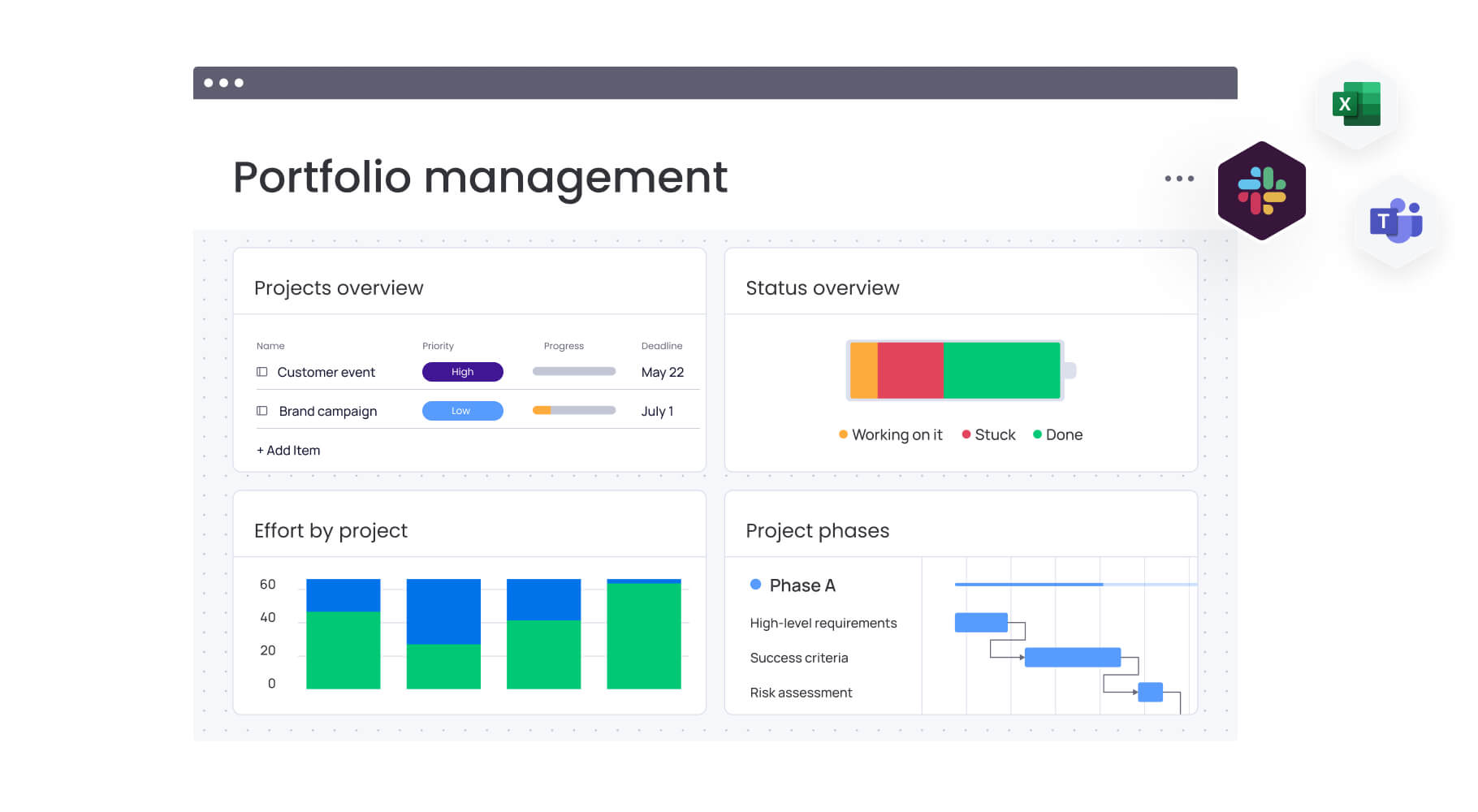
The following features make monday work management the preferred choice for marketing leaders. Each capability addresses the specific challenges of managing complex, multi-channel media campaigns at scale.
Real-time dashboards and reporting
The platform aggregates data from multiple sources into visual reports that refresh automatically as teams log progress, eliminating manual data entry. This addresses a major industry challenge, as 69% of companies are exploring new possibilities with data-driven approaches to reduce operational inefficiencies.
Instead of chasing updates via email, leaders gain a unified, real-time view of campaign performance, team capacity, and budget utilization.
Key capabilities include:
- Filtering options: campaign, region, team, or any custom parameter you define.
- Multiple view types: executive-level summaries or detailed operational reports.
- Real-time updates: automatic refresh as teams update their work.
Customizable filtering by campaign, region, or team allows for the instant creation of both high-level executive summaries and detailed operational reports. This visibility is proven at scale; Genpact’s marketing team used these capabilities to monitor 24 large-scale campaigns simultaneously, tracking actual time frames against targets to resolve bottlenecks and delays.
Campaign management with performance tracking
The platform’s campaign management features unify planning and execution by connecting calendars and timelines directly to live workflow boards. This integration bridges the gap between strategy and day-to-day work, allowing leaders to see exactly how individual deliverable status impacts the overall launch timeline.
As goals cascade from the portfolio level down to creative and channel teams, dashboards reflect progress automatically, making it easy to identify risks and adjust resources before deadlines are missed.
SPH Media leverages this capability to manage hundreds of campaigns across 40+ brands, tracking everything from creative production to delivery with automated alerts at every phase.
Automated reporting and scheduled delivery
The platform includes automation recipes that generate and distribute reports on schedules you define, eliminating manual report creation. You can set up automation to send dashboard snapshots to stakeholders weekly, notify teams when campaign metrics hit thresholds, or trigger alerts when deadlines approach.
When you need to report up to the C-suite, these automations deliver consistent, timely updates without eating up your team’s valuable time. You can configure different report views for different audiences:
- Operational reports: detailed task tracking for your team.
- Executive summaries: high-level performance overviews for leadership.
- Client reports: branded, simplified views for external stakeholders.
The platform handles distribution automatically, maintaining reporting cadence even during busy campaign periods. This automation capability directly addresses the pain point of inefficient processes where teams reinvent workflows, ensuring consistent data accuracy while freeing your team to focus on strategic work rather than manual reporting tasks.
Resource management and capacity planning
Effective resource management tools provide visibility into team bandwidth and skill availability across all active projects. The workload view tracks individual capacity and assigned tasks, enabling heads of marketing to allocate people strategically and prevent burnout.
This is essential for managing teams of 50–100+, as it identifies which departments have bandwidth for new campaigns and which are at risk of missing deadlines due to overload. Genpact uses these workload features to balance ad hoc requests with long-term marketing plans, ensuring timely delivery without overcommitting their global team.
Goals and OKR tracking
Built-in OKR tracking connects individual marketing tasks to company-level objectives, ensuring every initiative aligns with strategic priorities. This allows leaders to move beyond isolated campaign metrics and demonstrate exactly how marketing efforts contribute to quarterly goals or annual growth.
For media teams managing multiple business units, this visibility ensures focus remains on high-impact activities by allowing you to prioritize campaigns based on strategic contribution.
Integrations with marketing platforms
Native integrations for 200+ platforms (including Google Analytics, Facebook Ads, and major CRMs) pull live performance data directly into workflow boards. This eliminates manual data transfer and ensures reporting reflects current performance across every channel.
By combining execution data with metrics from your external tech stack, you gain a complete view of ROI without switching systems. The platform also supports an open API for custom integrations with proprietary media tools.
How a head of marketing in media benefits from monday work management
Teams that switch to monday work management see real changes fast; they work more efficiently, improve collaboration, and stay aligned with company strategy. And these benefits only grow over time, giving your media marketing team a serious edge as you scale.
- Time savings and efficiency: eliminate hours of manual reporting and searching for data through automated workflows and centralized campaign visibility.
- Cost reduction and ROI: consolidating tools reduces software overhead; FARFETCH saved $118K monthly by unifying their marketing organization on one platform.
- Improved data accuracy: automated workflows and a full audit trail minimize manual entry errors, ensuring reliable data for executive decision-making.
- Enhanced team collaboration: rransparency in campaign status and task ownership eliminates the need for constant status meetings and long email chains.
- Quality at scale: maintain high standards during volume increases using standardized workflows, as demonstrated by SPH Media’s management of 40+ brands.
- Proactive management: real-time dashboards of workload and budget allow leaders to resolve performance issues before they impact delivery.
How to optimize marketing reporting with monday work management
To maximize the value of monday work management, start with a solid foundation and scale upward. Follow these six steps to transition your team smoothly while building a high-impact reporting ecosystem.
Step 1: centralize campaign data in connected boards
First, establish a master campaign board as your single source of truth, including names, budgets, and timelines. Link this master view to specific execution boards for creative, content, and channel activation using board connections.
This hierarchy ensures that high-level reporting automatically reflects real-time progress across all granular tasks.
Step 2: build automated dashboards for stakeholder reporting
Configure tailored dashboards that pull data from your campaign boards to serve different audiences. Create executive-level summaries focusing on budget and goal progress, alongside operational dashboards for teams that highlight task status and upcoming deadlines.
Use AI-powered portfolio reports to instantly surface trends and risks, saving hours of manual data preparation.
Step 3: implement automation for report generation and distribution
Next, set up automation recipes to generate and send reports on your desired schedule. Configure weekly campaign status reports to stakeholders, monthly performance summaries to executive leadership, and real-time alerts when campaigns hit key milestones or encounter issues.
Essential automation types:
- Scheduled reports: weekly stakeholder updates, monthly executive summaries.
- Threshold alerts: notifications when metrics hit predefined targets.
- Status notifications: updates when campaign phases complete or deliverables are ready.
Step 4: connect marketing platforms through integrations
Sync your entire marketing technology stack (including Google Analytics, ad platforms, and CRMs) to pull live performance data directly into your boards.
Setting these integrations to update automatically ensures your reports reflect current ROI and conversion data without manual entry. For proprietary tools, use the open API to build custom connections tailored to your media organization.
Step 5: establish resource management workflows
Use the workload view to track team capacity and expertise across all active projects. By centralizing team skills and availability in a resource directory, you can assign the right people to the right tasks based on actual bandwidth.
Regular reviews of the capacity manager allow for smarter intake decisions and prevent burnout by rebalancing work distribution before deadlines are missed.
Step 6: link campaigns to strategic goals and OKRs
Finish by creating dedicated goal boards to define your quarterly and annual marketing objectives, then link specific campaigns to these goals. This connection allows you to track progress automatically as work is completed, making it simple to demonstrate strategic alignment to leadership.
Use these insights to prioritize high-impact initiatives and make data-driven decisions about where to allocate future resources.
Comparison: monday work management vs competing platforms for marketing reporting
When evaluating marketing reporting software, understanding how different platforms stack up against each other helps you make an informed decision. While traditional analytics tools like Tableau and Google Looker Studio excel at data visualization, they lack the integrated campaign planning and resource management capabilities that marketing leaders need.
Here’s how monday work management compares to these popular alternatives across the features that matter most for enterprise marketing teams.
| Feature | monday work management | Tableau | Google Looker Studio |
|---|---|---|---|
| Campaign planning integration | Native campaign boards with execution tracking | Requires separate project management tool | Requires separate project management tool |
| Real-time dashboard updates | Automatic updates as work progresses | Manual data refresh required | Automatic with data source updates |
| Resource management | Built-in workload and capacity planning | Not included | Not included |
| Automation capabilities | 200+ automation recipes for workflows and reporting | Limited to data refresh automation | Limited to data refresh automation |
| Goal and OKR tracking | Native goal boards with automatic progress tracking | Requires custom configuration | Requires custom configuration |
| Team collaboration features | Comments, mentions, file sharing, integrated communication | Limited collaboration features | Limited collaboration features |
| Price per user/month | From $10/user (Standard plan) | From $75/user (Creator license) | Free (with Google account) |
| Implementation time | Two to four weeks typical | Four to eight weeks typical | One to two weeks typical |
How Genpact's global marketing team transformed their campaign reporting
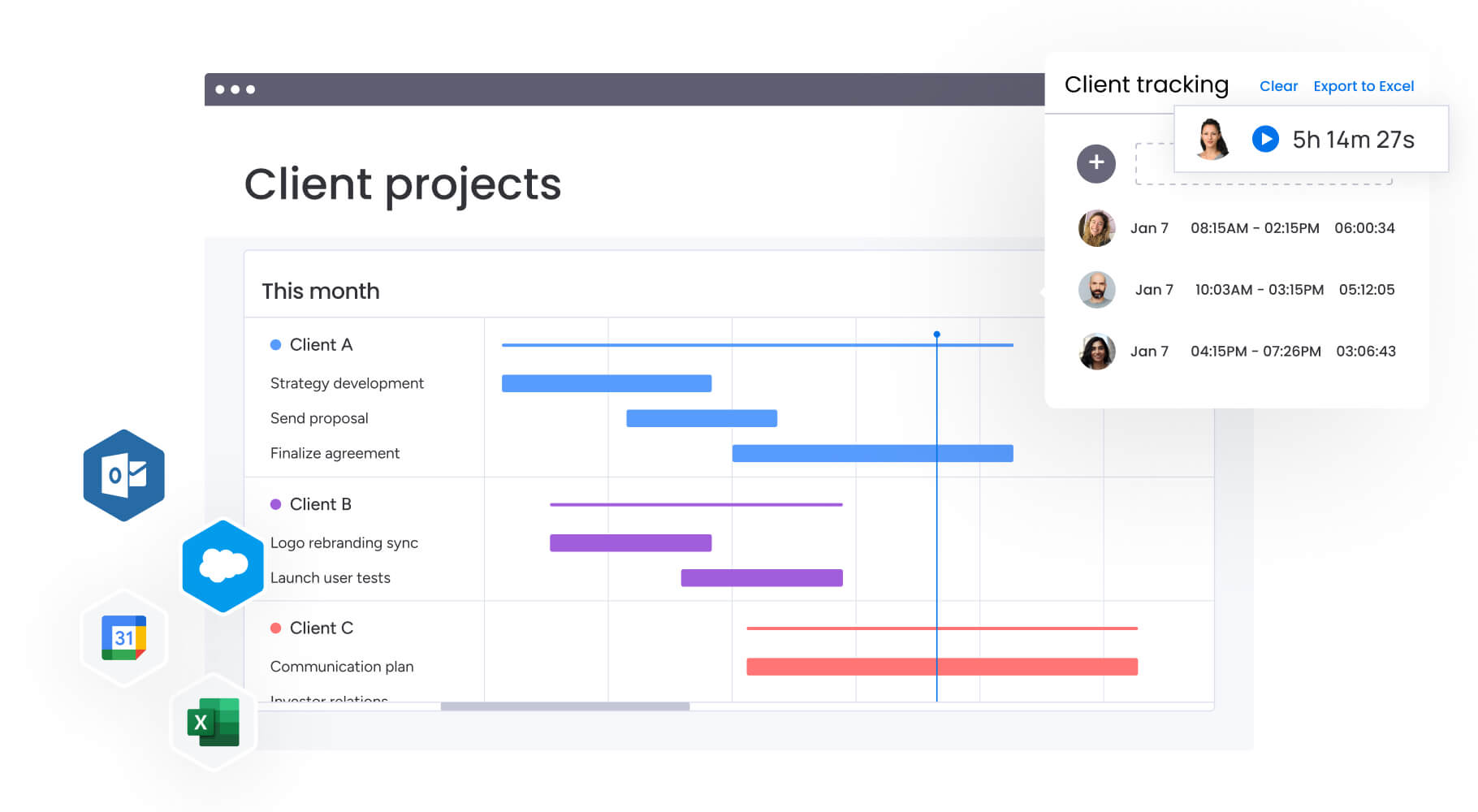
Genpact’s globally distributed marketing team faced significant challenges managing their complex campaign portfolio before implementing monday work management. Understanding their transformation provides insight into how enterprise marketing teams can overcome similar operational obstacles.
- The challenge: Genpact’s global marketing team managed 24 large-scale campaigns simultaneously, involving 400 people across 40 teams. Managers relied on spreadsheets, emails, and SharePoint folders to coordinate go-to-market planning.
- The solution: Genpact implemented monday Work Management to unify campaign planning, execution tracking, and reporting. They built a high-level GTM calendar with subitems for programs, campaigns, and activations, plus workflow boards for each channel to track target dates against actual completion.
The digital team implemented forms for campaign brief submission and approval, with automated notifications creating a visible queue for requests. This gave campaign managers visibility into where their requests stood in the process and realistic expectations for turnaround times.
The results speak for themselves:
- 40% improvement in cross-team collaboration for end-to-end campaign planning and execution.
- Complete removal of spreadsheets from the campaign management process.
- Significant decrease in email exchanges as communication moved into the platform.
Ready to transform your marketing reporting function?
Marketing reporting software transforms how your team works, from reactive data gathering to proactive operations that drive business results. The right platform connects what you measure with how you execute, enabling marketing leaders to demonstrate value while improving team efficiency.
By implementing monday work management, you gain the unified visibility and automated workflows that turn scattered campaign data into strategic insights. Your team spends less time compiling reports and more time optimizing performance, while executives receive consistent, accurate updates that support informed decision-making.
Join thousands of marketing teams who trust monday work management to connect campaign planning, execution, and performance reporting in one unified platform. With our 14-day free trial, you can experience real-time dashboards, automated reporting, and integrated resource management with no risk.
The content in this article is provided for informational purposes only and, to the best of monday.com’s knowledge, the information provided in this article is accurate and up-to-date at the time of publication. That said, monday.com encourages readers to verify all information directly.
Frequently asked questions
How does monday work management integrate with existing marketing analytics platforms?
Through native connectors and APIs, monday work management integrates with 200+ marketing platforms, including Google Analytics, Google Ads, Facebook Ads, HubSpot, Mailchimp, and major CRM systems. These integrations allow you to pull performance data directly into your workflow boards and dashboards, creating unified reports that combine campaign execution data with performance metrics.
Can monday work management handle reporting for multiple brands or business units simultaneously?
Yes, the platform is designed to manage multiple brands, regions, or business units within a single account while maintaining appropriate visibility controls. You can create separate workspaces for each brand or business unit, with shared boards for cross-brand initiatives, and use dashboard features to create consolidated views across all brands for executive reporting.
What's the typical implementation timeline for enterprise marketing teams?
Enterprise marketing teams typically implement monday work management in two to four weeks for initial deployment, with ongoing optimization continuing over subsequent months. The implementation process includes workspace setup, board configuration, integration with existing marketing platforms, dashboard creation, and team training.
How does monday work management support compliance and data governance for media companies?
Enterprise-grade security features are provided by monday work management, including IP restrictions, two-factor authentication, multiple SSO options, BYOK (Bring Your Own Key), and tenant-level encryption. The platform maintains complete audit trails showing who accessed, modified, or shared data, supporting compliance requirements for media companies handling sensitive campaign information or client data.
Can we customize reporting templates for different stakeholder groups?
Yes, extensive customization options for reports and dashboards tailored to different audiences are provided by monday work management. You can create executive dashboards showing high-level campaign status and goal progress, operational dashboards with detailed task tracking for your team, and client-facing dashboards with branded, simplified views of campaign performance.
How does resource management work for large marketing teams with 50-100+ members?
The resource management features in monday work management provide workload views showing each team member's capacity, assigned tasks, and availability across all campaigns and projects. You can set individual capacity limits, assign tasks with time estimates, and view team allocation in daily, weekly, or monthly views to prevent over-allocation and maintain balanced workloads.

 Get started