


Marketing teams generate more data than ever, yet many leaders still struggle to answer basic questions: which campaigns actually drive revenue, where budgets are leaking, and how team capacity is being used. The issue isn’t access to data, it’s that insights are scattered across tools, spreadsheets, and reports that arrive too late to influence decisions.
Effective dashboard software turns fragmented data into unified intelligence. Instead of static charts, modern dashboards connect performance metrics with execution, automate reporting workflows that consume hours each week, and surface risks early. For marketing leaders overseeing multiple teams and channels, dashboards replace constant tab-switching with real-time visibility.
This helpful post breaks down what separates enterprise-grade dashboard software from basic visualization tools. It explores the features that matter most to marketing leaders, real-world ROI outcomes, and how to implement dashboards that support both strategic oversight and day-to-day execution, without overwhelming teams or slowing creative work.
Key takeaways
Marketing leaders can leverage dashboard software to transform scattered data into actionable insights. These platforms bridge strategy and execution, improve decision-making speed, and provide visibility across complex marketing operations.
- Dashboards consolidate data across platforms: unify metrics from analytics, ad management, CRM, and project tools to reduce visibility gaps and eliminate constant tab-switching.
- Four dashboard types support different audiences: strategic, operational, analytical, and tactical dashboards ensure executives, managers, analysts, and team members each get relevant insights.
- Automation improves efficiency: automated workflows for reporting, budget monitoring, and resource management save hours weekly and reduce manual errors.
- Real-time tracking drives better decisions: live data updates allow marketing teams to identify underperforming campaigns, reallocate resources, and pivot strategies quickly.
- Integration with work management enhances execution: platforms that link dashboards to actual projects connect insights directly to team activity, improving alignment between strategic goals and daily tasks.
Understanding dashboard software for modern organizations
At its core, dashboard software consolidates scattered data into a single visual command center, enabling teams to see performance, identify issues, and make informed decisions. For marketing leaders managing 50–100+ team members across campaigns, creative, and operations, these platforms turn disparate metrics into unified intelligence that drives action.
Effective dashboards go beyond attractive charts. They bridge the gap between strategic planning and daily execution, reduce ten to twenty hours of weekly reporting, and flag issues before they escalate. For teams operating across Google Analytics, ad platforms, CRM systems, and project management solutions, implementing a project management dashboard creates a single source of truth that eliminates tab-switching and manual compilation.
What makes dashboard software essential for enterprise teams?
.jpg)
A marketing team’s biggest challenge often lies in fragmented data. Campaign metrics sit in Google Ads, creative performance hides in project trackers, budgets spread across spreadsheets, and team capacity is unclear until someone is overworked.
This fragmented approach generates three major challenges:
- Visibility gaps: without consolidated dashboards, leaders cannot fully see which campaigns drive ROI, where budgets overspend, or which teams are overloaded. Strategic decisions are based on incomplete insights.
- Manual reporting burden: teams spend entire days pulling data from disconnected platforms, formatting reports, and distributing updates. By the time insights reach leadership, they are often outdated.
- Strategic misalignment: when C-suite objectives do not connect to team-level work, executive dashboards help align campaigns with strategy and demonstrate marketing’s impact on revenue.
Dashboard platforms address these challenges by creating a unified intelligence layer. Marketing leaders gain real-time visibility across campaigns and team workloads, automate reporting workflows, and connect strategic objectives directly to execution metrics.
The four types of dashboards every organization needs
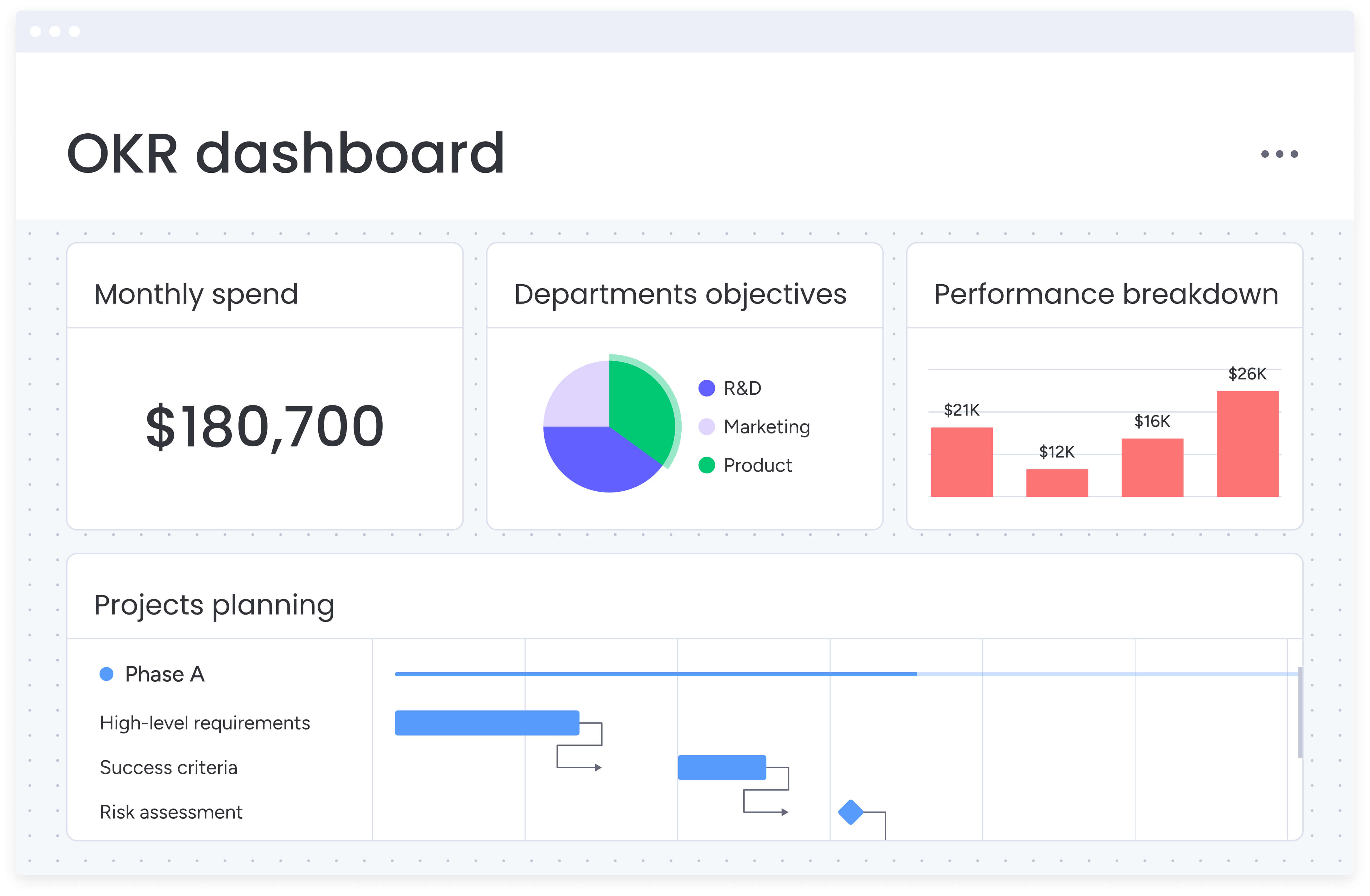
Understanding the four dashboard types helps close visibility gaps and ensures teams have the right insights. Each type serves distinct audiences and purposes, forming a complete intelligence ecosystem when implemented together.
| Dashboard type | Primary users | Key purpose | Update frequency |
|---|---|---|---|
| Strategic | Executives, C-suite | Track KPIs and OKRs, quarterly trends | Monthly/Quarterly |
| Operational | Marketing managers | Monitor campaigns, project status, team performance | Real-time |
| Analytical | Data analysts, strategists | Identify patterns, trends, opportunities | Weekly/Monthly |
| Tactical | Team leads, individual contributors | Track specific projects, tasks, deliverables | Daily |
- Strategic dashboards: these high-level views track KPIs and OKRs for executives, typically showing monthly or quarterly trends. They answer questions about overall marketing performance, ROI, and alignment with business goals.
- Operational dashboards: real-time monitoring tools that track ongoing campaigns, project status, and team performance. Marketing managers use these to spot bottlenecks, adjust resources, and keep execution on track.
- Analytical dashboards: deep-dive tools for identifying patterns, trends, and opportunities in historical data. These help you understand what drove past success and inform future strategy.
- Tactical dashboards: team-level tracking of specific projects, tasks, and deliverables. Individual contributors and team leads use these to manage daily work and maintain accountability.
Enterprise organizations need platforms that support all four types seamlessly. When strategic dashboards on monday.com connect directly to tactical execution boards, you eliminate the gap between planning and doing.
Top dashboard software solutions for enterprise marketing teams
Selecting the right dashboard platform requires understanding how different solutions address enterprise marketing needs. Each platform offers distinct strengths and limitations that impact your team’s ability to gain insights and drive action.
monday.com
Modern platforms like monday.com connect insights directly to projects, allowing teams to take action immediately when metrics indicate issues.
Key strengths:
- Work-to-dashboard connection: see a metric, click through to the actual project, and make adjustments instantly.
- No-code customization: marketing managers build sophisticated dashboards without IT support.
- AI-powered insights: proactively flags risks across hundreds of projects simultaneously.
- 200+ integrations: connects Google Analytics, ad platforms, CRM systems, and more.
The platform’s enterprise capabilities include AI-powered portfolio reports that generate executive summaries instantly, managed templates that standardize reporting across teams, and resource optimization tools that prevent burnout by balancing workloads.
Marketing teams report saving 7,000 hours monthly through automated reporting and achieving 40% improvement in cross-team collaboration.
Tableau
Tableau excels at complex data visualization and analysis, particularly for organizations with dedicated data teams. Its strength lies in creating detailed, interactive visualizations from large datasets.
Best for: organizations with data analysts who can manage SQL queries and complex data modeling.
Limitations: requires technical expertise, lacks work management integration, expensive per-user pricing starting at $75/month.
Power BI
Microsoft’s Power BI integrates well within the Microsoft ecosystem, making it attractive for organizations already using Office 365. It offers robust data modeling and AI-powered analytics.
Best for: companies heavily invested in Microsoft infrastructure.
Limitations: limited collaboration features, complex for non-technical users, requires separate project management tools.
Looker Studio (formerly Google Data Studio)
Google’s free dashboard solution provides basic visualization capabilities with strong integration to Google’s ecosystem. While cost-effective for simple needs, it lacks enterprise features.
Best for: small teams needing basic Google Analytics dashboards.
Limitations: limited customization, no work management features, lacks advanced automation.
Domo
Domo positions itself as a business cloud platform, combining data visualization with some workflow capabilities. It targets enterprises needing cloud-first solutions.
Best for: large enterprises with complex data infrastructure needs.
Limitations: high cost, steep learning curve, limited project management integration.
What marketing managers need from dashboard software
 A marketing dashboard acts as a centralized command center for campaign performance, budgets, resource allocation, and ROI reporting. For leaders managing complex, multichannel operations, dashboards must provide capabilities that directly address operational challenges.
Effective dashboards provide:
- Real-time performance tracking: monitor campaign metrics across all channels without platform switching.
- Budget visibility: track spend against targets with automated alerts for threshold breaches.
- Resource management: view team capacity and workload distribution to prevent burnout.
- ROI reporting: connect marketing activities directly to revenue outcomes.
- Integration depth: pull data from Google Analytics, ad platforms, CRM systems, and project tools.
How dashboard software fits into your marketing tech stack
Modern marketing teams manage a wide array of specialized platforms, creating a complex ecosystem that dashboard software must navigate effectively. Understanding how dashboards connect and consolidate these platforms determines whether you are adding value or creating another isolated system.
Typical marketing stacks include multiple categories that generate valuable data but often operate in isolation:
Analytics platforms: google Analytics, Adobe Analytics for web and app metrics.
Advertising tools: google Ads, Meta Ads Manager, LinkedIn Campaign Manager.
CRM systems: salesforce, HubSpot for lead and customer data.
Project management: various tools for campaign planning and execution.
Marketing automation: email platforms, workflow tools, content management.
Dashboard software functions as an intelligence layer above these platforms. Rather than replacing them, it aggregates their data into unified views. Modern solutions like monday.com provide 200+ native integrations that enable bidirectional data flows.
Campaign performance from advertising platforms updates automatically in dashboards, while status changes in workflows trigger notifications in Slack or Teams. The key is selecting dashboard software that reduces platform sprawl instead of adding to it. Platforms that combine dashboards with work management eliminate the need for separate BI platforms, project trackers, and reporting systems.
Essential features for enterprise dashboard software
When evaluating dashboard solutions for enterprise marketing teams, specific capabilities distinguish adequate platforms from transformational ones. These features directly address challenges of scale, complexity, and cross-functional coordination in enterprise environments.
- Real-time data refresh: ensures decisions rely on current information rather than outdated snapshots. Marketing moves quickly, by the time weekly reports are compiled, opportunities may be lost and issues escalated. Platforms like monday.com provide live updates that match campaign dynamics.
- No-code customization: democratizes dashboard creation. When only data analysts can build reports, managers wait days for simple adjustments. Drag-and-drop builders let team leads create, modify, and share dashboards independently, accelerating time-to-insight.
- AI-powered intelligence: turns passive reporting into proactive guidance. Instead of showing only that a campaign underperforms, AI identifies reasons and suggests actions. monday.com’s AI analyzes hundreds of projects simultaneously, flagging risks before they impact outcomes.
- Scalable architecture: handles enterprise complexity. Your dashboard platform must track thousands of campaigns, process millions of data points, and support hundreds of users without performance degradation. Enterprise features such as cross-project dependencies and portfolio-level views become critical at scale.
- Governance and permissions: ensure data security while enabling collaboration. Teams need to share insights with stakeholders while protecting sensitive information. Role-based access, audit trails, and compliance features maintain control without limiting visibility.
How to connect your data sources systematically
Successful dashboards depend on both technology and people. Teams will either adopt these platforms or abandon them quietly based on rollout execution.
Begin with high-value integrations, typically Google Analytics, primary advertising platforms, and CRM systems. Use native connectors whenever possible to ensure real-time synchronization. monday.com’s integration library covers most marketing platforms, removing the need for complex API development or middleware.
Focus on data quality from the outset:
- Validate data accuracy: compare dashboard metrics with source platforms.
- Establish naming conventions: standardize campaign and project names across platforms.
- Set refresh schedules: balance real-time needs with system performance.
Build your tracking structure using existing workflows
Create boards for each major marketing function using templates as starting points. Customize fields to capture the specific metrics your organization values, whether that’s CAC, campaign ROI, or content velocity. This structure becomes the backbone of your dashboard ecosystem.
Key structural elements include:
- Campaign hierarchies: organize by channel, audience, or business unit.
- Project templates: standardize tracking for recurring campaign types.
- Custom fields: capture metrics specific to your business model.
- Status workflows: define clear progression stages for all work types.
Design dashboards for different audiences
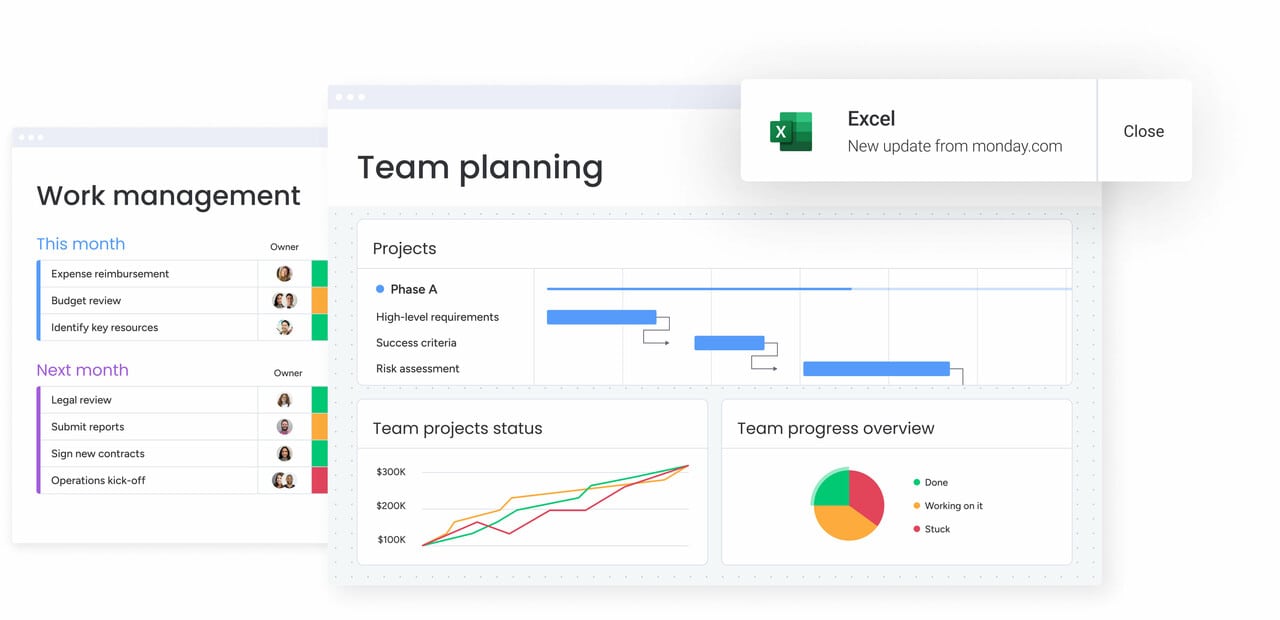
Executive dashboards require high-level KPIs and trend analysis. Team dashboards focus on operational detail and task-level visibility. Individual dashboards highlight personal workload and performance. Modern platforms like monday.com allow multiple views from the same dataset, ensuring every audience sees what they need without information overload.
Dashboard design principles:
- Executive level: focus on outcomes, trends, and strategic alignment.
- Manager level: balance overview with actionable detail.
- Team level: emphasize daily tasks, deadlines, and collaboration needs.
- Individual level: highlight personal workload and performance metrics.
How to establish automated workflows
Set up notifications for budget thresholds, automate status updates when campaigns hit milestones, and create alerts for at-risk projects. These automations transform your dashboards from static displays into active management tools.
Critical automation areas:
- Budget monitoring: alerts when spend approaches limits.
- Performance thresholds: notifications for underperforming campaigns.
- Resource management: warnings for overloaded team members.
- Milestone tracking: automatic updates when projects hit key stages.
Rolling out systematically with pilot teams
Choose a high-visibility project or campaign as your proof of concept. Gather feedback, refine your setup, and document what works. This iterative approach builds confidence and creates internal champions who drive broader adoption.
Rollout best practices:
- Start small: begin with one team or campaign type.
- Gather feedback: regular check-ins during the first month.
- Document learnings: create guides for future team onboarding.
- Scale gradually: add teams based on success metrics and capacity.
Measuring success with dashboard software
Success is measured by the transformation dashboards create, not by appearance alone. Real impact shows in day-to-day operations and strategic outcomes.
- Time savings: track hours saved on report compilation, reduction in status meetings, and decreased time spent searching for data. Marketing teams using monday.com report saving 7,000 hours monthly through automation and centralized reporting.
- Decision velocity: measure how quickly teams move from insight to action, including budget reallocation speed and campaign optimization cycles. Dashboards connected to work management accelerate these decisions.
- Alignment metrics: assess whether the organization is moving cohesively by tracking projects linked to strategic goals, consistency in KPI definitions, and reduction in conflicting priorities. Platforms connecting OKRs to execution make alignment measurable.
- Quality improvements: monitor campaign performance and team satisfaction. Clear visibility and balanced workloads enhance first-time approval rates, reduce delays, and improve employee engagement.
Transform your marketing operations with intelligent dashboards
Modern dashboards do more than visualize data. They connect strategy directly to execution. For marketing leaders managing complex operations across multiple teams and channels, the right platform eliminates visibility gaps, automates reporting, and ensures every campaign contributes to strategic goals.
Platforms that link dashboards to workflows, use AI to surface risks proactively, and scale seamlessly enable teams to pivot quickly, optimize spending, and present reliable ROI. Solutions like monday.com unify enterprise-grade dashboards with work execution capabilities, creating an environment where visibility drives action.
Smart marketing leaders understand dashboards deliver more than efficiency. Teams respond faster to market changes, allocate budgets strategically, and provide evidence of marketing’s value. In a competitive, data-driven landscape, dashboard software forms the foundation for marketing excellence.
The content in this article is provided for informational purposes only and, to the best of monday.com‘s knowledge, the information provided in this article is accurate and up-to-date at the time of publication. That said, monday.com encourages readers to verify all information directly.
Frequently asked questions
What is the best software for dashboards?
The best dashboard software depends on your organizational needs, but leading platforms share key characteristics: real-time data integration, no-code customization, and the ability to connect insights to action. monday.com excels for enterprise teams because it combines dashboards with work management, while Tableau suits organizations with dedicated data teams, and Power BI works well within Microsoft ecosystems.
What are the four types of dashboards?
The four types of dashboards are strategic (executive KPIs and quarterly trends), operational (real-time campaign and project monitoring), analytical (deep-dive analysis for pattern identification), and tactical (team-level task and deliverable tracking). Enterprise organizations need platforms that support all four types within a unified system.
What is the data dashboard for a marketing manager?
A marketing manager's data dashboard is a centralized interface displaying campaign performance, budget utilization, team capacity, and ROI metrics in real-time. It consolidates data from multiple marketing tools, automates reporting workflows, and provides actionable insights that help managers optimize campaigns and demonstrate marketing's impact on revenue.
What should be on a marketing manager dashboard?
Marketing managers typically use CRM systems like Salesforce, analytics platforms like Google Analytics, ad management tools for various platforms, project management software, and marketing automation tools. Dashboards within solutions like monday.com integrate with these tools to create unified visibility without replacing existing systems.
How does dashboard software integrate with other business platforms?
Dashboard software integrates through native connectors, APIs, and pre-built integrations that enable automatic data synchronization. Platforms like monday.com offer 200+ integrations, allowing bidirectional data flow where changes in connected tools update dashboards automatically and actions taken in dashboards can trigger updates in other systems.
What's the typical implementation timeline for enterprise dashboard software?
Enterprise dashboard software implementation typically takes two to four weeks for initial deployment, with full adoption occurring over two to three months. The process includes data source integration, dashboard design, team training, and iterative refinement based on user feedback.

 Get started