


Your teams are buried in busywork instead of focusing on what matters. They’re switching between platforms all day, hunting down updates, and rarely seeing how their daily work actually impacts business goals. Meanwhile, AI has evolved from experimental technology to practical business infrastructure that can automate routine tasks, predict project risks, and optimize resource allocation in real time.
Great AI workflow platforms don’t just automate tasks — they connect the dots across your entire company, making work flow naturally between people and departments. These platforms spot patterns in your work, shift resources when priorities change, and flag potential issues before they become problems — so your team can proactively resolve issues and maintain momentum.
They also democratize AI capabilities so every department can leverage automation without technical expertise, while maintaining the governance and scalability enterprise organizations require.
Below, we’ve assessed the top AI workflow platforms for 2026, with a close look at how they perform for project managers (PMs) and finance teams specifically. Join us for a few minutes and we’ll also show you how to evaluate platforms based on accessibility and scalability, while providing a practical roadmap for implementing AI workflows that drive real business impact.
Key takeaways
- Choose AI platforms that work for everyone, not just tech teams: look for no-code solutions that let any team member build workflows without waiting for IT support or learning complex systems.
- Focus on platforms that connect departments instead of creating more silos: the best AI workflow software unifies cross-functional work, giving leaders visibility across all projects and teams in one place.
- Start with quick wins to build momentum before tackling complex transformations: automate simple tasks like status reports and meeting summaries first, then expand to predictive analytics and resource optimization.
- monday work management democratizes AI through ready-made blocks and digital workforceers: teams get instant access to document summarization, data categorization, and always-on project monitoring without technical expertise required.
- Measure success through time saved and risks prevented, not just features used: track hours recovered from automation, delays avoided through predictive insights, and improved resource utilization to demonstrate real ROI.
Understanding AI workflow software in today's enterprise landscape
At its core, AI workflow software uses artificial intelligence to make work flow more efficiently — automating routine tasks, spotting bottlenecks, and helping teams collaborate more smoothly. For mid-to-large organizations drowning in tool sprawl and manual coordination, these solutions eliminate repetitive tasks across departments, connect cross-functional teams and processes, and help leaders make data-driven decisions through proactive insights and recommendations (reinforcing the importance of workflow management).
The shift from basic automation to intelligent business operating systems marks a fundamental change in how organizations work, as highlighted in this AI report. Old-school workflow tools just follow the rules you set.
Today’s AI solutions actually learn from how your team works, getting smarter and more helpful over time.
How can a project manager use AI?
The brutal reality is that project managers are constantly juggling deadlines, budgets, and quality standards while herding cats across departments and dealing with priorities that change weekly. AI transforms these challenges into manageable workflows through practical applications that reduce manual overhead and surface critical insights, showcasing the power of AI workflow automation. Here’s how AI capabilities directly support project management success.
AI capabilities that directly support project management include:
- Automated scheduling and resource allocation: ai analyzes team capacity, skills, and project requirements to suggest optimal task assignments.
- Proactive risk identification: pattern recognition flags potential delays or budget overruns before they impact delivery.
- Status update automation: AI generates progress reports from project data, eliminating hours of manual compilation.
- Timeline optimization: intelligent systems detect bottlenecks and suggest schedule adjustments to maintain deadlines.
- Predictive analytics: historical data helps forecast project completion dates and resource needs with greater accuracy.
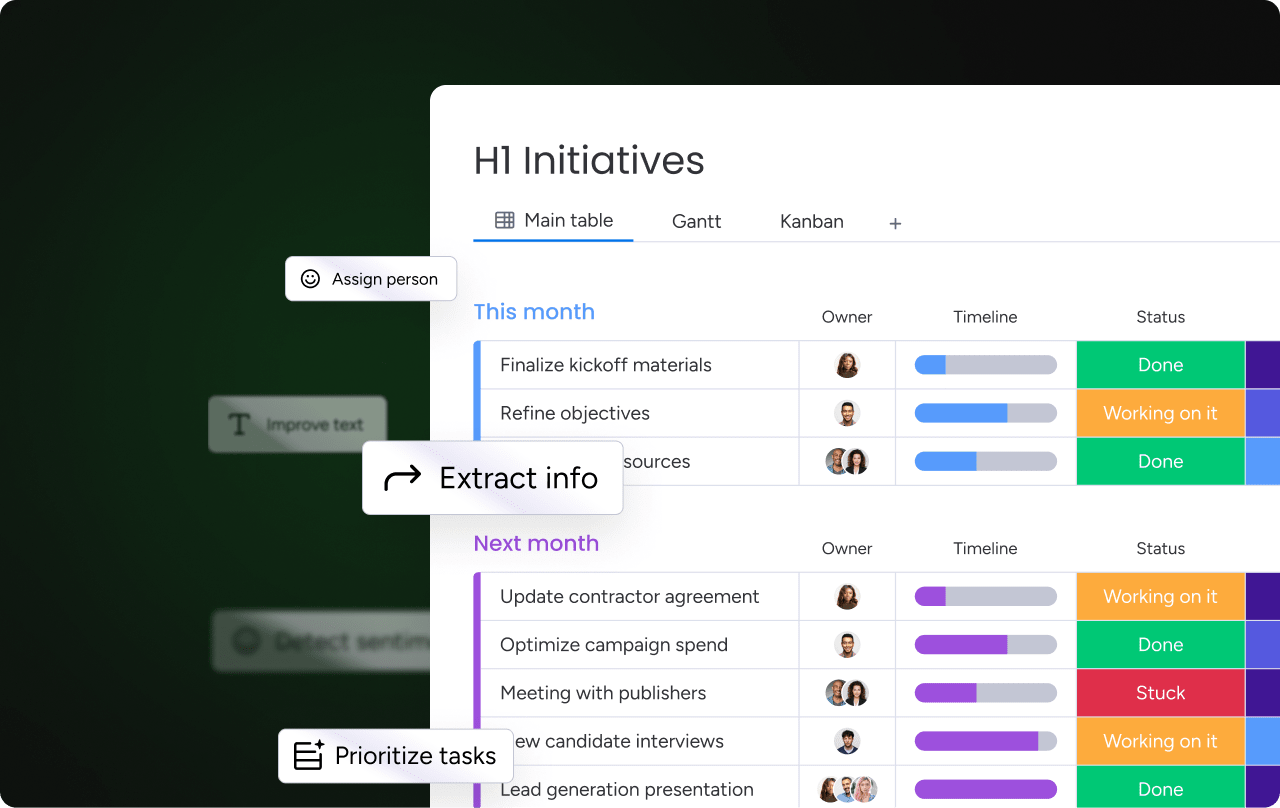
These applications represent a shift from reactive project management to proactive orchestration, illustrating how AI project management tools elevate strategic decisions for teams. The digital workforceforce concept takes this further — AI specialists that continuously monitor project health, suggest next steps, and deliver actionable insights directly in your workflow.
Top AI workflow software platforms for 2026
The AI workflow market has exploded in the last year, and today’s platforms do far more than just automate basic tasks.
Let’s break down how each platform tackles real enterprise problems so you can find your perfect match. Here’s how leading solutions compare across key capabilities.
| Platform | AI Approach | Best For | Key Limitations |
|---|---|---|---|
| monday work management | No-code AI democratization | Cross-functional teams, enterprise scale | None significant |
| Asana | AI teammates and smart fields | Project coordination | Requires Business+ tier |
| ClickUp | AI Brain productivity multiplier | Comprehensive feature needs | Steep learning curve |
| Smartsheet | Spreadsheet-style automation | Familiar interface users | Limited proactive intelligence |
| Wrike | Work intelligence and ML | Enterprise features | Complex setup required |
| Notion | Content generation and summarization | Documentation focus | Limited project management |
| Airtable | Database + AI automations | Custom applications | Technical expertise needed |
monday work management
monday work management democratizes AI across finance and project teams through a practical, no-code approach that scales at the enterprise level. AI capabilities are embedded directly into daily workflows, so teams get value without relying on IT or separate AI tools.
Key capabilities include:
- AI Blocks: ready-made actions that categorize financial data, summarize complex documents, and extract key insights without manual work
- Product Power-ups: portfolio-level risk identification and intelligent resource allocation that support finance oversight and forecasting
- Digital workforceforce: always-on AI specialists that monitor project health, flag bottlenecks, and recommend optimizations in real time
What sets the platform apart is how easily teams can implement AI at scale. With 200+ pre-built templates and no-code customization, organizations maintain governance and consistency while allowing finance and project teams to adapt workflows to their needs.
Asana
Asana’s AI Studio brings intelligence to project workflows through customizable AI teammates and smart fields. The platform excels at workflow automation and cross-functional coordination, with AI features that help teams prioritize work and identify dependencies. However, AI capabilities require Business+ tier subscriptions, and resource management features come as paid add-ons.
ClickUp
ClickUp positions AI as a productivity multiplier through its AI Brain feature, which connects tasks, docs, and people across the workspace. The platform offers AI-powered writing assistance, task creation, and project summaries. While comprehensive, the extensive feature set can create a steep learning curve for non-technical teams.
Smartsheet
Smartsheet brings AI to spreadsheet-style project management through automated workflows and predictive analytics. The platform’s strength lies in its familiar interface and robust reporting capabilities. AI features focus primarily on data analysis and automation rather than proactive project intelligence.
Wrike
Wrike’s AI capabilities center on work intelligence — using machine learning to predict project risks and optimize resource allocation. The platform offers strong enterprise features but requires significant setup time and technical configuration for AI implementation.
Notion
Notion AI enhances the platform’s collaborative workspace with content generation, summarization, and knowledge extraction. While excellent for documentation and knowledge management, Notion’s project management and workflow automation capabilities remain limited compared to dedicated work management platforms.
Airtable
Airtable combines database functionality with AI-powered automations and insights. The platform excels at data organization and custom application building but requires technical expertise to fully leverage AI capabilities for complex workflows.
Which AI tool is best for project management?
The most effective AI tools for project management go beyond task automation. They help project managers see across portfolios, reduce manual coordination, and anticipate issues before they impact delivery.
What separates leading platforms from basic project management tools comes down to a few essential capabilities.
What to look for in AI project management tools
The strongest solutions share these characteristics:
- Portfolio-wide intelligence: AI monitors entire project portfolios, not just individual tasks, surfacing risks, dependencies, and patterns across teams.
- Accessible automation: no-code builders and pre-configured AI actions allow project managers to automate workflows without relying on IT or technical expertise.
- Predictive insights: AI analyzes historical and real-time data to forecast timeline slippage, resource conflicts, and budget risks before they occur.
Why enterprise platforms deliver more value
For organizations managing complex, cross-departmental initiatives, enterprise workflow management software provides the most comprehensive AI support.
monday work management is a strong example of this approach. Its AI-powered risk insights scan hundreds of projects at once, flagging issues by urgency and suggesting mitigation steps. Digital workforce capabilities act as always-on project analysts, continuously monitoring project health and surfacing actionable insights.
Additional advantages include:
- Standardization at scale: managed templates ensure consistent workflows and reporting across hundreds of projects.
- Built-in coordination: AI Blocks automate routine work like status updates, data categorization, and document summarization directly within project workflows.
Together, these capabilities shift project management from reactive oversight to proactive control, giving project managers the visibility and intelligence they need to operate confidently at scale.
What is the best AI tool for finance professionals?

Finance teams require AI tools that balance automation with compliance, accuracy with accessibility. While specialized finance tools excel at specific tasks, the interconnected nature of finance work often makes comprehensive workflow platforms more valuable than point solutions.
Understanding both specialized and integrated options helps finance leaders choose the right approach for their organization.
Finance-specific AI tools typically focus on narrow use cases:
- DataSnipper: automates audit testing and documentation extraction.
- Workiva: streamlines regulatory reporting and compliance workflows.
- Planful: provides AI-driven financial planning and analysis.
- BlackLine: automates account reconciliation and close processes.
However, finance work rarely exists in isolation. Budget approvals involve multiple departments, financial reporting requires cross-functional data, and compliance touches every business unit. This interconnected reality makes unified AI workflow platforms more valuable than point solutions.
Comprehensive platforms like monday work management address finance needs while maintaining organizational connectivity.
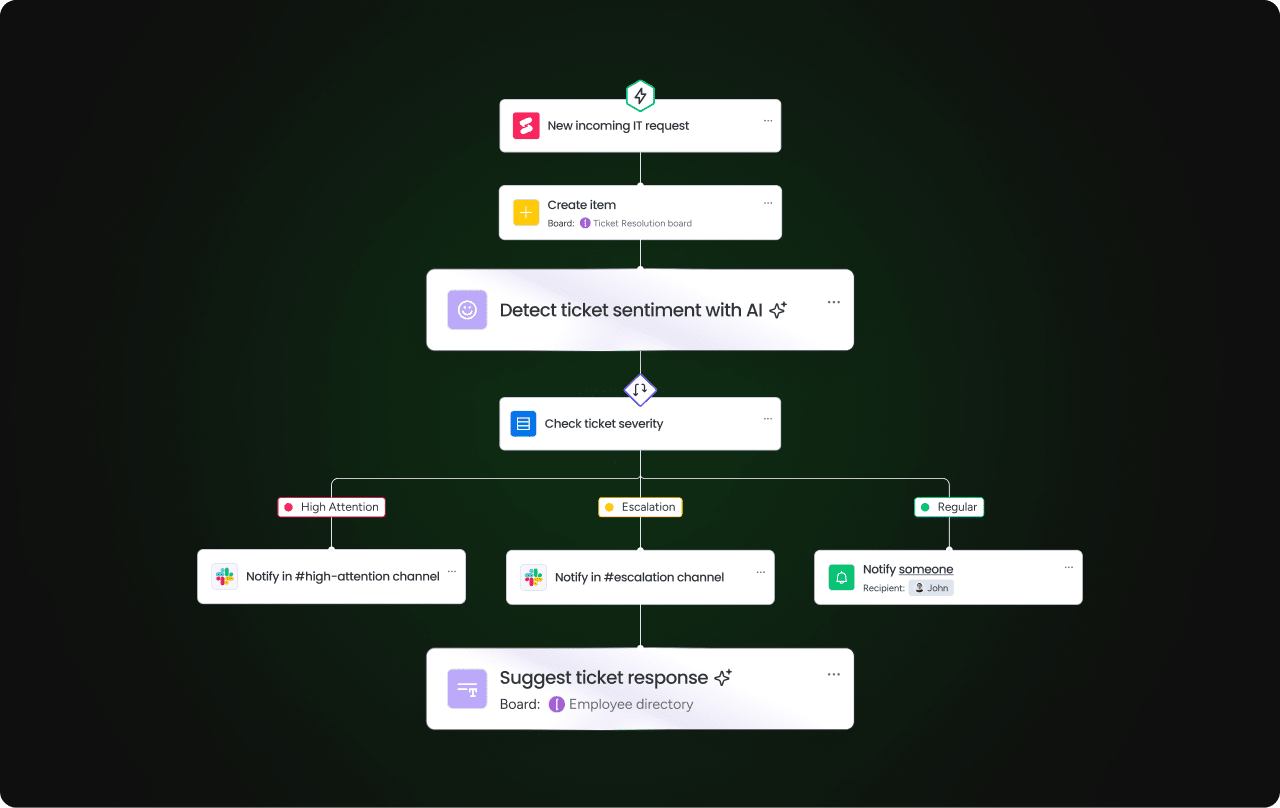
Finance teams use AI Blocks to automatically extract data from invoices, categorize expenses by type and urgency, and summarize complex financial documents into executive insights. The platform’s audit trails and permission controls ensure compliance while AI-powered dashboards provide real-time visibility into budget performance across departments.
What can AI be used for in finance?
AI transforms finance operations through both automation and intelligence, addressing the unique challenges of financial workflows while maintaining accuracy and compliance standards. These applications demonstrate how AI moves beyond simple task automation to provide strategic value across finance functions.
Key AI applications in finance workflows include:
- Automated invoice processing: AI extracts data from invoices, matches them to purchase orders, and routes them for approval based on predefined rules.
- Expense categorization and analysis: machine learning categorizes expenses, identifies anomalies, and flags potential policy violations.
- Budget variance detection: AI monitors actual spend against budgets, predicting overruns and suggesting reallocation strategies.
- Predictive cash flow analysis: historical patterns and current trends help AI forecast cash positions and identify potential shortfalls.
- Compliance monitoring: continuous scanning of transactions and documentation ensures adherence to regulatory requirements.
- Risk assessment automation: AI analyzes financial data to identify fraud patterns, credit risks, and operational vulnerabilities.
These capabilities become even more powerful when integrated into broader organizational workflows, underscoring the need for advanced team collaboration software to connect finance, operations, and other departments, creating end-to-end visibility.
For example, monday work management’s cross-project dependencies feature helps finance teams understand how project delays impact budget forecasts, while resource optimization capabilities ensure financial planning aligns with actual capacity.
How to evaluate and implement AI workflow software at the enterprise level
Choosing AI workflow software isn’t just a technology decision — it’s an operational one. The right platform needs to work for non-technical teams, scale across departments, integrate with existing systems, and deliver measurable business impact.
The steps below provide a practical framework for evaluating AI workflow platforms and rolling them out successfully. They’re designed to help project managers and finance teams separate real, usable AI from surface-level features and build an adoption plan that delivers results.
Step 1: evaluate AI accessibility and democratization
Selecting the right AI workflow platform requires looking beyond feature lists to understand how solutions will actually work within your organization. These questions will help you spot the difference between platforms with AI at their core and those that just slapped on AI features to check a box.
Remember, the most impactful AI workflow software empowers every team member, not just technical users. Evaluate whether platforms offer:
- No-code AI implementation: can non-technical teams build and modify AI workflows independently?
- Embedded AI features: does AI work within existing workflows or require separate tools?
- Pre-built AI templates: are there ready-made solutions for common use cases across departments?
- Intuitive interfaces: will teams actually adopt and use the AI capabilities?
Organizations using monday work management report faster AI adoption because capabilities integrate directly into familiar workflows. Teams don’t need to learn new systems or wait for IT support to leverage AI benefits.
Step 2: assess scalability and standardization balance
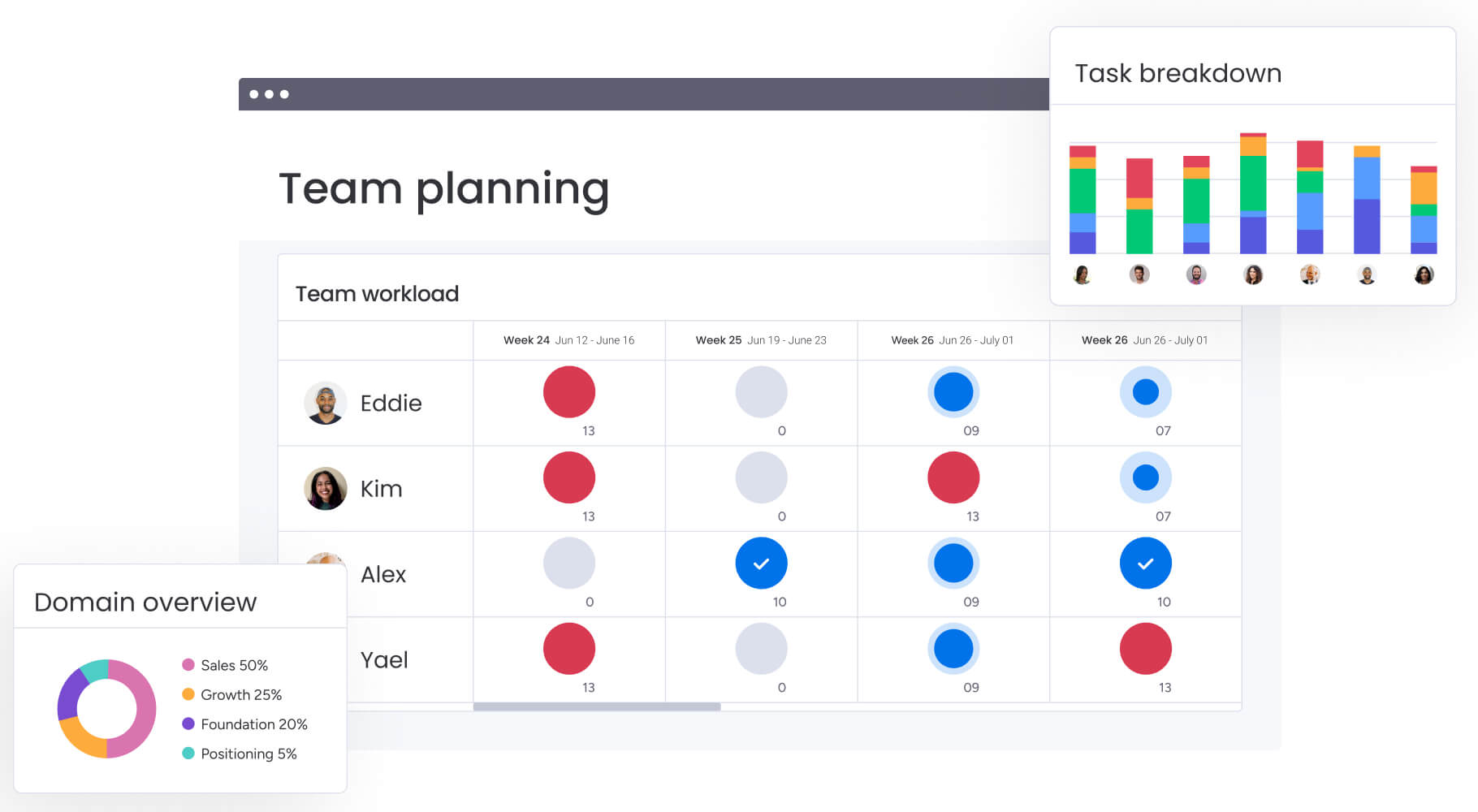
Enterprise organizations need AI that scales without sacrificing governance. Understanding how platforms handle growth while maintaining control helps ensure your investment remains valuable as your organization evolves. Critical factors include:
- Template management: can you deploy standardized AI workflows across hundreds of projects while allowing customization?
- Cross-functional visibility: does the platform provide leadership visibility into AI-driven insights across departments?
- Governance controls: are there audit trails, permission systems, and compliance features for regulated industries?
- Performance at scale: can the system handle thousands of concurrent AI operations without degradation?
The best platforms offer what monday work management calls “flexibility with guardrails” — teams can adapt workflows to their needs while maintaining enterprise standards through managed templates and governance controls.
Step 3: review integration ecosystem and data connectivity
AI is only as good as the data it can access. Comprehensive platforms should offer robust connectivity options that work with your existing technology stack. Comprehensive platforms should offer:
- Native integrations: ore-built connections to your existing tech stack.
- API flexibility: ability to build custom integrations for proprietary systems.
- Data synchronization: real-time syncing to ensure AI works with current information.
- Cross-platform workflows: AI that can trigger actions across multiple connected systems.
Step 4: define measurable business outcomes
Move beyond theoretical benefits to platforms that deliver quantifiable results. Establishing clear success metrics helps you evaluate ROI and demonstrate value to stakeholders:
- Time savings metrics: can you track hours saved through automation?
- Risk reduction data: does the platform measure prevented delays or avoided costs?
- Resource optimization insights: are there clear metrics on improved utilization?
- ROI tracking: can you connect AI investments to business outcomes?
Step 5: build your AI workflow transformation roadmap
A strong rollout plan turns AI from a pilot into a repeatable operating model. The goal is to sequence adoption so you get early value, protect governance, and scale without breaking workflows.
Phase 1: establish your baseline (week 1)
Define what “better” means before you automate anything.
- Map 2–3 high-friction workflows (approvals, reporting, intake, close processes)
- Set baseline metrics: time-to-approval, reporting hours, cycle time, missed handoffs
- Confirm required controls: permissions, audit trails, data handling, and sign-offs
Phase 2: deliver quick wins (weeks 2–3)
Start with automation that’s visible, low-risk, and easy to measure.
- Automate status reporting and recurring updates
- Use AI to summarize meeting notes and convert them into next steps
- Standardize intake and triage with AI categorization and routing
Phase 3: scale what works (weeks 4–8)
Once the basics are working, expand across teams and portfolios.
- Roll out standardized templates for repeatable workflows
- Add portfolio dashboards and cross-project visibility
- Build escalation paths for exceptions and at-risk work
Phase 4: move into predictive and optimization (month 3+)
This is where AI becomes operational leverage, not just automation.
- Implement predictive risk signals (schedule, capacity, budget variance)
- Use workload and resource insights to improve planning
- Continuously refine workflows based on adoption and outcomes
Keep it sustainable with a simple operating cadence
- Monthly review of usage, time saved, and risks prevented
- Quarterly refresh of templates, automations, and governance rules
- Clear ownership: who maintains templates, who approves changes, and who monitors impact
Transform your workflows with intelligent automation
AI workflow software has evolved from experimental technology to essential business infrastructure. The platforms that deliver real value go beyond basic automation to provide proactive intelligence, predictive insights, and autonomous execution — all while remaining accessible to non-technical users.
For organizations ready to move beyond fragmented tools and manual processes, the path forward is clear: choose platforms that democratize AI capabilities, balance standardization with flexibility, and connect to your existing ecosystem. Focus on measurable outcomes and build transformation roadmaps that create momentum through early wins.
monday work management exemplifies this new generation of AI workflow software. By combining AI Blocks for immediate automation, Product Power-ups for complex challenges, and a digital workforce for continuous optimization, it transforms how organizations operate. The platform’s no-code approach also ensures every team can leverage AI, while enterprise features like managed templates and cross-project dependencies provide the governance and scale large organizations require.
Companies that weave AI into their daily operations today will outpace their competition tomorrow. If you choose a platform that evolves with your team and puts powerful tools in everyone’s hands, you’ll be setting the standard others try to follow.
The content in this article is provided for informational purposes only and, to the best of monday.com’s knowledge, the information provided in this article is accurate and up-to-date at the time of publication. That said, monday.com encourages readers to verify all information directly.
Frequently asked questions
What are the main benefits of AI workflow software?
AI workflow software delivers measurable benefits including 10+ hours saved weekly on manual tasks, 25-50% faster project delivery through automated workflows, and proactive risk identification that prevents delays. Organizations also gain real-time visibility across departments, improved resource utilization, and the ability to scale operations without proportionally increasing headcount.
How long does it take to implement AI workflow software?
Implementation timelines vary by platform complexity and organizational readiness. No-code platforms like monday work management typically achieve initial deployment within two to four weeks, with teams seeing first results within days. Full enterprise rollout across departments usually takes two to three months, though quick wins can demonstrate value immediately.
Do you need technical expertise to use AI workflow tools?
Today's AI workflow platforms are designed for business users, not just IT teams. The best solutions offer no-code interfaces, pre-built templates, and drag-and-drop automation builders that anyone can use. While some initial setup may benefit from technical support, day-to-day AI features should be accessible to all team members.
What's the difference between AI workflow software and traditional automation?
Traditional automation follows fixed if-then rules that never change. AI workflow software learns from patterns, adapts to new situations, and makes intelligent recommendations. While traditional automation might route a form based on keywords, AI understands context, predicts outcomes, and continuously improves its performance.
How do you measure ROI from AI workflow software?
ROI measurement should track both quantitative and qualitative metrics. Quantitative measures include time saved on manual tasks, reduction in project delays, improved resource utilization rates, and decreased operational costs. Qualitative benefits include improved employee satisfaction, better decision-making through predictive insights, and enhanced cross-functional collaboration.
What security considerations apply to AI workflow platforms?
Enterprise AI workflow software must provide robust security including SOC two certification, GDPR compliance, role-based access controls, and audit trails for all AI decisions. Platforms should offer data encryption, SSO integration, and the ability to control where data is processed and stored. monday work management provides enterprise-grade security with granular permission controls and compliance certifications.

 Get started