


Professionals today juggle more tasks, tools, and notifications than ever. Between Slack pings, back-to-back meetings, and overflowing inboxes, staying focused on meaningful work requires more than willpower. That’s where productivity systems come in: structured approaches that help you manage your attention, prioritize what matters, and actually finish what you start.
This article covers eight proven productivity systems, from comprehensive frameworks like Getting Things Done to single-rule methods like Eat That Frog. Each one tackles a different challenge, whether that’s prioritization, deep focus, or building consistent habits.
The right system depends on how you work, what you’re struggling with, and how much structure you want. We’ll break down each method so you can find the one that fits your workflow and start getting more done.
Get started with monday.comKey takeaways
- Productivity systems give your workday structure so you spend less time deciding what to do and more time doing it
- The eight systems range from task management frameworks (GTD, Eisenhower Matrix) to time management techniques (Pomodoro, time blocking) to habit-building methods (Seinfeld Calendar, Daily Top 3)
- Combining two or three systems often works better than relying on a single method
- Digital tools like monday AI Workspace help you implement any productivity system so it becomes part of your daily workflow, not another thing to remember
What are productivity systems and why do they matter?
Productivity systems are structured methods that help people organize tasks, manage time, and maintain focus. The best ones are flexible enough to fit different work styles, yet consistent enough to build real habits.
In 1956, cognitive psychologist George Miller proposed that our working memory holds roughly 5 to 9 pieces of information at a time. Later research confirmed what most of us experience daily: our working memory has a limited capacity, and overloading it leads to dropped tasks and poor decisions.
Distractions make the problem worse. Once you’re pulled away from a task, it can take up to 30 minutes to fully refocus. Multiply that by the dozen or more interruptions in a typical workday, and hours disappear.
Productivity systems solve this by offloading decisions from your memory into a repeatable process. Instead of constantly choosing what to work on next, you follow a framework that keeps you on track. Here are 6 systems that can help.
Six best productivity systems to try
These productivity systems are ordered from comprehensive frameworks to focused techniques. Each one addresses a different aspect of productivity, so you can choose based on your biggest challenge: organizing complex workloads, protecting focus time, or building daily habits.
1. Getting Things Done (GTD)
Getting Things Done is a productivity system created by David Allen in his 2001 book of the same name. It’s built around one core idea: your brain is for having ideas, not holding them. By capturing every task, commitment, and thought in an external system, you free up mental space to focus on execution.
The system follows a five-step workflow:
- Capture: Record everything you need to remember: tasks, ideas, projects, and commitments. Use a notebook, a digital app, or a task management tool so nothing stays trapped in your head
- Clarify: Decide what each item means. Is it actionable? If so, define the next concrete step
- Organize: Sort items by context, priority, and project. Categorize tasks so you can act on them when the time and energy are right
- Reflect: Review your system regularly. A weekly review ensures nothing slips through and keeps your priorities aligned
- Engage: Execute with confidence. With everything captured and organized, you choose tasks based on context, time available, and energy level
Use case
GTD works best for professionals managing complex projects with many inputs, deadlines, and dependencies.
Key features
- Externalizes all commitments to reduce cognitive load
- Weekly review process keeps the system current and reliable
- Context-based task selection helps you work on the right thing at the right time
Considerations
- Requires discipline to maintain weekly reviews, especially during busy periods
- The full framework can feel heavy for people with simple, routine task lists
2. Time blocking
Time blocking assigns specific time slots on your calendar to individual tasks or categories of work. Instead of working from a to-do list and hoping you get to everything, you schedule every block of your day in advance. Cal Newport popularized the approach in his 2016 book Deep Work, arguing that planned focus time produces dramatically better results than reactive multitasking.
The method is straightforward: divide your workday into blocks, assign each block a specific task or category (deep work, meetings, admin, email), and protect those blocks from interruptions. A popular variation, day theming, dedicates entire days to a single type of work.

Use case
Time blocking suits knowledge workers who need protected deep-work time and managers whose schedules fragment easily amid meetings and requests.
Key features
- Calendar-based structure makes time commitments visible and concrete
- Separates deep work from shallow tasks so both get dedicated attention
- Day theming variant reduces context switching by grouping similar work
Considerations
- Unexpected interruptions can derail a tightly blocked schedule
- Requires regular replanning as priorities shift throughout the week
For a deeper walkthrough, check out our step-by-step guide to time blocking.
3. Pomodoro Technique
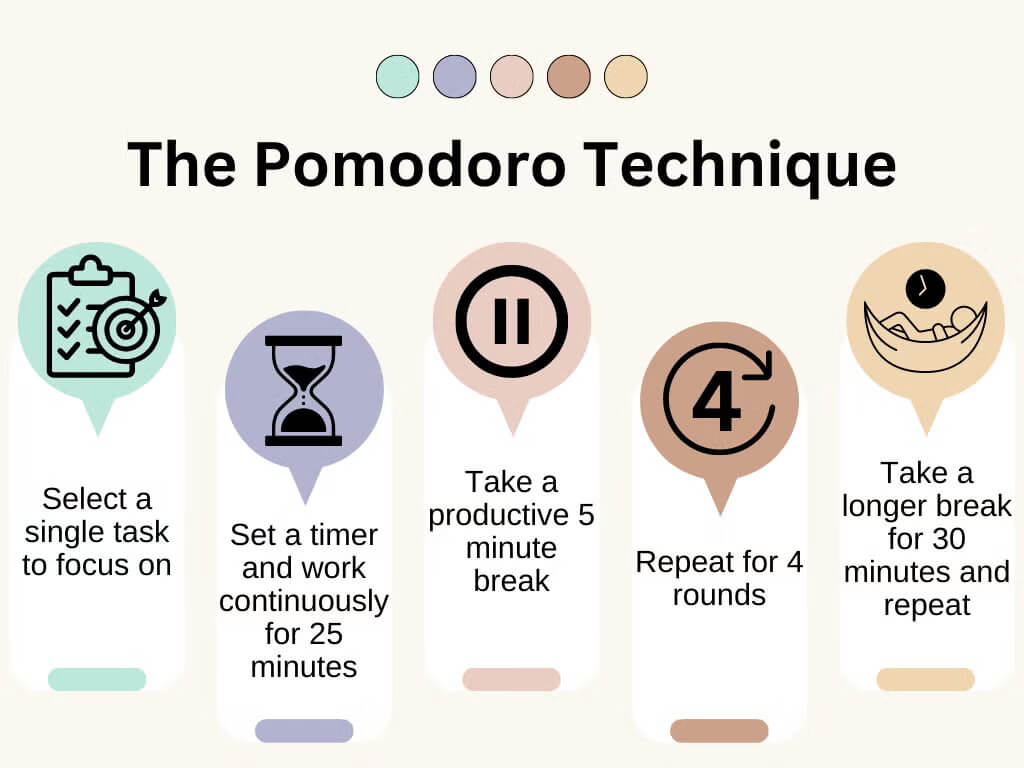
The Pomodoro Technique was developed by Francesco Cirillo in the late 1980s while he was a university student. He used a tomato-shaped kitchen timer to break his study sessions into focused intervals, and the name stuck. It’s one of the most widely adopted focus methods, with good reason: it turns sustained concentration into a repeatable habit.
The cycle is simple: work for 25 minutes with full focus, then take a 5-minute break. After completing four cycles, take a longer 15- to 20-minute break. Track your completed “pomodoros” to measure output over time.
Use case
The Pomodoro Technique helps people who struggle with procrastination or need structured focus intervals to push through demanding tasks.
Key features
- Short work sprints build focus without causing burnout
- Regular breaks maintain energy and prevent mental fatigue
- Tracking completed pomodoros creates awareness of how you spend time
Considerations
- Rigid 25-minute intervals don’t suit every type of work, especially creative or collaborative tasks
- Any interruption resets the timer, which can feel frustrating in open office environments
We tried the Pomodoro Technique and recorded our pros and cons. It pairs well with single-tasking practices for maximum impact.
4. Eisenhower Matrix
The Eisenhower Matrix is a prioritization framework inspired by Dwight D. Eisenhower’s approach to decision-making. Stephen Covey later popularized it in The 7 Habits of Highly Effective People. The core insight is powerful: most people confuse urgent tasks with important ones, and the distinction between the two determines whether you’re doing meaningful work or just staying busy.
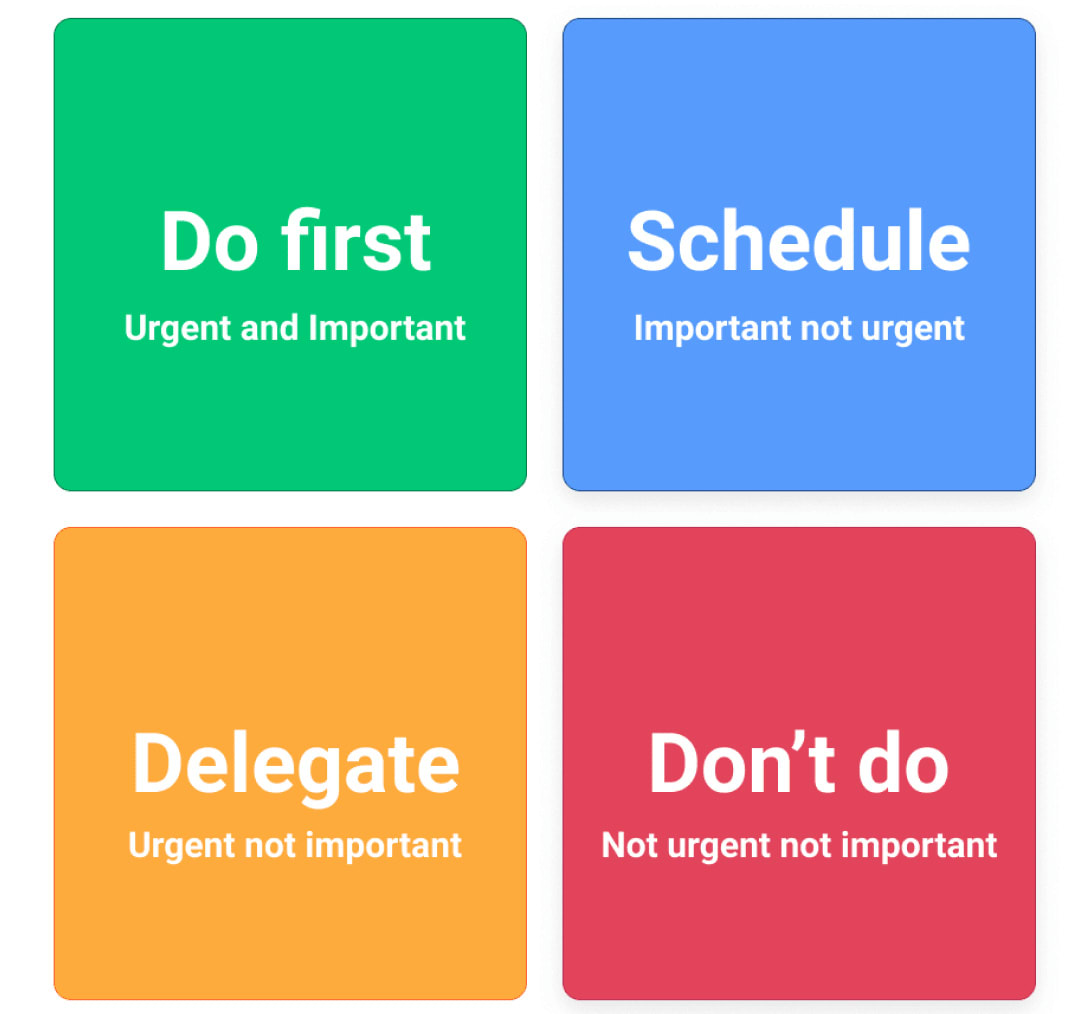
The matrix sorts every task into one of four quadrants based on urgency and importance:
- Do now: Urgent and important. Handle these immediately
- Schedule: Important but not urgent. Block time for these before they become crises
- Delegate: Urgent but not important. Hand these off to someone else
- Eliminate: Neither urgent nor important. Stop doing these entirely
Use case
The Eisenhower Matrix works for anyone overwhelmed by competing priorities, whether you’re managing your own workload or helping a team decide where to focus.
Key features
- Simple 2×2 framework makes prioritization decisions fast and visual
- Forces you to delegate and eliminate, not just organize
- Works at both individual and team levels
Considerations
- Binary classification can oversimplify tasks that span multiple quadrants
- The matrix addresses prioritization but doesn’t include a time management component
5. Eat That Frog
Eat That Frog is based on Brian Tracy’s 2001 book of the same name and draws on a quote often attributed to Mark Twain: “Eat a live frog first thing in the morning and nothing worse will happen to you the rest of the day.” The method is one rule: tackle your biggest, most important task first.
The approach is deliberately simple. Each evening, identify your “frog” for the next day. When you start work the following morning, complete that task before checking email, joining meetings, or handling smaller requests. If you have two frogs, eat the bigger one first.

Use case
Eat That Frog works for people who tend to procrastinate on high-impact work or whose energy and focus fade as the day goes on.
Key features
- Identifies your highest-impact task the night before so mornings start with clarity
- Capitalizes on peak morning energy for the work that matters most
- Creates momentum that carries through the rest of the day
Considerations
- Assumes your best energy is in the morning, which isn’t true for everyone
- Addresses task sequencing but doesn’t provide a framework for planning the full day
We tried the Eat That Frog method and documented what we learned about making it stick.
6. Bullet Journaling
Bullet journaling was created by digital product designer Ryder Carroll, who developed the system to manage ADHD. It combines mindfulness and productivity by helping you organize your “what” while staying connected to your “why”. The result is both a planning tool and a reflection practice.
The system uses rapid logging, a shorthand notation where bullets represent tasks, circles represent events, and dashes represent notes. You organize entries into daily, monthly, and future logs. A migration process forces you to regularly review unfinished tasks and decide whether to move them forward, schedule them, or drop them entirely.

Use case
Bullet journaling suits people who prefer analog planning and want to connect daily tasks to a greater sense of purpose.
Key features
- Rapid logging system captures tasks, events, and notes with minimal friction
- Migration process prevents outdated tasks from cluttering your list
- Highly customizable: you build the journal around how you think and work
Considerations
- Requires a consistent analog journaling habit, which takes time to build
- Not easily shareable or collaborative, so it works better for individual use
You can explore the full methodology on the official Bullet Journal site.
How monday AI Workspace helps you implement any productivity system
Productivity systems only work when you actually use them. The gap between knowing a method and practicing it consistently is where most people stall. monday AI Workspace closes that gap by turning any productivity system into a digital workflow you can build, automate, and maintain without extra effort.
The platform maps directly to the systems covered above. Boards and automations support GTD’s capture-clarify-organize-reflect-engage cycle. Calendar view enables time blocking with drag-and-drop scheduling. Time tracking powers Pomodoro-style focused intervals. Priority columns and status labels create a visual Eisenhower Matrix. And dashboards surface your most important task each morning so you can eat that frog first.
What sets monday AI Workspace apart from manual methods is the AI layer built into every workflow. monday sidekick acts as a context-aware assistant that recommends next steps, surfaces priorities, and runs routine work at scale. monday agents handle repetitive tasks autonomously, whether that’s triaging requests, updating project statuses, or sending follow-ups. monday workflows automate complex cross-functional processes so work moves between teams without manual handoffs. And with monday vibe, you can build custom productivity apps in minutes using natural language, no coding required.
Here’s how monday AI Workspace compares to managing productivity systems manually:
| Capability | Manual methods | monday AI Work Platform |
|---|---|---|
| Task capture | Notebooks, sticky notes, scattered apps | Centralized boards with 200+ integrations |
| Prioritization | Handwritten lists, mental sorting | Priority columns, status labels, AI recommendations |
| Time management | Kitchen timers, separate calendar apps | Built-in time tracking, calendar view, automated reminders |
| Automation | None | 200+ no-code automation recipes and agentic workflows |
| Visibility | Periodic manual review | Real-time dashboards across projects and teams |
| AI assistance | None | sidekick, agents, and workflows that think, recommend, and execute |
monday AI Workspace is trusted by nearly 250,000 customers worldwide, including more than 60% of the Fortune 500. A Forrester Total Economic Impact study found the platform delivers 288% ROI, with teams reporting faster execution and fewer dropped tasks.
Get started with monday.comHow to choose the right productivity system
No single productivity system works for everyone. The right choice depends on what’s actually slowing you down and how much structure you prefer. Here are five criteria to help you decide.
Your work style. If you thrive on detailed plans and routines, a comprehensive framework like GTD provides the structure to manage complex workloads. If you prefer simplicity, Eat That Frog or the Daily Top 3 gives you one clear rule to follow each day.
Individual vs. team. Some systems are built for personal productivity. Bullet journaling and the Seinfeld Calendar are solo methods. Others, like GTD and the Eisenhower Matrix, scale well across teams, especially when paired with shared digital tools.
The problem you’re solving. Struggling with prioritization? Start with the Eisenhower Matrix. Can’t stay focused for long stretches? Try the Pomodoro Technique or time blocking. Need to build a daily habit? The Seinfeld Calendar is designed for exactly that.
Complexity tolerance. GTD requires weekly reviews, context tagging, and a multi-step workflow. Eat That Frog has one rule. Match the system’s complexity to your willingness to maintain it.
Combining systems. Many productive professionals use two or three methods together. A common pairing: the Eisenhower Matrix for daily prioritization, time blocking for scheduling execution, and Eat That Frog for choosing what to tackle first each morning. Start with one system, give it two to three weeks, then layer on a second if you need more coverage.
Learn more: Productivity apps
Take the first step toward a more productive workflow
The best productivity systems are the ones you actually use. Every method in this guide solves a real problem, from managing overloaded task lists to protecting deep focus time to building habits that stick. The key is to start with one, commit to it for two to three weeks, and adjust based on what you learn about how you work.
monday AI Workspace makes that commitment easier by turning any productivity system into a digital workflow you don’t have to maintain by hand. With AI-powered task management, automated workflows, and real-time dashboards, you can implement GTD, time blocking, or any combination of systems on one connected platform.
Pick your first productivity system, set it up on monday AI Workspace, and see how much more you can get done when the right tools support your process. Try monday AI Workspace today.
Get started with monday.comThe content in this article is provided for informational purposes only and, to the best of monday.com’s knowledge, the information provided in this article is accurate and up-to-date at the time of publication. That said, monday.com encourages readers to verify all information directly.
Frequently asked questions
What is a productivity system?
A productivity system is a structured method for organizing tasks, managing time, and maintaining focus. Systems range from simple single-rule approaches like Eat That Frog to comprehensive frameworks like Getting Things Done (GTD).
What is the most popular productivity system?
The Pomodoro Technique and Getting Things Done (GTD) are among the most widely adopted productivity systems. Time blocking has also surged in popularity since Cal Newport's Deep Work brought it to a mainstream audience.
How do I choose the right productivity system?
Match the system to the problem you're solving. Use the Eisenhower Matrix for prioritization, the Pomodoro Technique for focus, or time blocking for schedule management. Start with one method and give it two to three weeks before adding another.
Can I combine multiple productivity systems?
Yes, and many people do. A common combination is the Eisenhower Matrix for deciding what matters most, time blocking for scheduling when to do it, and Eat That Frog for tackling the hardest task first each morning.
How do I stick to a productivity system?
Start with one system and practice it for two to three weeks before layering on another. Using a digital tool like monday AI Workspace helps build the system into your daily workflow so it becomes automatic rather than another thing to remember.

 Get started