



Your reps are spending hours every week on data entry, manual follow-ups, and chasing leads that were never going to buy. Meanwhile, the deals that actually matter sit waiting. That’s sales drag, and it’s costing you pipeline.
Lead generation automation tools handle the repetitive work so your team can focus on selling. They capture leads, score them based on real behavior, and trigger follow-ups at the right time. When connected to your CRM, every touchpoint lives in one place. No more scattered spreadsheets or missed opportunities.
The handy guide covers what actually matters in a lead gen platform, comparing eleven solutions for real problems, and providing a no-nonsense roadmap to get you up and running fast.
Whether you’re trying to scale outreach without adding headcount or give your reps back hours of selling time each day, you’ll find a path forward that fits how your team actually works.
Key takeaways
- Eliminate sales drag: automate data capture, scoring, and follow-ups so reps spend more time selling and less time on admin.
- Prioritize real buyers: use behavior-based and AI-driven scoring to focus outreach on leads that are actually ready to convert.
- Scale without hiring: grow pipeline volume and consistency by letting automation handle nurturing at a scale humans cannot.
- Unify lead data: connect sales lead generation tools directly to your CRM to keep every interaction, update, and insight in one place.
- Simplify execution: run lead capture, enrichment, outreach, and automation in one flexible platform like monday CRM that adapts to your sales process.
What are lead generation automation tools?
All that time your team spends on data entry and manual follow-ups? That’s sales drag, and it kills momentum. Lead generation automation platforms handle the repetitive work so your reps can focus on what they were hired to do: sell.
These tools handle the top of your funnel automatically, from capturing and qualifying leads to nurturing them with perfectly timed content. AI scores each prospect based on real behavior, so your team knows exactly who to call next. No more chasing cold leads.
When connected to your CRM, every lead and communication is tracked in one place. Automations trigger follow-ups and update records so no opportunity gets missed, giving your team a pipeline full of qualified leads and more time to close them.
Key benefits of lead generation automation tools
Manual lead management creates significant drag on your sales process. While your reps waste hours updating spreadsheets, your competitors are already closing deals with the buyers you haven’t even called yet. Smart automation pulls your team out of administrative quicksand and puts them back where they belong: closing deals.
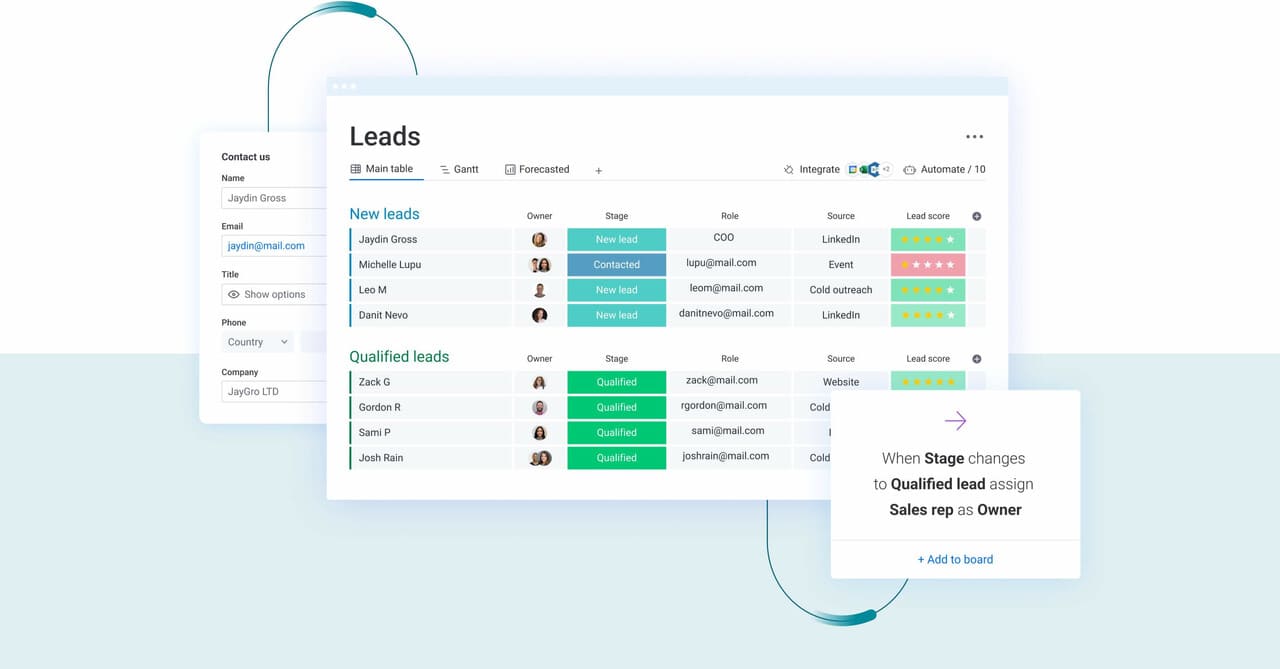
Give your reps 2+ hours back, every day
Repetitive tasks eat away at selling time like nothing else. Contact info gets captured automatically, freeing your team from manual data entry. Your team can stop playing detective on LinkedIn and let the system handle the research.
Follow-ups trigger based on a prospect’s actions, not a calendar reminder. This means your team spends their days having meaningful conversations that move deals forward, not updating CRM fields.
Focus on leads that are actually ready to buy
Hot or lukewarm? AI-powered scoring answers that question definitively. It analyzes behavior to spot prospects who show real buying intent, so your team doesn’t waste time on leads going nowhere.
Your reps can channel their energy toward high-score prospects who are actively engaged, improving lead conversion rates. Shorter sales cycles and dramatically higher win rates follow naturally.
Grow your pipeline, not your payroll
Automation multiplies what your current team can accomplish. One rep can manage nurturing sequences for hundreds of contacts simultaneously, keeping every conversation timely and relevant.
Scale your outreach and fill your pipeline without the budget constraints of hiring more people. Extract more revenue from the team you already have.
Get pipeline visibility you can actually trust
Real-time data improves forecasting accuracy. Dashboards deliver instant access to what’s working and what isn’t. You can see which campaigns generate the best leads and which segments convert the fastest.
Real-time data transforms unpredictable revenue forecasts into reliable projections. Report upwards with confidence and make smart decisions about where to invest your resources.
What to look for in lead generation automation tools
The right platform makes selling easier and ensures your team won’t want to go back to spreadsheets. You need something that makes selling easier, not a platform that feels like you need an engineering degree just to send an email.
Let’s be real about what makes or breaks these tools. Before you sign any contracts, here are the features you absolutely cannot compromise on:
- AI that actually scores: your team’s time is gold. The right tool uses AI to separate hot leads from the “just browsing” crowd, so reps can focus on deals ready to close.
- A single source of truth: juggling platforms is a recipe for disaster. Your automation tool should talk to your CRM perfectly, so all your data lives in one place, no copy-pasting required.
- Personalized emails that don’t feel robotic: your platform should make it easy to send the right message to the right person at the right time. Think less “Dear [First Name]” and more real, relevant conversation.
- Effortless data enrichment: stop the detective work. A great tool automatically fills in the blanks on prospect profiles, giving your team instant context for every call.
- Reports you can actually use: forget vanity metrics. You need real-time dashboards that show you exactly which campaigns are making money and which are just making noise.
- Customization without the code: your sales process is unique; your platform should bend to it, not the other way around. Look for a tool you can change on the fly, no IT ticket needed.
11 lead generation automation tools that actually deliver results
Tired of lead gen tools that overpromise and underdeliver? In 2026 you need something that actually works when you turn it on — not another project for your already-swamped dev team.
Explore the options below to find solutions that solve specific problems, from finding contacts to running entire campaigns.
| Tool | Best for | Key strength | Starting price |
|---|---|---|---|
| monday CRM | Mid-market and SMB teams seeking customizable automation without technical complexity | No-code workflows with AI-powered lead management | $12/user/month |
| Lindy | Technical teams comfortable with AI agent configuration | Autonomous lead qualification through AI agents | Custom pricing |
| Seamless.AI | Sales teams prioritizing contact database access | Real-time contact and company data discovery | $147/month |
| HubSpot | Marketing-focused teams needing all-in-one platform | Integrated marketing and sales automation | Free tier; paid from $45/month |
| CoPilot AI | Organizations focused on sales coaching and conversation quality | AI-powered conversation intelligence and coaching | Custom pricing |
| Customers.ai | E-commerce and high-traffic websites | Website visitor identification and behavioral tracking | $199/month |
| Jasper | Content marketing teams creating nurturing campaigns | AI content generation for email and landing pages | $49/month |
| LeadIQ | Outbound-focused teams building prospect lists | Prospecting and contact discovery with CRM sync | $75/user/month |
| OptinMonster | Websites prioritizing lead capture optimization | Conversion-focused pop-ups and forms | $9/month |
| Outreach | Enterprise sales teams with complex sequences | Advanced sales engagement and sequence automation | Custom pricing |
| Reply.io | Teams running multi-channel outreach campaigns | Email and LinkedIn automation with follow-up sequences | $60/user/month |
1. monday CRM
monday CRM helps revenue teams run lead generation automation without heavy technical work. You can collect leads, enrich them with the right context, and keep every touchpoint in one place, so reps spend less time chasing details and more time moving deals forward.
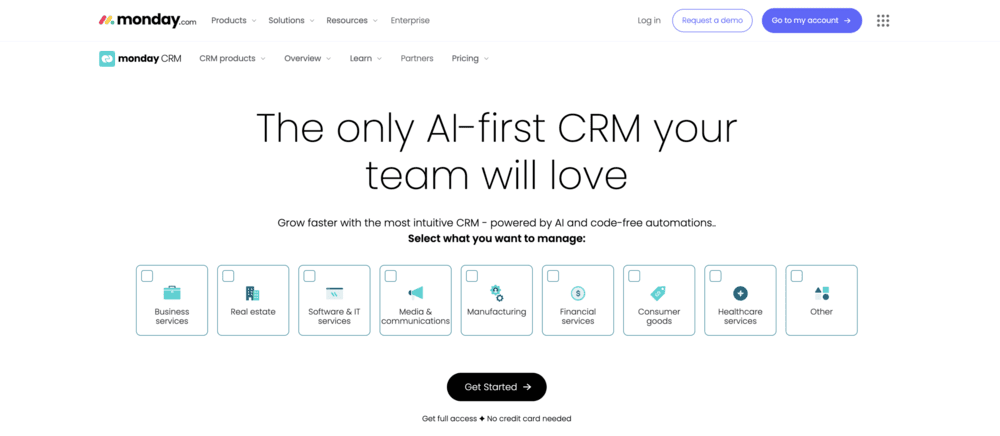
Use case: Teams who want powerful lead automation without the complexity can centralize their entire lead-to-close process on monday CRM’s intuitive platform.
A practical example: A marketing lead fills out a website form, the lead is enriched with Crunchbase data, then monday CRM routes it to the right rep. From there, the rep runs outreach from Emails & Activities, tracks engagement, and keeps every follow-up and note in the same timeline. How much time does your team lose today jumping between systems just to get that full story?
Key features:
- Automatic lead enrichment via Crunchbase integration, so your team can add company context without manual research.
- AI capabilities on monday CRM that support daily selling workflows, including composing emails in Emails & Activities and generating an AI Timeline Summary of past communication.
- Customizable deal stages with drag-and-drop deal management, so your pipeline matches your process (not the other way around).
Pricing:
- Basic: $12/month per user (annual billing).
- Standard: $17/month per user (annual billing).
- Pro: $28/month per user (annual billing).
- Ultimate: Contact sales for pricing.
- 18% discount available with annual billing.
- Three user minimum required.
- 14-day free trial available.
Why it stands out:
monday CRM is built for revenue teams who need visibility and control, without turning CRM maintenance into a second job. It’s part of the broader monday product suite, so organizations can run sales workflows and customer-facing processes in one place.
- A CRM you’ll actually want to use: Visual pipelines and boards make work easy to spot, prioritize, and move forward.
- One place for customer context: Teams can log and track emails, meetings, and notes in a single timeline, so handoffs stay smooth.
- Automation and AI that fit your process: You can adapt boards, columns, and workflows to your sales cycle, then let automation do the busywork.
Advanced AI features:
AI on monday CRM handles repetitive work inside the CRM workflow — no scavenger hunt required. Admins can enable AI capabilities, and they’re available on Standard, Pro, and Enterprise plans.
- Compose emails in Emails & Activities: Draft outreach faster, directly where your team already communicates.
- AI Timeline Summary: Create a short, easy-to-scan summary of emails, calls, meetings, and notes, great before a discovery call or a deal review.
- Autofill columns with AI: Apply AI actions to compatible columns (like Text, Status, People, and Dropdown) to keep lead data consistent at scale.
- Detect sentiment: Categorize text as Positive, Negative, or Neutral.
- Summarize or improve text: Turn long notes into quick takeaways, or polish messages.
- Assign label / Assign person: Standardize qualification labels or route work based on defined teammate roles.
- Extract information: Pull key details from supported files (like .pdf, .docx, .xlsx) and place them into board columns.
Automations:
Lead gen automation crumbles when reps must remember every next step. monday CRM supports automation across the sales cycle, so follow-ups and status changes don’t depend on someone having a “perfect day.”
- Automate email follow-ups, helping teams keep momentum after outreach and campaigns.
- Automate actions based on custom conditions, so updates happen when deal or lead details change.
- Support consistent lead qualification flows by pairing automations with structured fields (columns) and labeled stages.
Integrations:
Integrations matter most when they reduce manual research and data entry. monday CRM supports lead enrichment with Crunchbase, so your team can capture leads and add company context in the same workflow.
- Crunchbase integration: Auto-enrich lead data using Crunchbase’s database.
Lead generation automation tools features:
Lead generation automation tools should do two things well: capture demand and turn it into rep-ready work. monday CRM covers the full loop, from intake to outreach to tracking.
- Collect leads from multiple sources: Collect leads via website forms, social ad campaigns, or other sources.
- Route and qualify leads: Centralize, qualify, and assign all leads, so SDRs and AEs stay aligned.
- Run outreach from the CRM: Send individual and mass emails using dynamic fields and templates.
- Track engagement: Track individual and mass emails, including open rate and link clicks.
- Create polished campaigns: Use the HTML email editor to create custom-designed emails.
- Keep follow-ups consistent: Automate email follow-ups so no lead gets “accidentally ignored” for nine days.
2. Lindy
Lindy deploys AI agents that autonomously qualify leads through intelligent conversations and data analysis. The platform specializes in no-code agent building with enterprise-grade security, making it ideal for teams that want to automate lead qualification without heavy technical overhead. These AI agents learn from interactions to improve qualification accuracy over time.

Use case: Teams seeking autonomous lead qualification that handles initial prospect engagement while sales reps focus on closing qualified opportunities.
Key features:
- Autonomous AI agents that conduct initial prospect qualification conversations and score leads objectively.
- Machine learning models that improve lead scoring based on historical conversion data and interaction patterns.
- No-code builder with pre-built templates for inbound SDR, lead qualification, and sales agent workflows.
Pricing:
- Free tier: 400 free credits/tasks.
- Paid plans: Custom pricing based on agent deployment and conversation volume.
- Enterprise: Quote-based pricing with advanced governance and access controls.
Considerations:
- Credit-based usage means certain actions like premium enrichments can consume significant credits per lead, requiring careful cost modeling.
- Public pricing for paid tiers isn’t listed, making cost predictability challenging during evaluation phases.
3. Seamless.AI
Seamless.AI delivers real-time contact discovery and verification for sales teams hunting down decision-makers. The platform combines extensive contact databases with live validation, making it perfect for outbound teams who need accurate phone numbers and emails without the manual research grind.

Use case: Outbound sales teams building targeted prospect lists who need extensive, verified contact data to reach decision-makers quickly.
Key features:
- Real-time contact search with email verification and direct dial phone numbers.
- Chrome extension for enriching LinkedIn profiles and company websites during prospecting.
- CRM integration with automatic contact record updates and configurable field mapping.
- Intent data and job-change alerts to identify prospects actively researching solutions.
Pricing:
- Free: 50 credits for one user.
- Pro: Quote-based pricing with daily credit refresh.
- Enterprise: Custom pricing with unlimited users and custom credit allocation.
- Annual billing discounts available.
- Add-ons include Data Enrichment, Autopilot, Job Changes, Buyer Intent Data, and API access.
Considerations:
- Email engagement features remain in beta status, which may limit reliability for critical outreach campaigns.
- Credit-based usage model and multiple paid add-ons can make cost planning challenging, especially with quote-only pricing for paid tiers.
4. HubSpot
HubSpot delivers an all-in-one marketing and sales platform that combines lead capture, email marketing, CRM, and automation in a unified interface. The platform targets marketing-led organizations seeking integrated automation and sales tools without the complexity of stitching together multiple point solutions.
According to its Q1 2024 earnings report, HubSpot serves over 258,000 customers and offers a robust ecosystem of 2,000+ marketplace apps, establishing it as a major player in the lead generation automation space.

Use case: Marketing-led organizations seeking integrated marketing automation and sales tools that want to reduce integration overhead while maintaining sophisticated lead nurturing capabilities.
Key features:
- Landing page and form builders with A/B testing capabilities and drag-and-drop functionality.
- Email marketing with advanced segmentation, personalization, and behavioral triggers.
- Marketing automation workflows triggered by prospect behavior with predictive lead scoring on Enterprise plans.
- Built-in CRM with pipeline management, deal tracking, and unified activity timelines.
- Comprehensive reporting dashboards showing campaign performance, attribution, and ROI metrics.
Pricing:
- Free: Core CRM and basic lead capture tools at $0.
- Starter: $15/month per seat for new customers (promotional pricing).
- Professional: Starting at $1,450/month for five seats with 2,000 marketing contacts included.
- Enterprise: Starting at $4,700/month for seven seats with 10,000 marketing contacts included.
- Additional marketing contact blocks are priced on a tiered basis.
- Onboarding fees: $3,000 for Professional, $7,000 for Enterprise.
Considerations:
- Pricing escalates significantly as contact lists grow, often reaching thousands per month for mid-market teams with extensive databases.
- Platform complexity requires substantial training time, and customization options are more limited than flexible solutions, often constraining teams to work within HubSpot’s predefined workflows rather than adapting to specific business processes.
5. CoPilot AI
CoPilot AI delivers AI-powered LinkedIn prospecting that turns social connections into booked meetings. The platform specializes in conversation intelligence and automated reply management, making it ideal for B2B sales teams who live on LinkedIn. With AI-driven lead scoring and meeting detection, it bridges the gap between social selling and actual revenue.

Use case: Sales organizations focused on LinkedIn-based prospecting that need AI sales lead generation assistance to qualify leads, manage conversations, and automatically detect when prospects are ready to meet.
Key features:
- AI lead filtering and reply prediction to prioritize the most meeting-ready prospects.
- Smart Inbox with one-click AI replies and automated meeting detection.
- Direct CRM sync to HubSpot and Salesforce for seamless pipeline management.
Pricing:
- Core: $203/month (annual billing) — includes 10 campaigns, 600 connection messages/month, 800 nurture messages/month, 150 AI-generated replies/month.
- Guided: $294/month (annual billing) — adds 1:1 onboarding, dedicated CSM, and Sandler three-day sales bootcamp.
- Teams: Custom pricing — includes multiple licenses, team inbox management, and prospect overlap protection.
- White-label: Custom pricing — for agencies selling CoPilot AI to clients.
- Annual billing offers up to 40% discount on select plans.
- LinkedIn Sales Navigator license required (additional cost).
Considerations:
- Platform requires LinkedIn Sales Navigator dependency, adding extra monthly costs to your tech stack.
- Usage caps on messages and AI replies may limit high-volume prospecting teams.
6. Customers.ai
Customers.ai turns anonymous website visitors into identifiable leads through advanced visitor tracking and data enrichment. The platform specializes in rebuilding remarketing audiences lost to iOS and cookie changes, making it particularly valuable for e-commerce brands and high-traffic websites.
Their X-Ray Pixel technology also claims 65-85% accuracy in matching visitor identities to real contact information.

Use case: E-commerce businesses and digital marketers seeking to recover lost remarketing reach and convert anonymous website traffic into actionable lead data.
Key features:
- Website visitor identification that matches IP addresses to individual contact information and company data.
- Built-in email service provider with deliverability protection, warmup sequences, and automated engagement campaigns.
- Direct integration with Meta, Google Ads, Klaviyo, and Salesforce for seamless audience syncing and lead nurturing.
Pricing:
- Starter: $600/month (3,000 resolutions, $0.20 overage).
- Grow: $900/month (5,000 resolutions, $0.18 overage).
- Scale: $1,500/month (10,000 resolutions, $0.15 overage).
- Enterprise: Custom pricing available.
- Shopify App: Starting at $199/month after 14-day free trial.
- Free trial available for core plans.
Considerations:
- Geographic limitations exclude EU visitors and California residents due to compliance restrictions, potentially reducing total identifiable audience.
- Pricing structure based on per-resolution fees can become expensive for high-traffic websites, with additional overage charges applying.
7. Jasper
Jasper transforms AI content creation into a governed, brand-safe engine for marketing and sales teams. The platform specializes in generating on-brand emails, landing pages, and nurture sequences at scale, making it ideal for enterprise teams who need consistent messaging across complex lead generation campaigns.

Use case: Marketing teams creating high-volume, brand-compliant content for lead capture and nurture campaigns while maintaining governance controls across distributed teams.
Key features:
- AI-powered content generation for emails, landing pages, and social media with brand voice customization.
- Jasper IQ governance layer with Brand Voice, Style Guide, and Knowledge Base for consistent messaging.
- Native integrations with Braze and Salesforce Marketing Cloud for seamless content deployment.
Pricing:
- Pro: $59/month (annual) or $69/month (monthly) for one seat with essential apps and limited customization.
- Business: Custom pricing with advanced apps, Agents, API access, and unlimited governance features.
- Free trial: Available for Pro plan.
- Nonprofit discount: 20% off for verified nonprofit organizations.
Considerations:
- Focuses solely on content creation without native lead database management, scoring, or email sending capabilities.
- Business tier features like SSO, API access, and advanced governance require custom pricing quotes, reducing transparency for budget planning.
8. LeadIQ
LeadIQ transforms prospecting from a time-consuming research grind into a one-click capture system. The platform specializes in real-time contact discovery and CRM enrichment, making it perfect for outbound sales teams who need accurate data fast. With its Chrome extension and automated sync capabilities, LeadIQ eliminates the manual work that slows down pipeline building.

Use case: Outbound sales teams building targeted prospect lists and enriching CRM records during LinkedIn research sessions.
Key features:
- Chrome extension captures contact information directly from LinkedIn and company websites with one click.
- Real-time email verification and direct dial phone number discovery to improve connect rates.
- Automatic CRM synchronization with duplicate detection and field mapping controls.
Pricing:
- Free: Basic contact capture with limited credits.
- Pro: $200/month with expanded credit allocation.
- Enterprise: Custom pricing for larger teams.
- Annual billing offers 25% discount across all plans.
Considerations:
- Credit consumption can escalate quickly when accessing premium data like mobile numbers (ten credits per phone vs one credit per email).
- Chrome-only browser support limits deployment flexibility in mixed IT environments.
9. OptinMonster
OptinMonster creates conversion-focused website pop-ups and forms designed to capture more leads from your existing traffic. The platform specializes in behavior-triggered campaigns and advanced targeting rules, making it ideal for websites prioritizing lead capture optimization.
With exit-intent technology and A/B testing capabilities, OptinMonster helps maximize visitor-to-lead conversion rates.

Use case: Websites looking to optimize lead capture and improve conversion rates from existing traffic through targeted pop-ups and forms.
Key features:
- Exit-intent technology that detects when visitors are about to leave and displays targeted capture forms.
- Advanced targeting rules based on visitor behavior, traffic source, geolocation, and demographic data.
- A/B testing capabilities to optimize form performance and maximize conversion rates.
Pricing:
- Basic: $7/month billed annually (one site, 2,500 impressions).
- Plus: $17/month billed annually (two sites, 10,000 impressions, adds A/B testing).
- Pro: $25/month billed annually (three sites, 25,000 impressions, adds exit-intent and revenue attribution).
- Growth: $37/month billed annually (five sites, 100,000 impressions, adds geolocation targeting).
- Enterprise: Custom pricing available.
- 60% discount available for first year.
- Lead verification available as paid add-on.
Considerations:
- OptinMonster focuses solely on lead capture, requiring separate platforms for lead nurturing, qualification, and sales automation.
- Usage limits based on monthly campaign impressions can trigger automatic upgrades to higher tiers, potentially increasing costs unexpectedly.
10. Outreach
Outreach delivers enterprise-grade sales engagement automation for large revenue teams managing complex, multi-channel sequences. The platform excels at orchestrating sophisticated workflows across email, phone, and social channels with advanced scheduling and AI-powered personalization.
With over 6,000 customers and recognition as a Forrester Leader in Revenue Orchestration Platforms, Outreach targets organizations that need enterprise-level governance and extensive reporting capabilities.

Use case: Enterprise sales teams with complex, multi-channel sequences requiring sophisticated automation, detailed analytics, and enterprise-grade security compliance.
Key features:
- Multi-channel sequence automation across email, phone, and social with AI-powered personalization.
- Advanced analytics and reporting on sequence performance, rep productivity, and engagement metrics.
- Enterprise governance controls with content management, user access controls, and SOC 2 Type II compliance.
Pricing:
- Custom pricing: Quote-based per-user pricing with no platform fees.
- Voice add-on: Pay-per-use or subscription plans for calling minutes and phone numbers.
- AI Amplify: Credit-based consumption model with $1.40 per credit for overages.
- Professional Services: Available for accelerated onboarding and implementation.
Considerations:
- Complex implementation requiring significant setup time and ongoing administration.
- Steep learning curve with enterprise-focused features that may overwhelm mid-market teams.
11. Reply.io
Reply.io delivers AI-powered multichannel outreach that combines email sequences with LinkedIn automation in one unified platform. The platform targets SMBs and agencies running high-volume outbound campaigns, offering real-time B2B data and automated reply handling to accelerate lead generation.
With Jason AI handling everything from targeting to meeting booking, Reply.io eliminates the manual work that slows down sales teams.

Use case: Teams running high-volume, multichannel outbound campaigns that need to coordinate email and LinkedIn outreach while maintaining sender reputation at scale.
Key features:
- Email sequence automation with AI personalization and deliverability monitoring to keep bounce rates under 3%.
- LinkedIn automation for connection requests and messaging, integrated directly into email sequences.
- Jason AI SDR that autonomously handles targeting, reply categorization, and meeting booking.
Pricing:
- Email Volume plans: Start at $59 per user per month (billed annually).
- Multichannel plans: Start at $99 per user per month (annual billing).
- AI SDR plans: Start at $500 per month.
- LinkedIn automation: $69 per account per month (add-on).
- Calls & SMS: $29 per account per month (add-on).
Considerations:
- Focuses primarily on outbound communication rather than comprehensive lead management, requiring separate systems for pipeline tracking and deal management.
- Add-on costs for LinkedIn automation and other features can increase total investment beyond base pricing.
How AI transforms lead generation automation
Basic, rule-following automation is yesterday’s technology. AI gives your lead generation a brain, learning from your data to get smarter with every customer interaction. This isn’t about just doing the same tasks faster; it’s about doing the right tasks at the right time.
Rather than chasing every lead equally, AI reveals which ones are ready to buy. It shifts your team’s focus from guesswork to action by turning data into real opportunities. Here’s how AI changes the game:
- Predictive scoring: It analyzes past deals to pinpoint which new leads have the highest chance of converting.
- Behavioral analysis: It tracks engagement to spot real buying signals, so you reach out when prospects are most interested.
- Personalized content: It helps you craft messages that speak directly to a prospect’s needs, ditching the generic email blast for good.
The system improves on its own, continuously refining its accuracy without any manual work. Revenue teams find success using monday CRM to turn these AI insights into closed deals. Your reps get the context they need to win, and your pipeline gets the predictability you’ve been missing.
Choosing the right lead generation automation platform
Picking the wrong platform creates a special kind of headache. It doesn’t just cost you money; it costs you momentum and sales. The right choice isn’t about flashy features in a demo — it’s about finding what actually works for your team.
Step 1: Match the platform to your team and process
What works for a five-person team will choke a fifty-person one. Team size and sales cycle complexity are the two most important factors, period.
- For small teams (1–10 reps): Waiting isn’t an option. You need a platform that delivers value on day one, not in Q3, with visual workflows your team can build themselves.
- For growing teams (11–50 reps): Chaos multiplies as your team expands. You need a system that connects SDRs to AEs without dropping the ball and scales without forcing you to switch platforms later.
- For large teams (50+ reps): Power matters, but complexity shouldn’t be the price you pay. Your reps need a tool they’ll actually use, not one that requires a full-time admin to change a workflow.
Step 2: Make sure your tools talk to each other
A tech stack built from silos creates manual work and loses deals. Your tools need to work together without constant supervision.
Your lead gen tool and CRM should sync perfectly. Organizations achieve more efficient results when they leverage monday CRM for both, keeping all lead and customer data in one unified place. This eliminates integration headaches and ensures data is always accurate.
Email and marketing platforms also need to stay in the loop. Every click, open, and form fill should automatically update a lead’s record, giving your reps the full story without lifting a finger.
Step 3: Look beyond the sticker price
The subscription fee is just the beginning. The real cost of a platform includes setup time, training drain, and ongoing maintenance that nobody talks about.
Consider the implementation tax: Some enterprise platforms require weeks of setup and five-figure consulting bills. Revenue teams find success using monday CRM to build and launch their own workflows in days, not months.
Factor in lost productivity from training: A platform with a steep learning curve keeps your team from what they do best: selling. The right tool feels intuitive from the start and lets your team adapt it on the fly, no coding required.
| Cost factor | High-complexity platforms | Intuitive platforms like monday CRM |
|---|---|---|
| Implementation time | Weeks to months | Days to weeks |
| Consulting fees | Often $10,000+ | Minimal or none |
| Training investment | Extensive programs required | Minimal training needed |
| Ongoing admin | Dedicated admin often required | Self-service changes |
The right platform pays for itself by getting your team selling faster, not slower.

Implementation roadmap for lead generation automation
Flipping an “automation” switch and expecting a flood of leads is a nice dream. Reality? Automation that actually works is built, not magically activated. The difference between a lead gen engine and a lead gen mess is a smart plan.
This is a straightforward, four-week roadmap to get your automation running right. It’s a four-week roadmap to get your automation running right, build momentum, and give your team a system they’ll actually use.
Step 1: Get your data house in order (week 1)
Before automating anything, you need a clean foundation. A clean data foundation ensures every automation you build runs on accurate, complete information. This week is about getting your contacts and integrations sorted.
- Clean up the mess: Pull all your contact data into one place. Hunt down the duplicates, half-finished entries, and dead ends. Merge, purge, and get your list ready for action.
- Fill in the blanks: A name and an old email isn’t enough. Use enrichment tools to find current job titles, company info, and contact details. Ditch the bad email addresses that are killing your deliverability.
- Connect the dots: Get your existing tools talking to monday CRM. Map your fields so data flows to the right place, and run a quick test to make sure everything is syncing correctly.
A clean data foundation ensures every automation you build runs on accurate, complete information.
Step 2: Build the machine (week 2)
With clean data in place, it’s time to construct the workflows that will do the heavy lifting. This is where you tell the system what a good lead looks like and how to talk to them.
- Define a great lead: What signals a hot prospect? Assign points for the right job title, company size, or industry. Add more points for behaviors like visiting your pricing page or opening three emails.
- Map the journey: Define the exact steps from a new lead to a closed deal in your pipeline. Set up rules on monday CRM that automatically move leads forward when they hit key milestones, cutting out the manual drag.
- Write emails that work: Build out your nurture campaigns for different types of leads. And no, you don’t have to write every single one from scratch. Use AI features to help you draft personalized messages that hit the right note.
Your workflows now know exactly how to handle every lead that comes through.
Step 3: Get the team on board (week 3)
Even the best automation is useless if no one uses it. A gradual rollout with focused training gets everyone up to speed without the overwhelm. It’s about building confidence, not causing chaos.
- Train, don’t drain: Start with a 60-minute session on the basics for everyone. Follow up with shorter, role-specific trainings. The goal is to give people time to play with the system, not bury them in a four-hour webinar.
- Start with a pilot crew: Pick three to five people from different roles to test-drive the new setup. Get their honest feedback on what works and what feels clunky. They’ll become your champions.
- Roll it out in waves: Don’t unleash it on the whole company at once. Add a few new team members each week. This gives you time to support each group and fix issues before they become major headaches.
A phased rollout builds internal champions who help drive adoption across the entire team.
Step 4: Tune the engine (week 4)
Your lead generation machine is running. This final week is about checking the dashboard, seeing what the numbers say, and making smart adjustments. This isn’t set-it-and-forget-it; it’s about constant, smart improvement.
- Know what success looks like: Track the numbers that actually matter. Are lead response times down? Are conversion rates up? Set your baseline and measure the impact.
- Find what’s working (and what’s not): Dig into your dashboards on monday CRM. Are your “high-scoring” leads actually converting? Which email sequences are getting ghosted? The data tells the real story.
- Tweak, measure, repeat: Use that feedback to make targeted improvements. Adjust scoring if it’s off. Rewrite an email sequence if it’s falling flat. Small, consistent tweaks are what turn a good system into a great one.
Continuous optimization separates teams that hit quota from teams that wonder why their automation isn’t working.
How monday CRM delivers lead automation without the complexity
Your sales process already works. But most CRMs force you to demolish it and start over. You end up trapped — either drowning in manual tasks or fighting with automation so complex it needs its own engineering team.
monday CRM was built to give you powerful automation that adapts to your team, not the other way around. It’s an intuitive platform that helps you capture, qualify, and convert leads faster, without the technical headaches.
Core lead automation features
Automate your lead lifecycle while giving your team the freedom to work how they want. These tools connect seamlessly, eliminating the data silos and manual work that kill your team’s momentum.
- Capture and enrich leads on autopilot: Use simple web forms to instantly capture and route leads. Our Crunchbase integration automatically enriches contacts with key company data, so your reps can skip the manual research and get right to selling.
- Qualify every lead in one place: Bring all lead information into a single view to track engagement and make decisions. Custom fields and automated lead scoring help you focus on the prospects most likely to close.
- Send personalized emails that get opened: Build and send emails at scale with a simple editor. Track opens, clicks, and replies in real time, and trigger automated follow-ups based on how your leads engage.
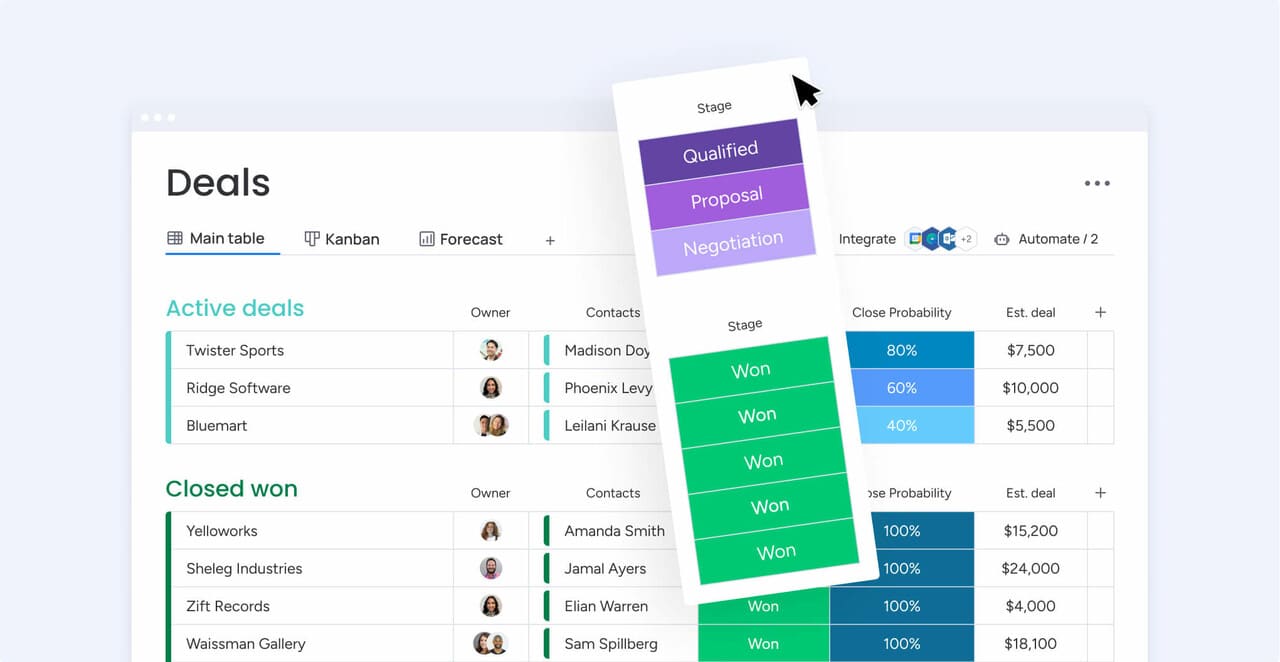
- See your entire pipeline at a glance: Use customizable boards to see exactly where every lead is. Drag and drop deals between stages to trigger automatic updates and actions.
AI-powered capabilities
AI that actually helps your team sell? AI features on monday CRM work in the background to handle the repetitive tasks, freeing up your reps to build relationships and close deals.
- Write more effective emails, faster: get AI-powered suggestions for personalized messages based on a lead’s profile and history. Your reps keep their authentic voice while the AI helps them craft emails that get replies.
- Get the full story in seconds: Stop scrolling through endless email chains. AI summarizes conversation histories, giving reps instant context on objections, interests, and next steps before every call.
- Know how your leads really feel: Sentiment detection flags conversations where leads show buying signals or risk. This helps you spot opportunities and solve problems before deals go cold.
Customization without the chaos
Your CRM should fit your process, not dictate it. The intuitive platform is flexible enough to grow with you, without requiring a massive overhaul every time your strategy shifts.
- Build workflows, no code required: Use a visual, no-code builder to create automations that make sense. If you can think “when this happens, do that,” you can build a workflow on monday CRM.
- Start fast with proven templates: Get going in minutes with pre-built workflows for common sales scenarios. Use them out of the box or tweak them to fit your exact needs.
- An interface your team will actually use: The visual, intuitive design means your team can see their priorities at a glance. It’s built to be powerful, not complicated.
| Capability | The monday CRM approach | The traditional CRM way |
|---|---|---|
| Implementation time | Days or weeks with intuitive setup | Months of consulting and configuration |
| Customization | No-code builder for anyone on your team | Requires technical experts for changes |
| Learning curve | Minimal training needed | Requires extensive training programs |
| AI integration | Native AI features included | Separate AI tools that need integration |
| Data enrichment | Built-in automatic enrichment | Requires separate third-party tools |
| Email automation | Native mass email and sequences | Requires external email marketing tools |
monday CRM ends the battle between power and simplicity. Revenue teams get the automation they need without the complexity that holds them back, seeing results in days, not months.

“With monday CRM, we’re finally able to adapt the platform to our needs — not the other way around. It gives us the flexibility to work smarter, cut costs, save time, and scale with confidence.”
Samuel Lobao | Contract Administrator & Special Projects, Strategix
“Now we have a lot less data, but it’s quality data. That change allows us to use AI confidently, without second-guessing the outputs.”
Elizabeth Gerbel | CEO
“Without monday CRM, we’d be chasing updates and fixing errors. Now we’re focused on growing the program — not just keeping up with it."
Quentin Williams | Head of Dropship, Freedom Furniture
“There’s probably about a 70% increase in efficiency in regards to the admin tasks that were removed and automated, which is a huge win for us.“
Kyle Dorman | Department Manager - Operations, Ray White
"monday CRM helps us make sure the right people have immediate visibility into the information they need so we're not wasting time."
Luca Pope | Global Client Solutions Manager at Black Mountain
“In a couple of weeks, all of the team members were using monday CRM fully. The automations and the many integrations, make monday CRM the best CRM in the market right now.”
Nuno Godinho | CIO at VelvTurn your lead generation into a competitive advantage
A great lead gen tool doesn’t just claw back a few hours — it completely changes your team’s ability to close deals. Now that you’ve seen what’s out there, from AI scoring to multichannel campaigns, you can spot the difference between tools that collect digital dust and ones that actually fill your pipeline.
Your next move? Start with your biggest pain point. If your team drowns in manual data entry, prioritize enrichment and capture. If qualified leads slip through the cracks, focus on scoring and routing. Match the tool to the problem, not the other way around.
Revenue teams using monday CRM discover they can build the automation they need without waiting on IT or hiring consultants. The 14-day free trial lets you test whether it fits your process before you commit.
Get started with monday CRM and see how fast your team can move when the busywork disappears.
Try monday CRMFrequently asked questions
How long does it take to implement lead generation automation tools?
Implementation time for lead generation automation tools ranges from a few days to several months. The timeline depends on the platform's complexity, your team size, and data migration needs.
Do I need technical expertise to use AI lead generation tools?
Most modern AI lead generation tools are designed for business users, not developers. The AI features work automatically without requiring you to code or manage complex algorithms.
What's the difference between AI agents and traditional automation?
Traditional automation follows fixed, preset rules. AI agents learn from data to make intelligent decisions. AI adapts its actions based on context and past results; traditional automation does not.
How much do lead generation automation tools typically cost?
Costs vary widely, from around $10 per user per month for basic plans to over $100 for enterprise systems. Pricing depends on your team size, required features, and any extra implementation fees.
Can lead generation automation tools replace my SDR team?
Lead generation automation tools cannot replace your SDR team, but they can dramatically increase their efficiency. Automation handles the repetitive work so your team can focus on building relationships and closing deals.
Which lead generation tools integrate best with existing CRMs?
Tools with native, built-in connections to your existing CRM integrate most smoothly. Platforms that combine lead generation and CRM functions in one place eliminate integration issues entirely.

 Get started