



The shift from messy spreadsheets to a high-performing revenue engine begins with the quality of your underlying information. When sales teams struggle with outdated contact details and missing opportunity amounts, the issue isn’t their talent — it is a fragmented data foundation that makes forecasting impossible.
CRM data management transforms these scattered touchpoints into organized intelligence that drives measurable sales performance. By collecting and maintaining accurate information in a central system, you enable your team to close deals faster and identify expansion opportunities they would otherwise miss.
Effective management ensures that representatives spend their time selling rather than hunting for phone numbers or deciphering old sticky notes. This overview explores the essential components of a modern data strategy, focusing on how to build a reliable “single source of truth” for your entire organization.
Key takeaways
- Clean data drives 30% higher sales revenue: accurate customer information helps teams close deals faster by eliminating wasted time searching for contact details and enabling targeted outreach based on real buying signals.
- AI automation cuts manual data work by 41%: let intelligent systems handle data entry, duplicate detection, and record enrichment so your team spends more time selling and less time on administrative tasks.
- Visual workflows simplify complex data processes: platforms like monday CRM use drag-and-drop interfaces to build automated data workflows, making sophisticated data management accessible without requiring technical expertise or custom programming.
- Real-time data access enables faster decisions: centralized customer information lets sales, marketing, and service teams coordinate activities and respond to opportunities immediately instead of waiting for manual updates.
- Strong data foundations unlock advanced AI capabilities: organized, high-quality customer data becomes the fuel for predictive analytics, automated personalization, and intelligent opportunity routing that drive competitive advantages.
What is CRM data management?
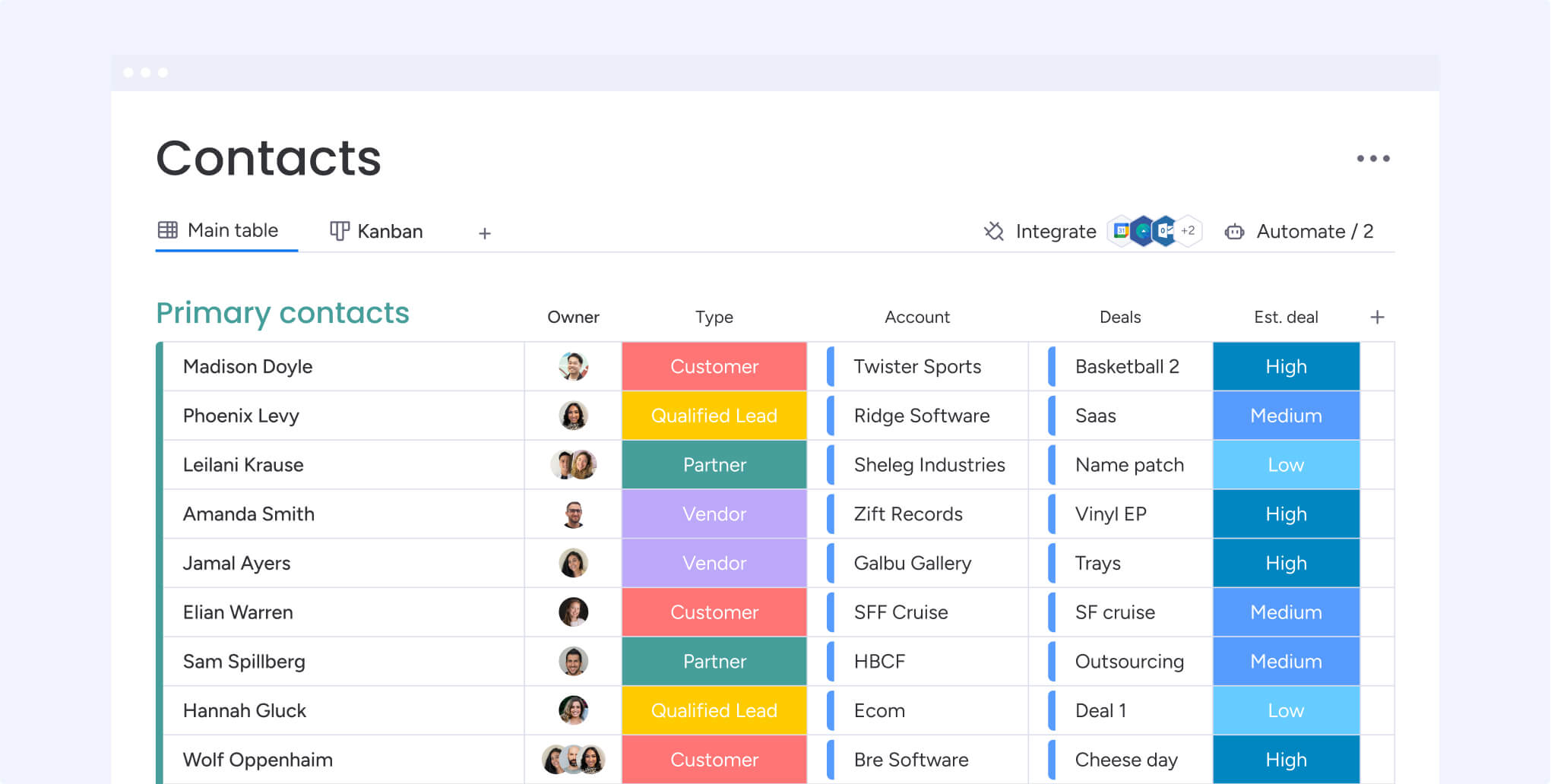
CRM data management turns your scattered customer information into organized intelligence that drives real results. Instead of hunting through spreadsheets and email threads, you’ll have every customer interaction organized in one place so your team can close deals faster and forecast with confidence.
Imagine transforming a messy filing cabinet of notes into a searchable digital command center. This shift gives you instant access to every interaction exactly when you need it, replacing time spent digging through old emails. As a result, sales teams using organized data close deals 23% faster because they spend more time selling.
Furthermore, this real power is vital for subscription-based businesses that rely on specialized CRM for SaaS solutions.
Understanding CRM databases and data systems
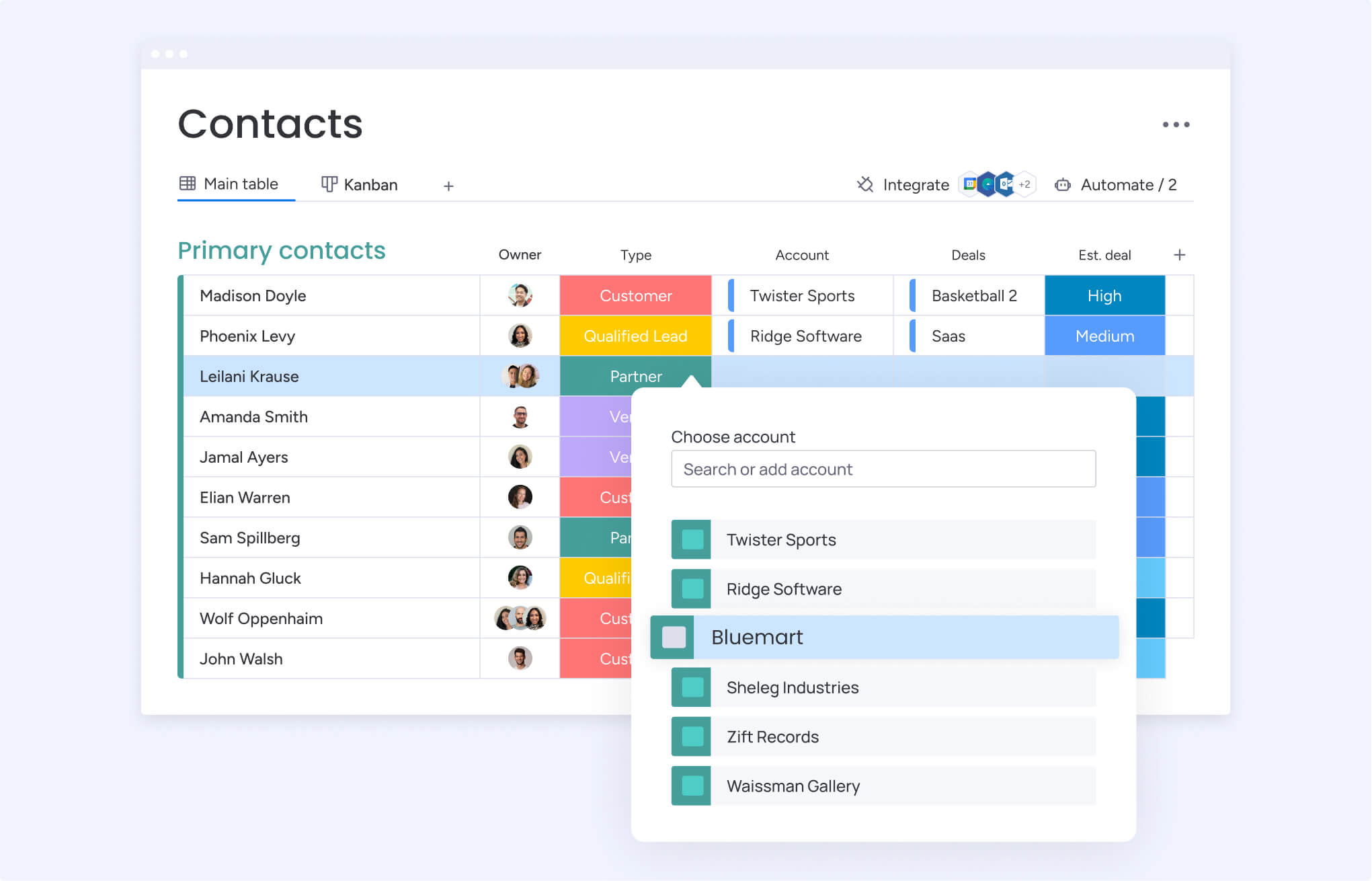
A CRM database serves as the single source of truth for customer information, maintaining organized and accessible data that enables team members to update or retrieve information instantly from any location.
Unlike traditional databases, they automatically connect related information: linking contact details to purchase history, support tickets, and email interactions in one unified view.
CRM databases store four primary data types that build comprehensive customer profiles:
- Contact information: names, emails, phone numbers for direct communication.
- Interaction history: calls, meetings, emails showing relationship progression.
- Purchase records: orders, invoices, contracts revealing buying patterns.
- Behavioral data: website visits, email opens, product interests indicating engagement.
Cloud-based CRM databases let multiple team members access and update customer information simultaneously from any location. This eliminates version control issues and ensures everyone works with current data, whether they’re in the office or meeting customers in the field.
Identifying core components of customer data management
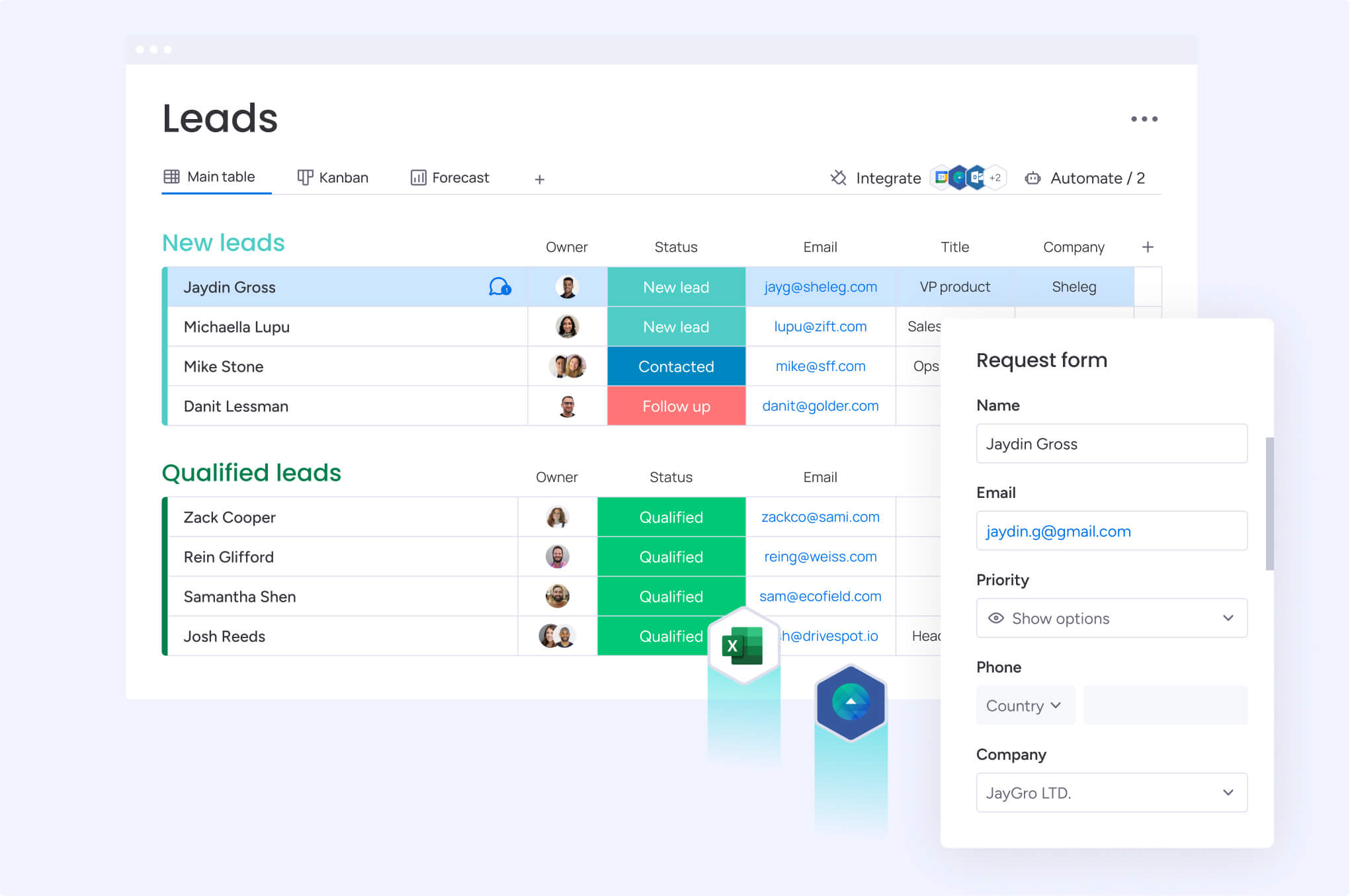
Effective data management relies on five essential components: collection, organization, quality, access, and maintenance. By getting these right, your customer data becomes a competitive advantage rather than an administrative burden, providing a strategy that supports long-term growth.
These five components work together to create a robust data ecosystem:
- Data collection: information flows into the CRM through forms and integrations, capturing details from multiple touchpoints simultaneously. This builds complete records in real time without the need for manual consolidation.
- Data organization: information is structured into logical categories like contacts and deals, using smart relationships to link them. This makes data both discoverable and actionable by connecting every interaction to a central company record.
- Data quality: accuracy is maintained through automated validation rules and duplicate detection. These standards ensure sales teams can trust their data for decision-making and prevent errors from undermining business operations.
- Data access: permission controls determine who can view or edit information based on their specific role. This balances security with efficiency, protecting sensitive data while ensuring teams have the tools they need.
- Data maintenance: continuous updates and automated cleaning routines keep information reliable. By flagging outdated or incomplete records in the background, the system preserves integrity without manual intervention.
Leveraging AI to transform CRM data processes
Stop wasting your sales team’s time on data entry. AI does the heavy lifting by extracting information straight from emails and documents, then populating your CRM automatically. No more rushed typing between meetings, no more missing details because someone was in a hurry to get to their next call.
Intelligent systems identify data quality issues by scanning records for missing information, inconsistent formatting, and duplicate entries. Modern AI capabilities deliver sophisticated data management through accessible interfaces that require no technical expertise.
Key AI-powered capabilities include:
- Automated data enrichment: supplements customer records with publicly available information.
- Sentiment analysis: evaluates customer communications to flag satisfaction concerns or identify upsell opportunities.
- Duplicate detection: identifies matching records across different formats and naming conventions.
- Data validation: ensures information meets quality standards before entering the system.
These AI-powered features make sophisticated data management accessible to non-technical users. Therefore, sales representatives no longer need to understand database structures or validation rules; the AI monitors data quality continuously and prompts users to correct issues before they compound.
Why CRM data management drives business growth
Organized customer data transforms from administrative overhead into a strategic asset that directly impacts revenue and competitive positioning. Companies treating data management as a core function consistently outperform competitors who view CRM systems as glorified contact lists.
The connection between data quality and business outcomes becomes evident when sales teams instantly access complete customer histories, marketing teams segment audiences with precision, and executives forecast revenue with confidence.
Measuring impact on revenue and sales performance
Accurate information enables teams to identify high-value opportunities by analyzing buying signals and engagement levels. By knowing a customer’s contract status and feature usage, representatives can time outreach perfectly and tailor proposals to the current situation.
Furthermore, this contextual awareness builds trust by ensuring representatives acknowledge previous interactions and resolve complaints effectively.
Revenue impact manifests through several measurable outcomes:
- Faster deal closure: representatives spend more time selling and less time searching for information.
- Higher conversion rates: targeted outreach based on real buying signals improves success rates.
- Increased deal sizes: complete purchase histories enable strategic upsell and cross-sell opportunities.
- Reduced churn: early identification of at-risk accounts enables proactive retention efforts.
Data-driven insights reveal which customers will likely make repeat purchases, which accounts show churn risk, and which prospects match successful customer profiles. These patterns remain invisible in disorganized data but become actionable intelligence when information is structured systematically.
Creating predictable customer insights
Systematic data collection transforms random interactions into predictable patterns that inform strategic decisions. When every conversation and purchase is recorded consistently, businesses can identify seasonal trends, common objections, and typical sales timelines.
This predictability, in turn, allows managers to calculate close probabilities and forecast revenue based on historical evidence.
Predictable consumer insights deliver competitive advantages through:
- Accurate forecasting: historical patterns enable reliable revenue predictions.
- Strategic resource allocation: data-driven insights guide hiring and investment decisions.
- Optimized campaign timing: understanding customer cycles improves marketing effectiveness.
- Proactive customer service: anticipating needs enables superior customer experiences.
Furthermore, businesses maintaining organized records categorize their market with high granularity. By analyzing specific attributes, teams identify which personas prefer email over phone communication, which industries engage most with case study content, and which company profiles yield the highest lifetime value..
Building a foundation for AI implementation
AI systems require organized data to function effectively, as inconsistent data produces unreliable results that undermine technology trust.
Therefore, companies with strong data management can immediately leverage advanced capabilities like predictive scoring and automated personalization. Since their data is already structured, these organizations turn emerging tech into immediate ROI.
Well-maintained CRM data enables advanced AI applications that deliver measurable business value:
- Churn prediction models: analyze hundreds of customer behavior signals to identify at-risk accounts.
- Recommendation engines: suggest next best actions for each customer interaction.
- Automated personalization: tailor communications based on individual customer preferences and history.
- Intelligent routing: direct opportunities to representatives with highest success probability.
These capabilities become possible only when underlying data is accurate, complete, and consistently formatted. Organizations investing in data quality today position themselves to leverage emerging AI technologies as they become available.
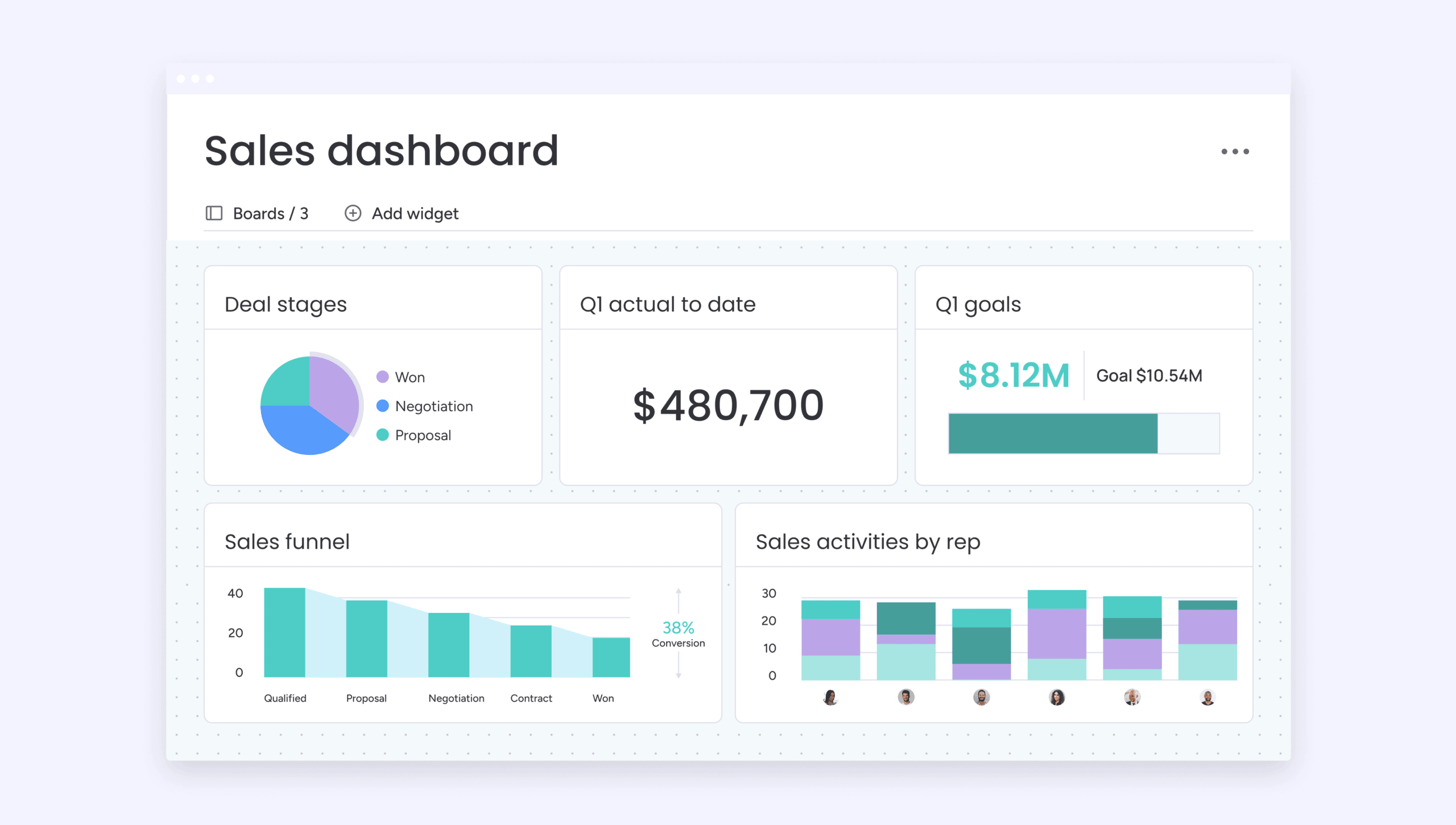
5 essential benefits of strategic CRM data management
Strategic CRM data management delivers measurable outcomes that directly impact revenue, operational efficiency, and competitive positioning.
These benefits compound over time as improved data enables more sophisticated analysis and automation. Understanding these specific advantages helps organizations prioritize data management investments and measure success.
1. Achieve 30% higher sales revenue through data accuracy
Sales teams using accurate data generate higher revenue by focusing on qualified prospects and timing outreach based on real buying signals. Current contact details allow representatives to connect with decision-makers immediately, while complete purchase histories enable targeted upsell and cross-sell offers tailored to specific needs.
Revenue improvements manifest through multiple channels:
- Reduced prospecting time: accurate contact data eliminates wasted outreach efforts.
- Improved meeting preparation: complete customer profiles enable more effective sales conversations.
- Strategic opportunity identification: historical data reveals expansion opportunities.
- Faster deal progression: context-aware interactions accelerate sales cycles.
Beyond these immediate gains, data accuracy reduces time wasted on outdated leads by automatically flagging contacts who changed companies, moved to new roles, or indicated they’re not in a buying cycle.
This efficiency allows sales teams to maintain larger pipelines without sacrificing personalization or relationship quality.
2. Reduce manual data work by 41% with automation
Automated data management eliminates repetitive tasks like manual entry and duplicate detection, freeing sales teams to focus on building relationships. By reclaiming the four hours typically spent weekly on data entry, representatives can shift their focus to revenue-generating, customer-facing activities.
Using AI, CRM systems automatically enrich records with public data, validate contact information, and standardize formatting. For instance, representatives can simply snap photos of business cards at conferences, allowing the system to extract and populate details instantly.
Automation delivers efficiency gains across multiple areas:
- Data entry elimination: AI extracts information from emails, documents, and forms.
- Automatic enrichment: systems supplement records with publicly available information.
- Format standardization: consistent formatting improves reporting accuracy.
- Duplicate prevention: intelligent matching prevents redundant record creation.
Automated duplicate detection prevents multiple team members from creating separate records for the same contact, which fragments customer history and creates confusion about relationship ownership.
The system identifies potential duplicates based on name, email, and company information, then prompts users to merge records while preserving interaction history.
3. Enable real-time decision making across teams
Unified, up-to-date customer information allows teams to make faster, more informed decisions. By eliminating the hunt for scattered spreadsheets, support teams can view sales promises, while customer service agents see recent interactions and orders instantly. This immediate context speeds up issue resolution and reveals clear opportunities for sales expansion.
Furthermore, marketing teams can segment audiences based on real-time behavior rather than static demographics, launching campaigns exactly when prospects are researching solutions.
Similarly, sales managers can track pipeline shifts instantly, reallocating resources to high-priority deals without waiting for weekly reports.
Real-time access delivers operational advantages through:
- Instant context: complete customer histories available during every interaction.
- Coordinated activities: All teams work from current, consistent information.
- Rapid response: immediate access to data enables faster issue resolution.
- Strategic agility: real-time insights support dynamic resource allocation.
Shared data visibility improves cross-team collaboration by eliminating information silos. When sales, marketing, and customer service access the same customer records, they coordinate activities and present unified experiences.
Customers requesting information from marketing receive follow-ups from sales that acknowledge specific interests instead of generic pitches.
4. Ensure compliance with evolving privacy laws
Proper data management ensures compliance with regulations like GDPR and CCPA by tracking consent, managing retention, and enabling rapid responses to data access requests. Organized systems allow you to instantly identify, export, or delete customer information within mandatory legal timeframes.
To maintain these standards, CRM platforms automatically log every instance where data is accessed or modified, creating an audit trail for regulatory reviews.
These systems also improve security by automatically deleting records after specified retention periods and flagging any entries that lack the required consent documentation.
Compliance capabilities protect organizations through:
- Audit trail creation: automatic logging of all data access and modifications.
- Consent management: tracking and honoring customer privacy preferences.
- Data retention control: automatic deletion based on regulatory requirements.
- Access request fulfillment: quick identification and export of customer data.
Transparent data practices build customer trust and competitive advantage. Businesses communicating how they use customer information and honor privacy preferences differentiate themselves in markets where data breaches and privacy violations regularly make headlines.
5. Scale operations without adding headcount
Organized data allows you to scale without increasing headcount. A team of ten using clean data and automation can match the output of fifteen people using disorganized systems, simply because they spend less time hunting for information.
This efficiency enables better customer experiences and higher closing rates with existing resources.
Scalability benefits include:
- Increased productivity: teams accomplish more with existing resources.
- Consistent quality: automated processes maintain standards as volume grows.
- Intelligent resource allocation: data-driven assignment optimizes team performance.
- Self-service enablement: organized data powers customer self-service capabilities.
Self-service capabilities powered by organized customer data reduce support volume by enabling customers to find answers independently. Knowledge bases surfacing relevant articles based on customer history and behavior resolve common questions without human intervention.
10 best practices for CRM data management in 2026
Modern CRM strategies leverage AI and automation to transform data from a burden into a competitive foundation. By implementing the following 10 practices, organizations ensure high-quality data that fuels advanced business capabilities.
1. Conduct a comprehensive data quality audit
Start by assessing the accuracy and completion rates of your current records to prioritize issues impacting your bottom line. Defining quality standards, such as requiring emails for contacts or close dates for opportunities, provides an objective baseline for improvement.
The audit process begins by defining quality standards for each field type:
- Contact records: first name, last name, email, phone, and company at minimum.
- Opportunity records: amount, close date, stage, and assigned owner required.
- Company records: industry, employee count, and revenue when available.
- Activity records: date, type, outcome, and next steps documented.
Furthermore, automated scanning calculates what percentage of records meet standards and flags common issues. This quantitative assessment provides objective baselines for measuring improvement and identifying priority areas for immediate attention, such as:
- Duplicate contacts: different team members creating separate records.
- Incomplete records: missing industry or employee count information.
- Outdated data: contact information for people who changed jobs.
- Inconsistent formatting: preventing accurate reporting.
2. Implement AI-powered data cleaning and enrichment
AI automates the detection of duplicates and standardizes formatting, saving hundreds of manual hours. These systems continuously scan records to correct capitalization and validate phone numbers, while enrichment services automatically pull in job titles and company sizes from public sources to provide a 360-degree view.
AI cleaning capabilities deliver immediate value through:
- Intelligent duplicate detection: advanced algorithms identify matches across format variations.
- Automatic standardization: consistent formatting improves data usability.
- Real-time validation: immediate feedback prevents bad data entry.
- Continuous monitoring: ongoing scans maintain data quality over time.
Moreover, data enrichment services automatically supplement customer records with information from public sources. When representatives add new contacts with just names and email addresses, enrichment systems fill in job titles, company sizes, and industries within seconds.
3. Establish automated data entry standards
Automated entry standards reduce human error and ensure consistency by implementing validation rules, required fields, and standardized formats at data capture points. These controls prevent bad data from entering the system rather than fixing it later. Prevention-focused approaches prove more efficient than correction-based strategies.
Form design plays a critical role by making correct entry easy and mistakes difficult:
- Dropdown menus: eliminate spelling variations for industry, company size, and lead source.
- Required fields: prevent users from saving incomplete records.
- Format validation: ensure phone numbers and email addresses follow standard patterns.
- Auto-complete features: suggest existing entries to prevent duplicates.
Workflow automation captures data from customer interactions without manual entry. When representatives send emails through the CRM, the system automatically logs activities, updates last contact dates, and creates conversation records. Calendar integration logs meetings automatically. Email parsing extracts key information like next steps and follow-up dates from conversation content.
4. Create unified data workflows across departments
Ensure information flows seamlessly between sales, marketing, and service to eliminate data silos. For example, when a lead meets marketing qualification criteria, the system should automatically route it to sales with its full interaction history intact, maintaining a unified customer experience.
Integration strategies connect the CRM with essential business systems:
- Marketing automation platforms: synchronize campaign data and lead scoring.
- Email systems: capture communication history automatically.
- Calendar applications: log meetings and schedule follow-ups.
- Customer support platforms: share interaction history across teams.
Real-time synchronization ensures updates in one system immediately reflect in all connected applications. This immediate propagation prevents conflicts and ensures all teams work with current information.
5. Deploy natural language queries for data access
Natural language query capabilities enable users to find information using conversational questions instead of learning complex database syntax or report builders. Sales managers type “show me all opportunities over $50,000 closing this quarter” and receive instant results without navigating multiple filters and dropdown menus.
This accessibility makes CRM data useful to team members lacking technical expertise or database knowledge:
- Marketing managers: ask “which campaigns generated the most qualified leads last month”.
- Customer service representatives: query “customers who contacted us more than three times this week”.
- Sales directors: request “accounts with contracts expiring in the next 60 days”.
- Operations teams: search “deals stuck in the proposal stage for more than 30 days”.
Natural language interfaces reduce information-finding time from minutes to seconds, enabling faster decision-making and more frequent data analysis. When accessing data is as simple as asking questions, team members check information before making decisions rather than relying on assumptions.
6. Enable real-time data synchronization
Real-time synchronization keeps customer information current across all systems and touchpoints by updating records instantly when changes occur in any connected application. This immediate propagation prevents conflicts and confusion arising when different systems contain contradictory information about the same customer.
| Sync type | Update speed | Best for | Key benefit |
|---|---|---|---|
| Bi-directional | Instant | Core business systems | Changes in either system update both |
| Uni-directional | Instant | Single source of truth | One system controls specific data |
| Batch sync | Scheduled | Large data volumes | Efficient for bulk updates |
| Field-level | Instant | Complex integrations | Different systems own different fields |
Conflict resolution rules determine how systems handle simultaneous updates to the same record:
- Time-stamp-based resolution: most recent changes take precedence.
- Field-level authority: different systems control specific data types.
- Manual review triggers: flag conflicts requiring human decision.
- Audit trail maintenance: track all changes for compliance and troubleshooting.
Additionally, field-level sync allows different systems to be authoritative for different data types, maintaining overall consistency while respecting departmental expertise.
7. Design role-based dashboards and permissions
Role-based dashboards present relevant information for each user’s responsibilities while hiding unnecessary data. Sales representatives see personal pipelines, upcoming tasks, and recent customer interactions. Sales managers view team performance metrics, pipeline health, and forecast accuracy.
This focused presentation reduces information overload and helps users quickly find needed information.
Permission systems control data access at multiple levels:
- Record-level permissions: which accounts or opportunities users can view.
- Field-level permissions: hide sensitive information like deal amounts or commission rates.
- Action permissions: control who can create, edit, or delete different record types.
Dashboard customization ensures each role receives actionable insights:
- Sales representatives: personal pipeline, task lists, recent activities.
- Sales managers: team performance, forecast accuracy, pipeline health.
- Marketing teams: campaign performance, lead quality metrics, conversion rates.
- Customer service: case volumes, resolution times, satisfaction scores.
These granular controls protect sensitive customer data while ensuring team members access information required for their jobs. Proper permission design balances security requirements with operational efficiency.
8. Build a data-driven team culture
Data-driven culture transforms CRM data from administrative requirements into competitive advantages by making data quality and usage central to organizational operations. This cultural shift requires leadership commitment, training programs, and accountability measures reinforcing accurate, complete customer information importance.
Training programs teach team members why data quality matters and how individual contributions impact team success:
- New hire onboarding: data entry standards, common quality issues to avoid, examples of how good data led to business wins.
- Ongoing education: new features, evolving best practices, lessons from data quality incidents.
- Role-specific training: customized instruction for different job functions and responsibilities.
- Success story sharing: regular communication about data-driven wins and improvements.
Accountability measures include:
- Performance metrics: data quality metrics in performance reviews.
- Recognition programs: celebrating team members maintaining excellent data hygiene.
- Visible dashboards: showing each person’s contribution to overall data quality.
Leadership commitment demonstrates through resource allocation, policy enforcement, and personal example. When executives use data for decisions and maintain high-quality records themselves, teams understand data quality importance.
9. Set up proactive data quality monitoring
Proactive monitoring systems continuously scan CRM data for quality issues and alert users to problems before they impact business operations. Automated checks identify missing information, outdated records, duplicate entries, and data inconsistencies without requiring manual review of thousands of records.
Automated alerts notify record owners when data fails quality checks:
- Missing information: opportunity records without close dates or amounts.
- Outdated contacts: key account information not updated in six months.
- Duplicate detection: potential matching records requiring review.
- Validation failures: data entries not meeting format requirements.
Regular quality reports provide visibility into data health trends, showing whether quality is improving or declining over time:
- Executive dashboards: overall quality scores and improvement trends.
- Team scorecards: individual and group performance metrics.
- Issue tracking: common problems and resolution status.
- Compliance monitoring: regulatory requirement adherence.
These monitoring systems enable quick corrections before issues compound or affect reporting accuracy. Early detection prevents small problems from becoming major operational challenges.
10. Leverage digital workers for autonomous management
Digital workers are AI-powered agents handling routine data management tasks autonomously, monitoring data quality, updating records, and flagging issues without human intervention. These systems function like virtual team members working continuously to maintain data integrity while human team members focus on activities requiring judgment and relationship skills.
Autonomous management capabilities include:
- Continuous duplicate detection: identifying and merging matching records.
- Automated data enrichment: supplementing records with current external information.
- Intelligent validation: flagging suspicious entries for human review.
Digital workers monitor specific patterns like contacts without activity in 90 days or opportunities stuck in the same stage for extended periods:
- Activity monitoring: identify stale records requiring attention.
- Progress tracking: flag deals not advancing through normal timelines.
- Engagement analysis: detect declining customer interaction levels.
- Compliance checking: ensure records meet regulatory requirements.
Furthermore, implementation starts with simple tasks then expands as teams build confidence. This gradual approach allows organizations to adjust before deploying autonomous systems for critical processes.
How to start your CRM data management journey?
Organizations beginning data management improvement should focus on achievable first steps demonstrating value quickly rather than attempting comprehensive transformation immediately.
This incremental approach builds momentum, secures stakeholder buy-in, and allows teams to learn and adjust before making larger investments. Success depends on balancing quick wins with sustainable long-term practices.
Step 1: assessing your current data maturity
Data maturity assessment evaluates organizational capabilities across five dimensions: data quality, data processes, technology infrastructure, team skills, and organizational culture. This comprehensive evaluation identifies strengths to build on and gaps requiring attention. Understanding current state enables realistic goal-setting and resource allocation.
| Dimension | Beginning (Level 1) | Developing (Level 2) | Mature (Level 3) | Advanced (Level 4) |
|---|---|---|---|---|
| Data quality | <50% records complete, many duplicates | 50-70% complete, some quality issues | 70-90% complete, few duplicates | >90% complete, automated quality control |
| Processes | Manual entry, no standards | Basic standards, inconsistent follow-through | Documented processes, mostly followed | Automated workflows, continuous improvement |
| Technology | Basic CRM, limited integration | CRM with some automation | Integrated systems, AI capabilities | Advanced AI, predictive analytics |
| Team skills | Minimal CRM training | Basic CRM proficiency | Data-driven decision making | Advanced analytics skills |
| Culture | Data entry seen as burden | Recognition of data importance | Data quality valued | Data-driven culture embedded |
Data quality evaluation measures accuracy, completeness, consistency, and timeliness of current CRM records:
- Sample assessment: review 100-200 records across different types.
- Completeness analysis: calculate percentage meeting minimum standards.
- Accuracy verification: validate contact information and company details.
- Consistency review: identify formatting and standardization issues.
Process assessment examines how data enters the system, how it’s maintained, and how it’s used for decision-making. This evaluation reveals workflow gaps and automation opportunities that can deliver immediate improvements.
Step 2: choosing between build vs buy solutions
The build versus buy decision depends on organization size, technical capabilities, customization requirements, and timeline constraints. Most mid-market organizations find purchasing existing CRM platforms and customizing them provides the best balance of functionality, implementation speed, and total cost of ownership.
| Factor | Build custom solution | Buy existing platform | Hybrid approach |
|---|---|---|---|
| Initial cost | $100,000-500,000+ development | $50-150 per user/month | $50-150/user/month + custom development |
| Time to implement | six to 18 months to basic functionality | one to three months to full deployment | two to six months including customizations |
| Customization | Unlimited flexibility | Extensive configuration options | Platform features + custom extensions |
| Technical requirements | Dedicated development team | Minimal technical skills needed | Some technical expertise required |
| Long-term maintenance | Ongoing development costs | Included in subscription | Platform updates + custom code maintenance |
Custom development makes sense only for organizations with:
- Unique requirements: truly specialized needs that existing platforms cannot accommodate.
- Technical resources: substantial development team to build and maintain systems.
- Long timeline: willingness to invest 12-18 months before seeing results.
- Large scale: volume justifying custom development costs.
Most organizations benefit from purchasing proven platforms and customizing them to meet specific needs. This approach delivers faster time-to-value while providing flexibility for future growth.
Step 3: planning implementation timeline and quick wins
Implementation should balance quick wins demonstrating value with building sustainable foundations for long-term success. This phased approach delivers measurable improvements within 90 days while establishing practices supporting continuous optimization. Each phase builds on previous accomplishments while adding new capabilities.
Phase 1: foundation (weeks 1-4)
Start by conducting data quality audits and establishing baseline metrics:
- Define data standards: required fields, formatting, and completeness criteria.
- Clean critical data: active opportunities, key accounts, and current contacts.
- Configure basic automation: data entry validation and duplicate detection.
- Train core teams: quality standards, best practices, and system usage.
Phase 2: quick Wins (weeks 5-12)
Implement automated processes delivering immediate value:
- Deploy duplicate detection: automated identification and merge workflows.
- Enable data enrichment: AI-powered company and contact information enhancement.
- Create role-based dashboards: relevant information for each team member.
- Establish automated workflows: lead routing and opportunity management.
- Launch quality monitoring: alerts for common data issues.
Phase 3: optimization (months 4-12)
Expand capabilities and scale successful practices:
- Advanced automation: comprehensive workflow coverage for all major processes.
- AI implementation: predictive lead scoring and intelligent recommendations.
- System integration: marketing, support, and finance platform connections.
- Continuous improvement: regular quality reviews and process refinement.
- Organization-wide scaling: successful practices across all departments.
Quick wins demonstrating early value include:
- Top account data cleaning: focus on sales team’s 20 most important accounts.
- Automated lead assignment: eliminate routing delays and improve response times.
- Executive dashboards: real-time pipeline visibility for leadership team.
- Duplicate elimination: merge redundant records to improve data accuracy.
CRM data security and compliance essentials
Data security and compliance have transitioned from IT concerns to business imperatives that directly impact customer trust and legal risk. Organizations treating privacy as a core practice differentiate themselves in a market that increasingly values protection.
Moreover, modern compliance requires proactive strategies that integrate security into daily operations.
Navigating 2025 privacy regulations
Privacy regulations now center on transparency, consent, and individual rights. Global organizations typically meet GDPR standards as a baseline to ensure they comply with the strictest requirements.
Furthermore, understanding these rules enables proactive compliance rather than reactive scrambling.
Key compliance requirements include:
- Explicit consent: obtaining permission before collecting personal information.
- Privacy notices: explaining data usage transparently.
- Access rights: enabling customers to access and correct their data.
- Deletion rights: allowing customers to request data removal.
- Processing records: maintaining documentation of data activities.
Practical compliance measures start with data inventory:
- Document data collection: what customer information is gathered and how.
- Map data storage: where information is kept and who has access.
- Track data usage: how information is used for business purposes.
- Monitor data sharing: when and why data is shared with third parties.
This inventory enables quick responses to customer data requests and demonstrates compliance during regulatory audits. Comprehensive documentation proves essential for both operational efficiency and legal protection.
Implementing zero trust security for customer data
Zero trust security assumes threats can come from anywhere and requires verification for every access request regardless of origin. This approach replaces traditional perimeter-based security that trusted users inside networks and focused on keeping attackers out. Modern threat landscapes require comprehensive protection strategies.
Core zero trust principles applied to CRM data include:
- Identity verification: multi-factor authentication for every access request.
- Least privilege access: minimum necessary permissions for each role.
- Data encryption: protection in transit and at rest.
- Continuous monitoring: all data access and changes logged.
- Breach assumption: limit damage if credentials are compromised.
Access controls implement zero trust by requiring users to authenticate identity before accessing CRM data, even when connecting from corporate networks or company devices:
- Multi-factor authentication: something you know, have, and are.
- Role-based permissions: access aligned with job responsibilities.
- Session management: time limits and activity monitoring.
- Device verification: trusted device registration and monitoring.
Encryption protects data by making it unreadable without proper decryption keys. Monitoring systems log all data access and changes, creating audit trails enabling investigation of security incidents and detection of suspicious patterns.
Building customer trust through transparency
Transparent practices build trust by openly communicating how information is collected and protected. This openness differentiates brands in skeptical markets. Consequently, trust becomes a major competitive advantage.
Privacy policies should be written in plain language customers understand, avoiding legal jargon and technical terminology:
- Clear explanations: what data is collected and why.
- Specific benefits: how customers benefit from sharing information.
- Usage limitations: what the organization will and won’t do with data.
- Control mechanisms: how customers can manage their information.
Data usage transparency includes explaining specific benefits customers receive in exchange for sharing information:
- Personalized experiences: tailored recommendations and communications.
- Improved service: faster support and better problem resolution.
- Product development: features and improvements based on usage patterns.
- Security protection: fraud detection and account security.
Transparency also involves highlighting customer benefits such as personalized experiences and improved service. Furthermore, self-service portals allow individuals to manage their own data preferences.
Finally, clear breach notification procedures ensure customers are informed promptly of the steps being taken to address any security issues.

“With monday CRM, we’re finally able to adapt the platform to our needs — not the other way around. It gives us the flexibility to work smarter, cut costs, save time, and scale with confidence.”
Samuel Lobao | Contract Administrator & Special Projects, Strategix
“Now we have a lot less data, but it’s quality data. That change allows us to use AI confidently, without second-guessing the outputs.”
Elizabeth Gerbel | CEO
“Without monday CRM, we’d be chasing updates and fixing errors. Now we’re focused on growing the program — not just keeping up with it."
Quentin Williams | Head of Dropship, Freedom Furniture
“There’s probably about a 70% increase in efficiency in regards to the admin tasks that were removed and automated, which is a huge win for us.“
Kyle Dorman | Department Manager - Operations, Ray White
"monday CRM helps us make sure the right people have immediate visibility into the information they need so we're not wasting time."
Luca Pope | Global Client Solutions Manager at Black Mountain
“In a couple of weeks, all of the team members were using monday CRM fully. The automations and the many integrations, make monday CRM the best CRM in the market right now.”
Nuno Godinho | CIO at VelvAccelerate data management success with monday CRM
Organizations using monday CRM benefit from an intuitive platform specifically designed to solve daily data management challenges. The system combines powerful automation with an approachable interface, enabling teams to maintain high-quality data without needing technical expertise.
Moreover, this balance makes advanced management accessible to organizations of all sizes. Indeed, the platform emphasizes prevention over correction; such a proactive approach uses intelligent workflows and AI to maintain data integrity while allowing teams to focus on customer relationships.
Implementing AI blocks that automate data tasks
AI blocks provide pre-built capabilities that solve specific data challenges without requiring technical configuration. Furthermore, these ready-made features integrate directly into workflows, allowing teams to leverage sophisticated AI through simple interfaces.
Extract information automatically pulls key details from unstructured sources like emails, meeting notes, and uploaded documents, then populates appropriate CRM fields:
- Email processing: extract company names, contact details, budget information, and timeline requirements.
- Document analysis: pull key data from contracts, proposals, and meeting transcripts.
- Form parsing: automatically populate fields from uploaded business cards or forms.
- Communication mining: identify action items and follow-up requirements from conversations.
Categorize data uses AI to organize leads, contacts, and opportunities based on content analysis and pattern recognition:
- Industry classification: automatically assign categories based on company descriptions.
- Lead quality scoring: classify prospects based on engagement signals and historical patterns.
- Opportunity prioritization: rank deals based on characteristics predicting success.
- Customer segmentation: group accounts by behavior patterns and preferences.
Detect sentiment analyzes customer communications to identify satisfaction levels, urgency signals, and potential issues before they escalate:
- Email tone analysis: flag frustrated customers requiring immediate attention.
- Support ticket evaluation: identify escalation risks based on language patterns.
- Survey response interpretation: extract actionable insights from open-ended feedback.
- Engagement tracking: measure enthusiasm levels to identify expansion opportunities.
These AI capabilities work continuously in the background, improving data quality without interrupting sales workflows or requiring manual oversight.
Teams benefit from sophisticated automation while maintaining the simple, visual interface that makes monday CRM accessible to users at all technical skill levels.
Leveraging visual workflows for data consistency
With the visual workflow builder, you can create automated processes to maintain consistency without writing code. You design these using drag-and-drop interfaces that show exactly how data moves, making it easy to spot gaps.
Workflow automation ensures consistent data handling across your organization:
- Automatic field updates: when deal stages change, related fields update automatically to maintain accuracy.
- Conditional logic: different data requirements trigger based on deal size, industry, or customer type.
- Cross-board automation: changes in one area automatically update related records across your CRM.
- Notification triggers: alert team members when data requires attention or validation.
Visual workflows make complex data management accessible by showing the logic behind automation. When new team members join, they can see exactly how customer information flows through your system and understand why specific data points matter.
Integrating seamlessly with your existing tech stack
Connecting with the tools your team already uses, monday CRM eliminates data silos and reduces manual entry. Native integrations with email platforms, marketing automation systems, and business applications ensure customer information stays synchronized across your entire tech stack.
This connectivity means data entered once flows everywhere it’s needed without duplicate effort.
Key integration capabilities include:
- Email platform sync: automatically log communications from Gmail, Outlook, and other email systems.
- Marketing automation: sync lead data and campaign performance from platforms like HubSpot and Mailchimp.
- Calendar integration: automatically create CRM records from scheduled meetings and calls.
- Document management: connect with Google Drive, Dropbox, and SharePoint for seamless file access.
- Communication tools: integrate Slack, Microsoft Teams, and other collaboration platforms.
These integrations work bidirectionally, meaning updates in the CRM reflect in connected systems and vice versa. Such synchronization eliminates the version control issues that typically plague organizations using disconnected tools.
Customizing dashboards for data-driven decisions
Raw data is transformed into actionable insights tailored to each role through customizable dashboards. Sales reps see personal pipelines, while managers view performance metrics. Moreover, this role-based approach ensures everyone gets relevant information without drowning in data.
Dashboard customization options include:
- Widget library: choose from pre-built visualizations for common metrics and KPIs.
- Custom charts: create unique visualizations that match your specific reporting needs.
- Real-time updates: dashboards refresh automatically as data changes throughout the day.
- Filtering capabilities: drill down into specific segments, time periods, or team members.
- Sharing options: distribute dashboard views to stakeholders who need visibility.
The visual nature of monday CRM dashboards makes data accessible to team members who aren’t comfortable with traditional reporting tools. Instead of requesting reports from analysts and waiting for results, users create their own views and get immediate answers to business questions.
Scaling your data management as you grow
Everything from small teams to enterprise operations is supported by monday CRM as it grows with your organization. Increasing volumes and complex workflows are handled by the platform’s flexible architecture without requiring a migration.
Moreover, scalability features support this growth through:
- Unlimited customization: add fields, boards, and workflows as your needs evolve.
- Performance optimization: system maintains speed and responsiveness as data volumes increase.
- Advanced permissions: sophisticated access controls support complex organizational structures.
- API access: build custom integrations and extensions for unique requirements.
- Enterprise features: advanced security, compliance, and governance capabilities for larger organizations.
Consequently, organizations can start with basic functionality and gradually add sophisticated capabilities. Such an incremental approach prevents overwhelming users while ensuring the platform supports advanced needs as they emerge.
The content in this article is provided for informational purposes only and, to the best of monday.com’s knowledge, the information provided in this article is accurate and up-to-date at the time of publication. That said, monday.com encourages readers to verify all information directly.
Frequently asked questions
What is CRM data management?
CRM data management is how you collect, organize, maintain, and leverage customer information to drive better business outcomes. It covers everything from capturing contact details to ensuring data accuracy and using information for strategic decisions. When done right, it transforms scattered customer touchpoints into organized intelligence that helps teams work faster and smarter.
How does AI improve CRM data quality?
AI automates tasks that would take hundreds of manual hours — detecting duplicates, enriching records, validating formats, and extracting details from emails and documents. These systems work continuously in the background, flagging issues before they impact operations and making sophisticated data management accessible through simple interfaces.
What are the biggest CRM data management challenges?
The biggest challenges include maintaining accuracy as information changes, preventing duplicates when multiple team members interact with the same customers, ensuring consistent data entry, and integrating data from multiple systems. Many organizations also struggle with getting teams to prioritize data quality when they're focused on closing deals. Successful data management addresses these through automation, clear standards, and systems that make correct entry easier than shortcuts.
How often should you clean CRM data?
Continuous automated cleaning beats periodic manual reviews. Modern CRM systems with AI monitor data quality constantly, flagging issues as they occur. That said, comprehensive manual audits should happen quarterly, while high-priority records like active opportunities deserve monthly reviews.
What's the ROI of better CRM data management?
Organizations with strong data management see 30% higher sales revenue, 41% less time on manual data tasks, and 23% faster sales cycles. Beyond direct financial impacts, better data management reduces compliance risk, improves customer experiences, and creates the foundation for advanced AI capabilities.
Can small teams benefit from advanced data management?
Absolutely. Small teams often benefit more than large organizations because they lack dedicated resources for manual maintenance. Platforms with built-in AI and automation make sophisticated data management accessible without technical expertise or additional headcount. The key is choosing systems designed for ease of use.
How does data management support compliance?
Proper data management creates the foundation for regulatory compliance by tracking consent preferences, maintaining audit trails, enabling quick responses to data requests, and automatically enforcing retention policies. CRM systems with built-in compliance features help organizations meet requirements like GDPR and CCPA while building customer trust.
What makes monday CRM different for data management?
The platform combines powerful automation and AI with an intuitive visual interface that makes advanced data management accessible to non-technical users. Teams can build sophisticated workflows, leverage AI for data quality, and create custom dashboards through simple drag-and-drop interfaces. The emphasis is on prevention over correction: using intelligent validation and automation to capture data accurately from the start. This maintains high data quality while letting sales teams focus on selling rather than administrative tasks.

 Get started