


It would be nice to magically sell a prospect the moment you meet them, but that’s rarely the case.
In reality, some leads put up plenty of buying resistance — do you continue to try selling these leads, or drop them?
Others only need to hear about your product before splurging. A small nudge and they’ll hand you the money.
In short, all your leads will be at varying levels of “readiness” to buy.
Not to mention that your leads could come from all sorts of places, from social media to word-of-mouth.
How do you manage all these different leads?
The answer is a well-designed sales pipeline.
Down below, we’ll look at the stages of a sales pipeline, some best practices to follow in maintaining yours, and why a CRM can be a huge help.
What is a sales pipeline?
A sales pipeline is a visual representation of your sales process’s stages and which stage each of your prospects are in.

Monitoring your pipeline plays a crucial component in making more sales.
Why have a sales pipeline in the first place?
Visualizing your prospects’ journey through your sales process offers plenty of benefits to your organization.
For one, it helps with resource allocation. You can monitor for hang-ups in your sales process or especially important prospects and allocate resources accordingly.
For example, if a certain deal is more crucial to land than another, you can put more resources toward that deal.
Sales pipelines Improve sales management, too. You can identify and fix common challenges reps face, facilitating the movement of prospects through your sales process.
A pipeline makes it easy to identify salespeople who need more support to meet their quota as well. Or, on the other hand, you can see which salespeople don’t need as much help and reallocate resources as needed.
The benefits of sales pipelines stretch into the marketing department — in particular, their ability to create efficient and high-ROI marketing campaigns. Your marketing team can directly see their campaign’s results and make decisions for future campaigns by looking at total leads, qualified leads, and so on.
For example, your business might not be getting any leads, or at least very few. Your marketing team may take this as a sign to research the customer more to understand their pain points and desires better.
On the other hand, your sales team might be drowning in leads. The problem is, only a handful are qualified to work with your business.
In this case, your marketing message might be speaking to the wrong audience. Fine-tuning your copy and marketing channels might be in order.
Sales pipelines also help your salespeople track their commissions more easily. With a platform like monday.com, this is as simple as entering a formula, as seen in the image below.

What is sales pipeline management?
Sales pipeline management involves tracking each sales opportunity in your pipeline, allocating resources and prospects, and monitoring progress toward sales goals and quotas.
It also entails continual sales pipeline improvement, something we’ll talk about later.
What’s the difference between a sales pipeline and a sales funnel?
Pipeline, funnel, what’s the difference?
Well, they’re complementary.
A pipeline shows each stage, allowing you to track what stage leads are in on the way to closing.
A sales funnel also shows your sales process stages, but it measures each stage’s conversion rate instead of displaying where prospects are.
Both tools work in tandem to help you analyze your company’s sales performance.
The stages of a sales pipeline
There are several stages your prospects move through in your sales pipeline.
Some people group stages together or split them apart, but the following is a general overview prospects follow to reach a sale.
Prospecting/lead generation
First, you have to find leads, but not just any leads. They should be leads that your product or service can help.
After all, you can’t help everyone.
This involves creating a buyer persona, which represents your ideal customer.
When creating a buyer persona, you’ll need to gather demographic, psychographic, behavioral, and transactional data on your customers.
If you have several distinct customer segments, you’ll have multiple buyer personas.
Then, you can go find leads. These leads can come from inbound efforts, such as SEO or paid ads, or from outbound tactics, like cold calling.
Your lead generation process should be standardized to increase efficiency.
You want to minimize the time spent on lead generation without losing out on leads. That way, your sales team can focus on closing deals.
One way to make standardizing your process easier is to use monday.com’s lead management template.

Qualification
Once you have leads flowing into your pipeline, you need to choose which are best for your business.
You’ll inevitably get some leads that just don’t fit — they have needs that your product or service doesn’t fill.
These are known as unqualified leads. Their problems may evolve to a point where you can help in the future, but for now, don’t dedicate much time to them.
This is where customer personas are helpful. You should take leads that closely match your personas the most seriously.
You can also use lead scoring, which involves scoring each prospect based on several criteria you think are important.
Examples of lead scoring criteria include:
- Budget
- Organization size
- Industry
- Site pages visited
- Website interaction frequency
- Email opens/clickthroughs
- Lead source
Your sales reps should still be providing value and selling at this stage, not just qualifying leads. Doing so can boost conversions by addressing problems and pain points early on.
It’ll also weed out unqualified leads faster. If they aren’t responding to the value you provide, they aren’t a likely fit for your business.
Demo or meeting
Schedule a demo or meeting with your qualified leads to show them your product.
At this stage, your goal is to figure out if the product could fit their needs well. You should further discuss what your prospect is dealing with and where your product fits in as a solution.
A good sales team will have many qualified leads close to being sold at this time. Sometimes, all it takes is a demo of your product to make prospects eager to pay you.
Proposal
You’ve got prospects interested in buying. Now, it’s time to summarize how your product or service can meet or exceed your customer’s needs.
Framing the value of your product or service is crucial here.
Focus on selling the benefits of your product while explaining how the value of these benefits is more than worth the price. Use your unique selling proposition and competitive advantages here to demonstrate how you’re different from other people.
Keep in mind there may be some negotiation once you create the proposal.
Closing
You’ve persuaded the customer that your product or service is beneficial and they want to buy.
Great job!
Now you have to get all the paperwork signed, take their money, and start fulfilling the customer’s order.
Not much else to say here. You made a sale! Go, you!
Post-purchase
The sale doesn’t stop when you close the deal. Providing excellent service leads to high customer satisfaction, which boosts your chances of repeat business.
In fact, Hubspot found that 93% of customers were more likely to buy again from companies with excellent customer service.
Sales pipeline management: some best practices
Here are 5 best practices for managing your sales pipeline:
Prospect consistently to fill your pipeline
Once your sales pipeline feels ready to burst, it’s tempting to drop the prospecting work and focus on your current leads. An easy trap to fall into, but a trap that’ll lead to an empty pipeline in the near future.Your sales pipeline should always be weighted more heavily at the left/top — whichever direction your visual representation flows in — as your prospects will drop off as they move through.
If your pipeline is not heavier at the left/top, that’s a warning sign that it will run dry soon.
Your sales pipeline should always be stable, and stability is achieved through prospecting.
Take on a “if you’re not growing, you’re shrinking” mentality.
Follow up and standardize your follow-up process
Entrepreneur Jim Rohn once said “the fortune is in the follow-up,” and he was right.
You’ll be “leaking” leads if you don’t continually follow-up with your prospects.
According to Marketing Donut, about 80% of non-routine sales require at least 5 follow-ups, yet 44% of salespeople give in after only a single attempt.
That leaves you with plenty of opportunity. But, for the best results, you must standardize your follow-up processes to maximize efficiency.
Establish things like follow-up cadence and timing, along with contact method and number of attempts.
Take detailed notes on each lead for each stage
Keeping detailed notes on each lead requires some extra administrative time and energy, but it helps you keep track of leads without losing any important information about them.
You can use your notes to inform the actions you’ll take on each lead — including removing dead leads.
Ditch dead leads, but not before one last attempt
Dead leads are those that go silent on you. It’s best to ditch them, but first, make one last attempt with a sales “breakup” email.
Keep this email short and sweet. State that you’ve tried reaching out several times, and emphasize that you’re there to help the prospect however possible.
Also, add value one final time before closing out the loop.
The prospect may reach out and want to work with you, they may not want to work with you, or they might not respond.
Drop any leads from the latter 2, but use a Customer Relationship Management platform to hold onto these contacts. Perhaps you can wait a year and reach out again.
Evaluate and improve your sales pipeline
You can’t survive in business by coasting. If you’re not seeking improvements, you’ll slide backward.
Continually review your sales pipeline and find areas that can be tweaked for better results.
For example, try to find bottlenecks in your sales process and discover ways to get rid of them.
Treat your improvements like an experiment. Split test different ways of doing each part, one at a time, and see what works better.
Slowly and steadily, your lead generation and deal-closing efficiency will increase.
How monday.com’s CRM capabilities can enhance your sales pipeline
Maybe you can get by with spreadsheets if you only have a few deals flowing through. But if you’re doing a lot of sales, a platform like monday.com with CRM capabilities is what you need.
CRM platforms enhance your sales pipeline through automation, saving your contacts, along with other great features.
Of course, monday.com is more than just a CRM platform. It is a fully optimized Work OS that fulfills the duties of a CRM, using a wealth of beneficial features like those we’ve outlined below.
Lead generation
Use monday.com to create lead capture forms, such as a sales request form, to gather information from prospects that poke around your site.

With your leads’ contact information in hand, you can reach out to them via email, phone, or any other method that works.
Implement forms into your content marketing, too. Create a downloadable lead magnet that your prospect can only access by providing their phone or email.
Qualifying leads
Organize each new lead into a qualified or unqualified category using monday.com’s CRM features.
This makes it much easier to know where to allocate sales resources.

You can save time by automating menial lead qualification tasks — like moving leads around these groups — in monday.com.

And thanks to monday.com’s enhanced customization, you can create lead scoring criteria and judge your leads however you’d like.
Follow-up
Document your follow up attempts in your monday.com CRM. Include attempt number, contact method, and how the follow-up went.
Want to speed up the follow-up? You can automate follow-up messages using monday.com through integration with your email software.

Reporting and analytics
You can’t make improvements without hard data to see how you’re doing.
monday.com offers a host of analytics and reporting features that enhance its CRM capabilities. Review your sales pipeline data in whatever way works best for you.
For example, you might check out where your leads come from and evaluate their qualification level with a bar chart, like the one below.

Sound like a lot?
We get it. monday.com offers so many CRM and sales pipeline management possibilities, you might get overwhelmed.
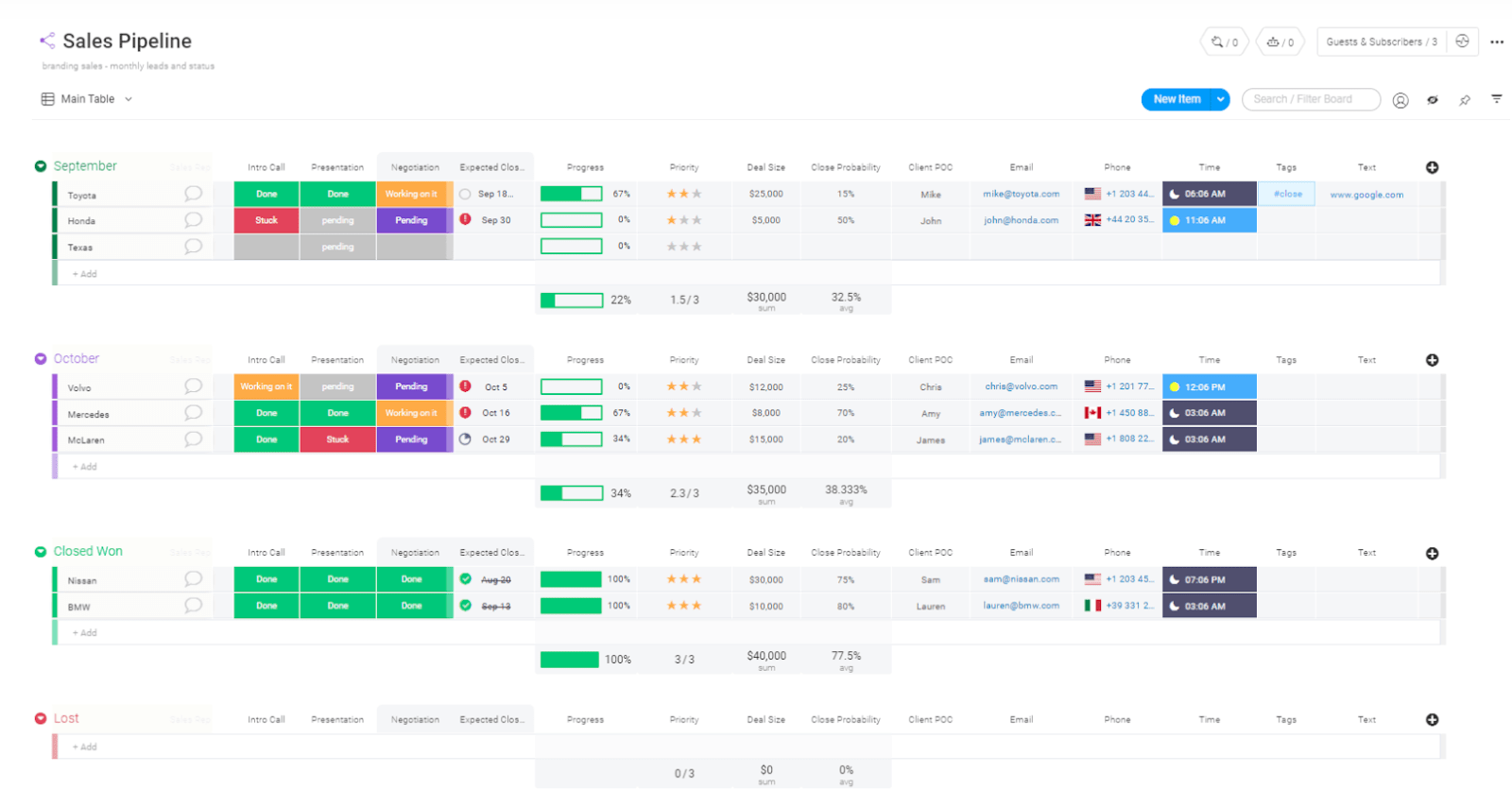
Lucky for you, you can get a head start on all this with the sales pipeline template. It comes with plenty of columns for your pipeline stages and other pertinent information.
You can then edit the template if need be and monitor your sales pipeline for areas of improvement.
Fill your sales pipeline to the brim
Without sales, your organization won’t last long. Consequently, it’s vital to direct attention to improving and streamlining your sales processes. Arm yourself with a CRM to manage your sales pipeline, and you’ll be ready to rock.
monday.com has all the functionality you need in a CRM solution. But as a Work OS, it offers so much more than standalone competitors.